Save changes to persist through solution restarts
Changes can be made specifically to your solution and then saved to persist across solution restarts.
Workcell changes
Workcell changes encompass edits made to objects in your workcell, such as geometry, poses, parenting relationships, and configuration files.
Save to solution
To save the workcell for your solution, click File|Save. To reset the workcell to the last saved state, click Scene|Restore.
Update asset version
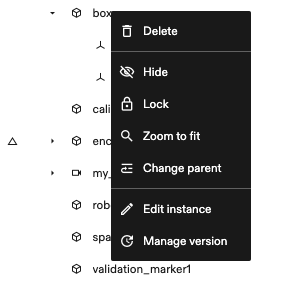
To check for updates on a specific asset within your solution, right-click the object in the Scene panel on the right and click Manage version to see the table of versions.
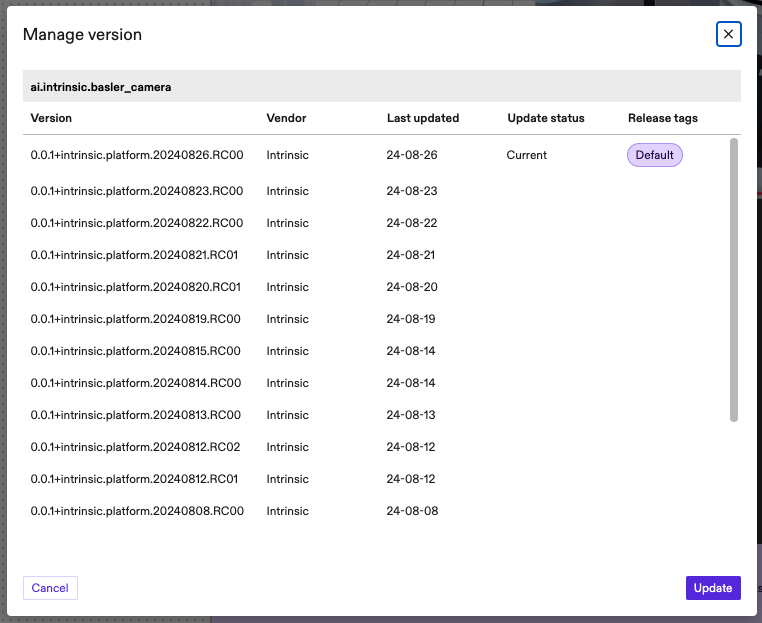
The Version column displays the full version in semver format.
The Vendor column names which organization released the asset.
The Last Updated column shows the timestamp in YY.MM.dd format that the version was updated.
The Update status column shows the 'Current' version. For every other version, select the version you want to switch to and click Update button. This can be used to revert and advance versions.
The Release tags column displays all the current release tags of the asset.