Subtree node
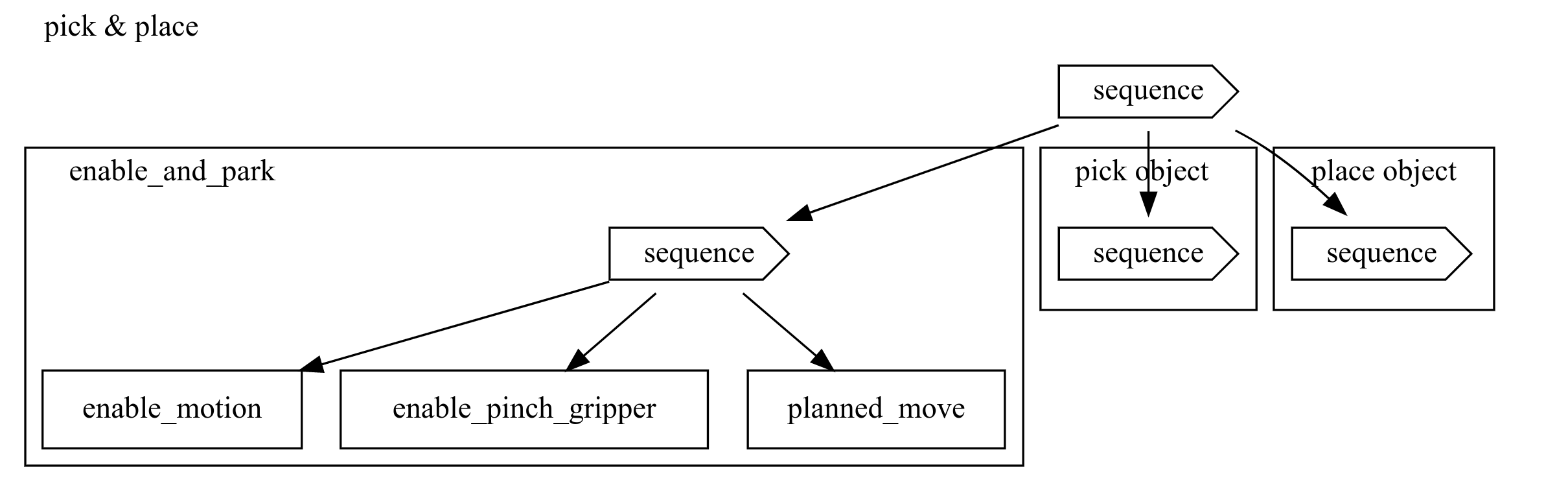
The subtree node makes the integration of a sub-tree explicit. It has a single
child, which is the root node of another tree, and therefore can distinguish
and visualize sub-trees. It does not add any specific functionality other than
delegating its behavior to the sub-tree root node. Once selected, it enters the
running state and selects the sub-trees root node. In the diagram above,
enable_and_park, pick_object, and place_object are subtrees.
Properties
| Property | Description |
|---|---|
| Child semantics | single sub-tree root node |
| Parameters | name: name of the node behavior_tree: node to wrap in the subtree node |
| Success criterion | sub-tree root node (and thus sub-tree) succeeds |
| Failure criterion | sub-tree root node (and thus sub-tree) fails |
Python API
The node can be constructed by parameterizing it either on creation or by using the builder pattern as shown below.
# Define the required skills
enable_motion_skill = skills.enable_motion(clear_faults=True)
enable_gripper_skill = skills.enable_pinch_gripper()
move_home = BT.Task(name="Move home",
                    action=skills.planned_move(joint_target=world.robot.joint_configurations.home))

# Define the corresponding subtree node
enable_and_park = BT.SubTree(name='enable_and_park',
                behavior_tree=BT.Sequence(children=[enable_motion_skill,
                                                    enable_gripper_skill,
                                                    move_home]))
# Define the corresponding subtree node using the builder pattern
enable_and_park = BT.SubTree(name='enable_and_park')
enable_and_park.set_behavior_tree(name='sequence',
                behavior_tree=BT.Sequence(children=[enable_motion_skill,
                                                    enable_gripper_skill,
                                                    move_home]))

# Use subtree with other subtrees for clarity
# (assuming `pick_object` and 'place_object' to be defined)
pick_and_place = BT.SubTree(name='pick_and_place',
                children=BT.Sequence(children=[enable_and_park,
                                               pick_object,
                                               place_object]))