estimate_pose
Introduction
The estimate_pose skill is one of Intrinsic’s main perception skills. It uses Intrinsic's pose estimation algorithms to estimate the poses of one or multiple objects given a single camera image of the scene.
The skill collects an image from the specified camera then runs the estimation algorithm using the specified pose estimator. The skill succeeds if the number of detections is equal or greater than the min_num_instances specified. The skill returns the pose, score and ID for each detected object instance.
This skill does not update the pose of the detected object instances in the belief world. Instead, skills such as update_world or sync_product_objects can use the output of this skill to update the belief world.
List of supported cameras:
- Any 2D color or intensity camera that supports the GenICam standard
- 3D cameras that produce a color/intensity image as well as a depth map
To use multi-view pose estimation (i.e. pose estimation with >1 camera images), refer to estimate_pose_multi_view (here) instead.
Pose estimator: One from the list of available, saved pose estimators. Mind that the pose estimator must be trained on a similar camera as the one selected. If a new pose estimator needs to be trained, follow the instructions here.
Prerequisites
estimate_pose requires a trained pose estimator in the solution (training guide).
In order to be able to detect objects and estimate their pose the perception equipment in the workcells needs to be properly set up and calibrated (calibration guide)
Usage example
The estimate_pose skill outputs the estimated 3D pose(s) of the object(s) it was able to detect. Those poses are typically used as input to subsequent skills to plan the manipulation of object(s) or the scene in consideration of the objects’ respective pose.
Update the digital twin (belief world)
Instead of saving the detected poses in variables, they can be used to update the digital twin to match the configuration of the real or simulated world (from which the camera image has been acquired). To this end, use skills like update_world or sync_product_objects, which lets you transform objects in the belief world to their correct poses.
Link estimate_pose output root_ts_target to the “A t b” input of the update_world or the root_ts_object input of the sync product objects skill, respectively.
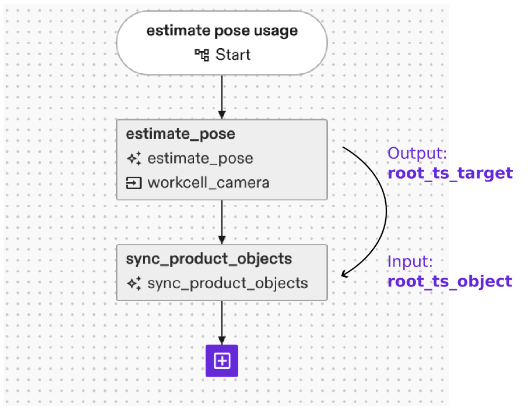
To move a robot to the object, you can then directly use the updated frames of the object. In case the process flow shall not use a specific fixed object, skills like “echo world nodes” allow to query a range of objects and use them in further data flows.
The estimate_pose skill outputs the estimated 3D pose(s) of the object(s) it was able to detect. Those poses are typically used as input to subsequent skills to plan the manipulation of object(s) or the scene in consideration of the objects’ respective pose.
Error handling
Object is not recognized at all
The execution failure message of the skill gives valuable information as to why a detection has failed. Typical examples to look out for include object occlusions and off lighting conditions. Check the perceived camera images in the sequence list. Can you see the objects to estimate in the first image? If not, typical reasons for failure include
- Parts placed outside the field of view of the camera
- Parts are occluded in the camera view
- The part is not clearly visible, e.g. due to poor image lightning or not distinguishable from the background (e.g. black part on black background)
- Wrong camera selected in skill
- Wrong pose estimator selected in skill
Did the skill mark the expected objects as detected by outlining them in the second image? If not, you can re-open the inference dialog for the pose estimator to test different parameters or test detection in different lighting conditions.
Object’s pose is off
Check the perceived camera images in the sequence list. Are the rendered outlines in the second image matching the part’s edges? If yes, then likely your camera-to-robot calibration is off. If the edges are not matching, it could be that the camera’s intrinsic calibration is off. Or the pose estimator is confusing edges, e.g. due to clutter: place the part in an isolated pose on uniform background and re-run the pose estimation to check if it’s detected. If so, try removing clutter in the background to get more reliable pose estimates.
Too few objects are recognized
Check the skill parameter min_num_instances. In case the skill recognizes less objects than parameterized here, the execution will fail.
If set, the max_num_instances value will limit the number of instances returned by the skill even though the pose estimator can detect more.
Check the perceived camera images in the sequence list. Can you see the objects to estimate in the first image? Did the skill mark detected objects in the second image?