ExtendedStatus
Assets such as skills and services provide functions. During normal operation, these may fail for a number of reasons. Such functions return a "status". In case of a failure the status provides information about the cause of the failure. It is essential for users of such assets to understand the failure causes to be able to react when they happen. The authors of service and skill assets have control over what status is returned to users. Typically, a status denotes a categorical error (e.g. "invalid argument", "deadline exceeded") and a message. In the Intrinsic platform, extended status information (ExtendedStatus) can be used to provide additional information. This can encompass information relevant to users and developers of an asset as well as traces of failures to more easily identify the root case. The ExtendedStatus information helps users to understand and debug failures.
The concept of ExtendedStatus
Skill executions and calls to services return categorical error codes (such as 'not found' or 'invalid argument') along with a message. Since many of these errors are ultimately directed to users (e.g., solution builders testing a process), the ExtendedStatus concept allows for providing additional context to these. To allow additional information, an ExtendedStatus proto is added as a payload (sometimes referred to as 'details') to the plain status.
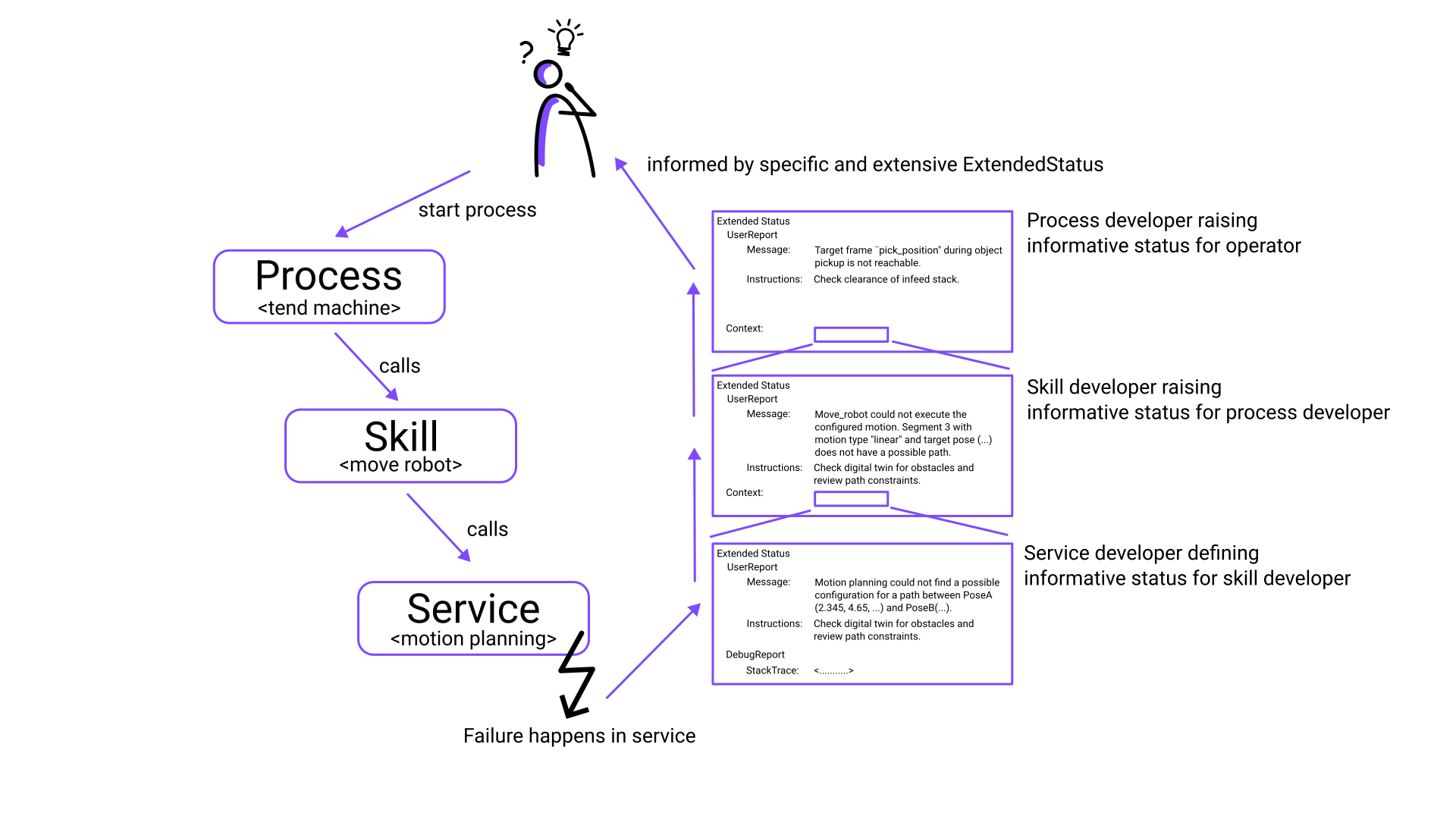
In order to extend the status information as an error propagates through the stack, ExtendedStatus is structured as a tree: ExtendedStatus received from lower levels are nested in ExtendedStatus in higher levels and thus allow to track a failure to its origin with useful context information on each layer of the stack.
The ExtendedStatus proto contains the following additional information which can be defined by the asset author:
- Status Code
- Title
- User Report
- Debug Report
- optional: Other context ExtendedStatus (e.g. the ExtendedStatus of an underlying error) (multiple context entries possible)
Example of a typical ExtendedStatus propagated through various levels:
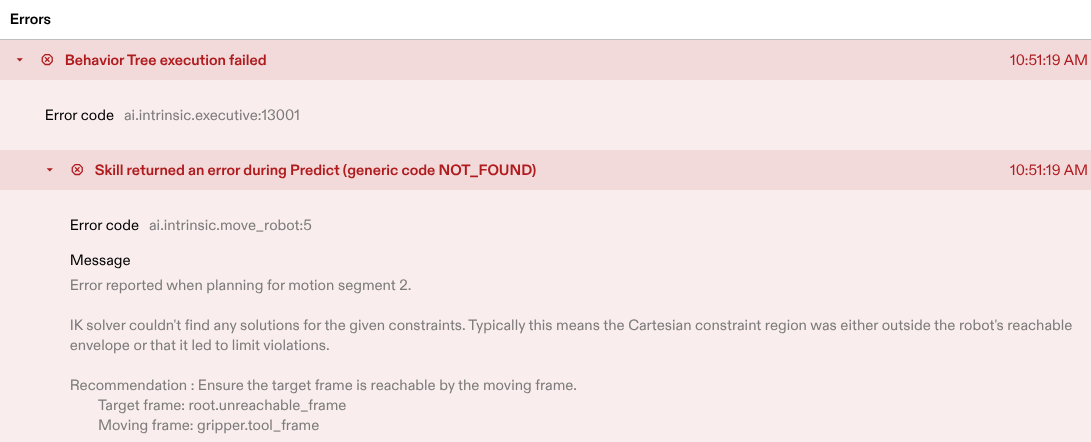
How this will be visible in the Flowstate Solution Editor:
Status codes
Status codes consist of two parts: a component and a number. The component identifies the origin of an error (e.g., a skill, service, or internal component such as ai.intrinsic.executive), while the numeric code describes a specific error or a group of related errors within that component. Because the numeric code is combined with the component, each status code is fully unique although e.g. different services could use the same numeric identifier. The status codes serve multiple functions: they allow errors to be aggregated under the same code for dashboards or metrics, enable precise communication with support by sharing the code, and facilitate targeted error handling for specific codes.
For example, consider a skill. A common status code might be assigned to errors related to incorrect parameterization. While each parameter can have its own error message, grouping them under a single status code allows for generic handling of these errors (e.g., requiring a different parameter configuration). Meanwhile, the report provides specific details on the parameter that needs attention. Similarly, a skill may encounter different execution failures, each with its own status code. This enables distinct recovery processes for specific failures and simplifies support by uniquely identifying the issue.
There are specific ranges for the codes of an ExtendedStatus.
| Status code | Description |
|---|---|
| 0 | Reserved. Specifies an "unknown" status that is set by the system when no further information is provided. |
| 1-9999 | Reserved. |
| 10000+ | Free to use for component author. |
Title and reports
The title of an ExtendedStatus is supposed to be a static string briefly identifying the error. Ideally, it has no more than 75 characters. We recommend to use sentence case. That is, capitalize only the first word in the title and any proper nouns or other terms that are always capitalized a certain way.
The user_report of the ExtendedStatus contains the message and
instructions which shall explain users of issuing component what went wrong
and what to do about it. In contrast to the static title, message can be a
dynamic text and should contain information describing the error in detail, like
actual values that lead to a failure or range information for out of range
errors. The instructions field shall contain directions on how to react to
this status, e.g. how to resolve this specific error. The external report is
meant to be visible to anyone on the system and is shown in the Flowstate Editor by
default.
The debug_report is considered to provide additional information for in-depth
troubleshooting and debugging by the author of the emitting component. The
message of the debug report can therefore be filled with extensive data that
may be useful to analyse a failure in more detail. In case the developer wants
to disclose such information, the stacktrace field can be used to attach a
stack trace of the failure.
There is a limit of the overall amount of data that can be sent in response to an error. This limit applies to the overall hierarchical extended status. Therefore, be mindful and aim for less than 10kB of text for your reports.
Tree structure and ExtendedStatus context
The ExtendedStatus is structured as a tree. In its context field, other
ExtendedStatus protos can be stored. This is meant to be used to eventually
generate a trace of events. For example, a behavior tree invokes a skill, which
in turn invokes a service. The service reports an ExtendedStatus. The skill
(and its author) may have the better situational information to describe an
error, so it creates its own ExtendedStatus and attaches the service
ExtendedStatus as context. As context can contain multiple ExtendedStatus,
the skill can also summarize multiple failures it receives from a service in an
understandable status and still include all detail information by adding all
ExtendedStatus to context. In the behavior tree a similar wrapping may
occur. The frontend will display the error with nested context errors. Another
typical use of context is to annotate a particular status with other status
messages that may have a relation to it or provide additional information. The
Intrinsic platform, for example, does that when it detects an ExtendedStatus
which is not properly defined (e.g. no ID and title specified) by adding a
generic warning status explaining the detected issues to the context of the
particular ExtendedStatus.
The tree structure also allows the user to investigate as deep as necessary (or how deep they understand the system). Thus, ExtendedStatus creates the ability to formulate user-facing errors, but at the same time convey information relevant to developers in its context.
Adding ExtendedStatus to assets
Using ExtendedStatus is particularly important for skills and services. It allows to pass accessible status information and actionable instructions for resolving issues to users of those assets.
Skills
The skills SDK provides specific support for ExtendedStatus. Since skills are written in C++ or Python, the language-specific notes described below still apply, but some simplifications are possible.
Expected skill status codes must be declared in the skill’s manifest:
// file: skillXY_manifest.textproto

status_info: [
  { code: 10201 title: "Invalid parameterization"
    recovery_instructions: "Check and fix input parameters." },

  { code: 10301 title: "Stabilization timeout"
    recovery_instructions: "Check chosen contact_stiffness (oneof) value." }
]
Declaring the status codes in the skill’s manifest allows skill users to learn about potential status returned by the skill without checking its source code. Additionally, the declaration in the skill manifest allow process authoring tools to offer a list of relevant failures to catch, for example, in fallback nodes. When emitting an ExtendedStatus with the given code from a skill, the title will be filled in automatically according to what is defined in the manifest. The recovery instructions can be used by a process author to understand options to recover. Depending on the particular status and its root cause those might either be manual authoring actions or behaviors that can be added to, for example, a Retry node’s recovery content.
Generally, consider grouping calls that you expose under the same error code into a function so that it leads to a single error status with ExtendedStatus information. Example in C++, see below for specifics to these calls:
// define the coarse structure functions
absl::Status pick(/*...*/) {}
absl::Status place(/*...*/) {}

absl::StatusOr<proto2::Message> Execute(/*...*/) {
  // the following returns an absl::Status as error with *ExtendedStatus*
  // information attached as payload.
  INTR_RETURN_IF_ERROR(pick())
    .AttachExtendedStatus("ai.intrinsic.my_skill", 10301,
                       {.title = "Failed to pick object", /*...*/});
  INTR_RETURN_IF_ERROR(place())
    .AttachExtendedStatus("ai.intrinsic.my_skill", 10302,
                       {.title = "Failed to place object", /*...*/});
}
Consider the advice on general status code assignment to determine a useful grouping.
C++ Skill
In a C++ skill, functions such as Execute return an absl::StatusOr. The
general C++ advice given below applies. The SDK will automatically set certain
fields of the ExtendedStatus:
- component (will be set to skill ID, pass an empty string for simplicity)
- title (from manifest)
- timestamp (current time)
- log context (from request) if not already set.
Python Skill
In a Python skill, functions raise exceptions to indicate an error. There is a
SkillError exception that can be used to raise errors in skills easily (it is
based on the ExtendedStatusError, see Python section below). As a special
consideration, be deliberate in catching exceptions from code invoked by the
skill and combine them by raising an applicable SkillError. This prevents
those exceptions from reaching consumers unfiltered and confusing them with
low-level information that is not useful to solve the problem. Note that the
SkillError does not require you to pass the component (skill ID). It is set
automatically by the Skill SDK.
Here is an example for raising a SkillError:
raise SkillError(10201,
                 f"Norm of direction vector cannot be close to 0 (is {norm}).")
Use of ExtendedStatus with different programming languages
Outside the skills SDK, ExtendedStatus is supported for various different programming languages. This way, they can be used, e.g., when writing custom services.
C++
The easiest way to generate a status message in C++ code is to use Intrinsic’s
StatusBuilder.
There are three common options:
- Completely generate the error from scratch like this:
// The StatusBuilder can be implicitly converted to an absl::Status and hence
// can be used in functions that return absl::Status or absl::StatusOr<T>.
return StatusBuilder("ai.intrinsic.my_component", 11234,
                     {.title = "Component has failed X",
                      .timestamp = absl::Now(),
                      .user_message =
                         absl::StrFormat("Invalid value %f, allowed %f to %f",
                                         value, value_min, value_max)});
This will implicitly convert to absl::Status with the proper ExtendedStatus
payload.
- Attach ExtendedStatus errors to
INTR_RETURN_IF_ERROR
INTR_RETURN_IF_ERROR(function_returning_status)
  .AttachExtendedStatus("ai.intrinsic.my_component", 12334,
                      {.title = "Error calling...", /* … */});
AttachExtendedStatus will generate an ExtendedStatus, but also consider an
ExtendedStatus that is returned from function_returning_status. If there is
an ExtendedStatus returned by function_returning_status it will be inserted
into the context of this ExtendedStatus. AttachExtendedStatus “returns” the
StatusBuilder again that you can then use to chain builder calls.
- Attach ExtendedStatus errors to
INTR_ASSIGN_OR_RETURN
INTR_ASSIGN_OR_RETURN(some_value, retrieve_value(),
                      _.AttachExtendedStatus("ai.intrinsic.my_component", 14676,
                                           {.title = "Error ...", /*...*/}));
This works exactly as AttachExtendedStatus with INTR_RETURN_IF_ERROR, so
that an ExtendedStatus returned by retrieve_value() will be attached to the
context of the ExtendedStatus generated here.
For the INTR_ASSIGN_OR_RETURN macro a StatusBuilder is assigned to a macro-local variable _
(underscore) that AttachExtendedStatus can be called on.
AttachExtendedStatus “returns” the StatusBuilder again that you can then use to chain builder calls.
- Wrap
absl::Statuserrors
INTR_RETURN_IF_ERROR(function_returning_status)
  .WrapExtendedStatus("ai.intrinsic.my_component", 12334,
                      StatusBuilder::LEGACY_IN_CONTEXT,
                      {.title = "Error calling...", /* … */});
INTR_RETURN_IF_ERROR(function_returning_status)
  .WrapExtendedStatus("ai.intrinsic.my_component", 12334,
                      StatusBuilder::LEGACY_AS_DEBUG_REPORT,
                      {.title = "Error calling...", /* … */});
Some functions may return absl::Status with no ExtendedStatus attached
(especially library functions). Prefer to include all necessary information in
the ExtendedStatus, so that users can directly understand or resolve an
issue. Nevertheless, the information contained in the plain absl::Status may
still be useful or even required.
In that case WrapExtendedStatus also works for absl::Status, although the
information will most likely be less helpful to users. If
function_returning_status does provide an ExtendedStatus
WrapExtendedStatus will always include that as a context exactly as
AttachExtendedStatus. However, if no ExtendedStatus is present, then
WrapExtendedStatus will use the information from the absl::Status.
If you pass in StatusBuilder::LEGACY_IN_CONTEXT an ExtendedStatus with a
generic error code and message will be created from the absl::Status and
included in the context of the created ExtendedStatus.
If you pass in StatusBuilder::LEGACY_AS_DEBUG_REPORT a generic error message
based on the absl::Status will be appended to the DebugReport message of
the created ExtendedStatus.
Python
There is
ExtendedStatusError
which is an exception that can be raised. It supports users with a builder
pattern. It can be raised to add ExtendedStatus information like the
following:
raise ExtendedStatusError("ai.intrinsic.my_service", 24353,
                          title="Failed to set value",
                          user_message=f"Value {value} is out of range"+
                            f"({min_value} to {max_value})")
Note that in gRPC service methods, the call must be ended with a special context function.
class MyService(service_pb2_grpc.MyServiceServicer):

  def MyCall(self,
             request: service_pb2.MyCallRequest,
             context: grpc.ServicerContext,
  ) -> service_pb2.MyCallResponse:
    context.abort_with_status(
        ExtendedStatusError("ai.intrinsic.my_service", 34531,
                            title="Failed to set value",
                            user_message="..."))
The ExtendedStatusError class implements the grpc.Status interface.
Go
In Go, the extstatus package provides support for emitting and extracting
ExtendedStatus information. Errors implement the required interfaces to be
used transparently in situations where a Go error is returned and gRPC methods
that convert to a specific Status class to be transmitted as a gRPC error.
return nil, extstatus.New("ai.intrinsic.my_service", 9876,
                            WithTitle("Error Title"),
                         ).Err()
Despite the ease by which you can return these errors, focus the effort to emit user-readable errors.
To retrieve an ExtendedStatus from a client call, you can use the
FromGRPCError function:
result, err := client.MyCall(ctx, &myservice.MyCallRequest{})
if err != nil {
  extSt, ok := FromGRPCError(err)
  if ok {
    // could extract extended status into extSt
  }
}
Behavior Trees
Behavior trees (BT) need to deal with ExtendedStatus as they come in from invoked components, such as skills. Additionally, we enable BT authors to augment the tree with additional ExtendedStatus information. This can be used to capture the context knowledge available to the BT author to generate more informative (and situated) error messages. Error information is added to a node’s decorator.
In a behavior tree, ExtendedStatus information propagates up in the tree along failing nodes. If a node is annotated to emit an ExtendedStatus, it wraps the ExtendedStatus received from a child (the child ExtendedStatus becomes context for the emitted ExtendedStatus), or if no such ExtendedStatus was received the configured ExtendedStatus is emitted as-is.
The Solution Building Library (SBL) supports configuring emitting an
ExtendedStatus like the following. The component and code parameters are
mandatory, all other information is optional.
node.on_failure.emit_extended_status(
    'ai.intrinsic.trees.my_appl_tree',
    14567,
    user_message='user message',
    debug_message='debug message',
    title='My title',
    to_blackboard_key='blackboard_foo',
)
It is also possible to only configure an ExtendedStatus to be written to the blackboard, for example when one may be received such as for a Task node calling a skill.
node.on_failure.emit_extended_status_to('blackboard_foo')
ExtendedStatus that are written to the blackboard (either created or wrapped, or just stored) can be used in a new status match condition. The following performs an exact match on component and status code.
condition = bt.ExtendedStatusMatch(
    'blackboard_x',
    bt.ExtendedStatusMatch.MatchStatusCode('ai.intrinsic.testing', 12345),
)
The following example constructs a retry node that invokes different recovery behaviors based on the specific error reported by as skill.
node = bt.Retry(
node = bt.Retry(
    retry_counter_key='retry_counter',
    child=bt.Task(
        # In real code this would be skills.ai.intrinsic.do_it()
        behavior_call.Action(skill_id='ai.intrinsic.do_it'),
    ).on_failure.emit_extended_status_to('task_error'),
    recovery=bt.Fallback(
        children=[
            bt.Sequence(name='recovery1').set_decorators(
                bt.Decorators(
                    condition=bt.ExtendedStatusMatch(
                        'task_error',
                        bt.ExtendedStatusMatch.MatchStatusCode(
                            'ai.intrinsic.do_it', 12101
                        ),
                    ),
                ),
            ),
            bt.Parallel(name='recovery2').set_decorators(
                bt.Decorators(
                    condition=bt.ExtendedStatusMatch(
                        'task_error',
                        bt.ExtendedStatusMatch.MatchStatusCode(
                            'ai.intrinsic.do_it', 12202
                        ),
                    )
                ),
            ),
            # Last resort, may often not be useful but should rather be reported up
            bt.Sequence(name='fallback_recovery'),
        ]
    ),
)
In the graphical process editing, ExtendedStatus information can currently only be added using the fail node. The parameters of a fail node allow to set all fields of an ExtendedStatus. However, it is currently not possible to attach nested status information, so a fail node does not support to emit a full trace of statuses. This will be added in the future.
Using ExtendedStatus in other contexts
Sometimes it may be useful to use the ExtendedStatus proto in other contexts
(aside from being a payload to a Status). For example, one may want to provide
ExtendedStatus information for warnings or informational messages. These can
not be transported as a payload in any Status (the general contract is that
for an OK status no payload is to be added or transmitted and implementations
will simply drop it).
When using an ExtendedStatus as a field in another proto, always use a single value field, not a repeated field. To provide more information, create a top-level wrapper status and add other information as context. Tooling within Flowstate is unified to always operate on a single ExtendedStatus only.
Summary and guidelines
Use ExtendedStatus in your skills and services to provide valuable status and debugging information to the users of your assets. To achieve the best possible experience, there are some guidelines that you can follow.
Guidelines
Status code
- Respect the status code ranges in section status codes.
- Use distinct status codes for things users of your asset need to handle specifically.
- Bundle reports that have the same resolution or handling on user level under the same status code.
Title
- Use the title to describe the status briefly. Let the user know what generally happened.
- Use static strings for the title and do not include dynamic information (do that in the report instead).
- Restrict the title to no more than 75 characters.
- Use sentence case.
Reports
- Set
messageto a meaningful, and sufficiently detailed description of the status you want to express - Provide detailed information about things that went wrong, including runtime information (e.g. the name and actual value of a wrongly set skill parameter)
- Provide actionable
instructionsthat tell the user of your asset how to react to this status. - Always populate the
user_reportto transport status information to your users - Optionally populate the
debug_reportwith additional, more extensive troubleshooting information such as stack traces or in-depth value listings.
Context
-
Attach (all) status received from underlying assets (e.g. a status from a called service when you are writing skill code) to allow users to dig into the details and root causes of the status.
contextcan contain multiple ExtendedStatus instances for this purpose. -
Attach other status that may help explaining the context and content of the status (e.g. a general warning status)
-
For skills
-
Declare status codes and expressive titles in the skill manifest to define what kind of status information users can expect from your skill.