Skill Unit Testing
This guide teaches you how to create a Python or C++ unit test.
Before attempting this guide you must:
Create a new unit test
All new Python and C++ skills come with an automatically generated unit test. Create a new Python or C++ skill.
- When asked to enter a skill ID, use
com.example.stop_stopwatch. - When asked to enter a folder, use
skills/stop_stopwatch.
You now have several files in the skills/stop_stopwatch folder, including one file that contains unit tests.
Run a skill unit test
There are two ways to run a skill unit test:
- By running
bazel teston the command line, or - By clicking the CodeLens above the test target in VS code.
Run a bazel test on the command line
Use bazel test to run tests when:
- You prefer command line based workflows, or
- You want to run multiple tests at the same time.
If you are using the dev container, open a new terminal in VS Code.
If you are not using the dev container, open a new terminal and go to the directory containing your MODULE.bazel.
You must tell Bazel which targets it should test by giving it the name of the target.
The skill you created has a unit test target named //skills/stop_stopwatch:stop_stopwatch_test
Run that test by executing the following command in the terminal:
bazel test //skills/stop_stopwatch:stop_stopwatch_test
Run a bazel test through the VS Code extension
Use the VS code extention to run a test when:
- You are using the dev container, and
- You want to run a single test.
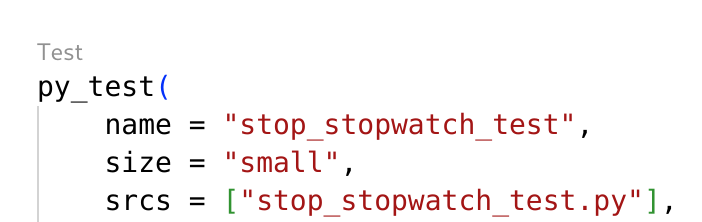
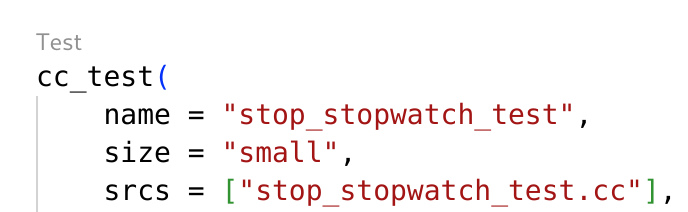
- Open the file
skills/stop_stopwatch/BUILD. - Click the
TestCodeLens above thepy_testorcc_testtarget namedstop_stopwatch_test.
- Python
- C++
Understand the new unit test
- Python
- C++
Open the file skills/stop_stopwatch/stop_stopwatch_test.py.
import unittest

from intrinsic.skills.testing import skill_test_utils as stu

from skills.stop_stopwatch.stop_stopwatch import StopStopwatch
from skills.stop_stopwatch.stop_stopwatch_pb2 import StopStopwatchParams


class StopStopwatchTest(unittest.TestCase):

    def test_get_footprint(self):
        skill = StopStopwatch()

        params = StopStopwatchParams(
            text="hello world",
        )
        context = stu.make_test_get_footprint_context()
        request = stu.make_test_get_footprint_request(params)

        result = skill.get_footprint(request, context)
        self.assertTrue(result.lock_the_universe)

    def test_preview(self):
        skill = StopStopwatch()

        params = StopStopwatchParams(
            text="hello world",
        )
        context = stu.make_test_preview_context()
        request = stu.make_test_preview_request(params)

        # Update this test when you implement preview
        with self.assertRaises(NotImplementedError):
            skill.preview(request, context)

    def test_execute(self):
        skill = StopStopwatch()

        params = StopStopwatchParams(
            text="hello world",
        )
        context = stu.make_test_execute_context()
        request = stu.make_test_execute_request(params)

        with self.assertLogs() as log_output:
            skill.execute(request, context)

        output = log_output[0][0].message
        self.assertEqual(output, '"text" parameter passed in skill params: hello world')


if __name__ == '__main__':
    unittest.main()
Open the file skills/stop_stopwatch/stop_stopwatch_test.cc.
#include "stop_stopwatch.h"

#include <gtest/gtest.h>

#include "intrinsic/skills/testing/skill_test_utils.h"
#include "skills/stop_stopwatch/stop_stopwatch.pb.h"

using ::intrinsic::skills::ExecuteContext;
using ::intrinsic::skills::ExecuteRequest;
using ::intrinsic::skills::GetFootprintContext;
using ::intrinsic::skills::GetFootprintRequest;
using ::intrinsic::skills::PreviewContext;
using ::intrinsic::skills::PreviewRequest;
using ::intrinsic::skills::SkillTestFactory;

using ::com::example::StopStopwatchParams;

using skills::stop_stopwatch::StopStopwatch;


TEST(SaySkillTest, GetFootprint) {
  auto skill = StopStopwatch::CreateSkill();

  // Set parameters
  StopStopwatchParams params;
  params.set_text("hello world");

  auto skill_test_factory = SkillTestFactory();
  GetFootprintRequest request = skill_test_factory.MakeGetFootprintRequest(params);
  std::unique_ptr<GetFootprintContext> context = skill_test_factory.MakeGetFootprintContext({});

  auto result = skill->GetFootprint(request, *context);

  ASSERT_TRUE(result.ok());
  EXPECT_TRUE(result->lock_the_universe());
}

TEST(SaySkillTest, Preview) {
  auto skill = StopStopwatch::CreateSkill();

  // Set parameters
  StopStopwatchParams params;
  params.set_text("hello world");

  auto skill_test_factory = SkillTestFactory();
  PreviewRequest request = skill_test_factory.MakePreviewRequest(params);
  std::unique_ptr<PreviewContext> context = skill_test_factory.MakePreviewContext({});

  auto result = skill->Preview(request, *context);

  ASSERT_TRUE(absl::IsUnimplemented(result.status()));
}

TEST(SaySkillTest, Execute) {
  auto skill = StopStopwatch::CreateSkill();

  // Set parameters
  StopStopwatchParams params;
  params.set_text("hello world");

  auto skill_test_factory = SkillTestFactory();
  ExecuteRequest request = skill_test_factory.MakeExecuteRequest(params);
  std::unique_ptr<ExecuteContext> context = skill_test_factory.MakeExecuteContext({});

  auto result = skill->Execute(request, *context);

  ASSERT_TRUE(result.ok());
}
The file contains a unit test for each of the 3 most important methods on a skill:
- Get Footprint
- Preview
- Execute
Each method takes two parameters:
- A context object that gives access to services in the solution, like the world service or a custom service
- A request object that includes the skill's parameters
Every test follows the same structure:
- Create an instance of the skill.
- Set the skill's parameters.
- Create a context object.
- Create a request object.
- Call a method on the skill with those objects.
- Check the results.
Implement the StopStopwatch skill
Most skills depend on services to perform some work for them.
Follow the instructions in this section to implement the StopStopwatch such that it depends on a stopwatch service.
Define the parameters and return type
How will the unit test know if the skill behaves correctly?
The skill should return a result that a unit test can check.
Modify the skill's proto file skills/stop_stopwatch/stop_stopwatch.proto as follows:
- The skill won't need any parameters, so delete the
textfield fromStopStopwatchParams. - The skill needs a result message, so add a new message
StopStopwatchResultwith a fieldtime_elapsed.
The two messages should look like this:
message StopStopwatchParams {
}

message StopStopwatchResult {
  double time_elapsed = 1;
}
Make the skill declare that it returns StopStopwatchResult when it is executed.
- Open
skills/stop_stopwatch/stop_stopwatch.manifest.textproto. - Copy the following return type declaration to the end of
stop_stopwatch.manifest.textproto.return_type {
message_full_name: "com.example.StopStopwatchResult"
}
Depend on the stopwatch service
Make stop_stopwatch depend on the Stopwatch Service from the SDK Examples.
There are multiple ways to depend on a service.
- If the service is in the same Bazel workspace as the skill, make the
py_proto_library,cc_proto_library,py_grpc_library, andcc_grpc_librarytargets visible to your skill. Then, make your skill targets depend on the service targets directly. - If the service is in a different Bazel workspace and that workspace is open source, add an external dependency to your
MODULE.bazel. Then, make your skill targets depend on the service targets from the external dependency. - If all you have is the service's proto definition, then add it to your own Bazel workspace.
Pretend that all you have is the service's proto definition. Follow these instructions to add it to your Bazel workspace.
- Copy the
stopwatch_service.protofile into theskills/stop_stopwatchfolder. - Add the following
proto_library()target toskills/stop_stopwatch/BUILD.
proto_library(
  name = "stopwatch_service_proto",
  srcs = ["stopwatch_service.proto"],
)
- Python
- C++
- Add a
load()statement for thepy_grpc_library()rules toskills/stop_stopwatch/BUILD.
load("@com_github_grpc_grpc//bazel:python_rules.bzl", "py_grpc_library")
- Create two targets for the stopwatch service proto definition.
py_proto_library(
    name = "stopwatch_service_py_pb2",
    visibility = ["//visibility:public"],
    deps = [":stopwatch_service_proto"],
)

py_grpc_library(
    name = "stopwatch_service_py_pb2_grpc",
    srcs = [":stopwatch_service_proto"],
    visibility = ["//visibility:public"],
    deps = [":stopwatch_service_py_pb2"],
)
- Add these dependencies to the list of
depsof thepy_librarytarget namedstop_stopwatch_py.
py_library(
    name = "stop_stopwatch_py",
    # ...
    deps = [
        # ...
        ":stopwatch_service_py_pb2_grpc",
        ":stopwatch_service_py_pb2",
        "@ai_intrinsic_sdks//intrinsic/util/grpc:connection",
        "@ai_intrinsic_sdks//intrinsic/util/grpc:interceptor",
    # ...
- Add the following imports to the top of
skills/stop_stopwatch/stop_stopwatch.py.
import grpc
from intrinsic.util.grpc import connection
from intrinsic.util.grpc import interceptor
from skills.stop_stopwatch import stopwatch_service_pb2 as stopwatch_proto
from skills.stop_stopwatch import stopwatch_service_pb2_grpc as stopwatch_grpc
- Add a function to create a gRPC client for the stopwatch service above the skill class definition in
skills/stop_stopwatch/stop_stopwatch.py.
def make_grpc_stub(resource_handle):
    logging.info(f"Address: {resource_handle.connection_info.grpc.address}")
    logging.info(f"Server Instance: {resource_handle.connection_info.grpc.server_instance}")
    logging.info(f"Header: {resource_handle.connection_info.grpc.header}")

    # Create a gRPC channel without using TLS
    grpc_info = resource_handle.connection_info.grpc
    grpc_channel = grpc.insecure_channel(grpc_info.address)
    connection_params = connection.ConnectionParams(
        grpc_info.address, grpc_info.server_instance, grpc_info.header
    )

    intercepted_channel = grpc.intercept_channel(
        grpc_channel,
        interceptor.HeaderAdderInterceptor(connection_params.headers),
    )
    return stopwatch_grpc.StopwatchServiceStub(
        intercepted_channel
    )
- Replace the
executemethod inskills/stop_stopwatch/stop_stopwatch.pywith the following to make the skill stop the stopwatch.
  @overrides(skill_interface.Skill)
  def execute(
      self,
      request: skill_interface.ExecuteRequest[stop_stopwatch_pb2.StopStopwatchParams],
      context: skill_interface.ExecuteContext
  ) -> stop_stopwatch_pb2.StopStopwatchResult:
      stub = make_grpc_stub(context.resource_handles["stopwatch_service"])

      logging.info("Stopping the stopwatch")
      response = stub.Stop(stopwatch_proto.StopRequest())
      if not response.success:
          raise skill_interface.SkillError(1, f"Failed to stop stopwatch {response.error}")

      logging.info("Successfully stopped the stopwatch")
      result = stop_stopwatch_pb2.StopStopwatchResult(time_elapsed=response.time_elapsed)
      return result
- Add a
load()statement for thecc_grpc_library()rules toskills/stop_stopwatch/BUILD.
load("@com_github_grpc_grpc//bazel:cc_grpc_library.bzl", "cc_grpc_library")
- Create two targets for the stopwatch service proto definition.
cc_proto_library(
    name = "stopwatch_service_cc_proto",
    deps = [":stopwatch_service_proto"],
)

cc_grpc_library(
    name = "stopwatch_service_cc_grpc_proto",
    srcs = [":stopwatch_service_proto"],
    grpc_only = True,
    deps = [":stopwatch_service_cc_proto"],
)
- Add these dependencies to the list of
depsof thecc_librarytarget namedstop_stopwatch_cc.
cc_library(
    name = "stop_stopwatch_cc",
    # ...
    deps = [
        # ...
        ":stopwatch_service_cc_proto",
        ":stopwatch_service_cc_grpc_proto",
        "@ai_intrinsic_sdks//intrinsic/util/status:status_macros_grpc",
    # ...
- Add the following includes to the top of
skills/stop_stopwatch/stop_stopwatch.cc.
#include "intrinsic/util/status/status_macros_grpc.h"
#include "skills/stop_stopwatch/stopwatch_service.pb.h"
#include "skills/stop_stopwatch/stopwatch_service.grpc.pb.h"
- Add these two functions to the top of
skills/stop_stopwatch/stop_stopwatch.ccto create a gRPC Client for the stopwatch service.
std::unique_ptr<::stopwatch::StopwatchService::Stub> MakeGrpcStub(intrinsic_proto::resources::ResourceHandle handle) {
  const std::string& address = handle.connection_info().grpc().address();
  std::shared_ptr<grpc::Channel> channel = ::grpc::CreateChannel(
      address, grpc::InsecureChannelCredentials());
  return ::stopwatch::StopwatchService::NewStub(channel);
}

std::unique_ptr<::grpc::ClientContext> MakeClientContext(intrinsic_proto::resources::ResourceHandle handle) {
  const std::string& instance = handle.connection_info().grpc().server_instance();
  auto ctx = std::make_unique<::grpc::ClientContext>();
  ctx->AddMetadata("x-resource-instance-name", instance);
  return ctx;
}
- Replace the
Executemethod inskills/stop_stopwatch/stop_stopwatch.ccwith the following to make the skill stop the stopwatch.
absl::StatusOr<std::unique_ptr<google::protobuf::Message>> StopStopwatch::Execute(
  const ExecuteRequest& request, ExecuteContext& context) {

  INTR_ASSIGN_OR_RETURN(intrinsic_proto::resources::ResourceHandle handle,
                        context.equipment().GetHandle("stopwatch_service"));

  auto stub = MakeGrpcStub(handle);
  auto ctx = MakeClientContext(handle);
  ::stopwatch::StopRequest stop_request;
  ::stopwatch::StopResponse stop_response;
  INTR_RETURN_IF_ERROR_GRPC(stub->Stop(ctx.get(), stop_request, &stop_response));

  LOG(INFO) << "Time elapsed: " << stop_response.time_elapsed();

  auto return_value = std::make_unique<com::example::StopStopwatchResult>();
  return_value->set_time_elapsed(stop_response.time_elapsed());
  return return_value;
}
- Lastly, add a dependency on the stopwatch service to
stop_stopwatch.manifest.textproto.
dependencies {
  required_equipment {
    key: "stopwatch_service"
    value {
      capability_names: "stopwatch.StopwatchService"
    }
  }
}
The skill now stops the stopwatch when it is executed.
Provide a service to a skill in a unit test
Now that the skill depends on the stopwatch service, every unit test must provide the service to the skill being tested.
Choose between using the real service or a fake service
If you have the source code of the service your skill depends on, you have a choice to make:
- Instantiate the real service in the unit test
- Instantiate a fake service in the unit test
Instantiate the real service in a unit test when:
- You have access to the source code of the real service, and
- The service is easy to instantiate, and
- The test conditions needed can be reached determinisitcally with the real service.
Instantiate a fake service in a unit test when:
- You don't have access to the source code of the real service, or
- The service has many dependencies or is difficult to instantiate, or
- The test is checking edge cases that cannot be reached deterministically with the real service.
Using real services makes unit tests more realistic, but it may limit what parts of your skill can be tested. Using fake services can test more of a skills behavoir, but it can miss real bugs in your skill if the fake service behaves differently from the real service.
Use a fake service in a test
Let's assume you have chosen to use a fake service in your unit test. Follow these instructions to create a fake stopwatch service that returns a constant value as the time elapsed.
- Python
- C++
- Add the following imports to
skills/stop_stopwatch/stop_stopwatch_test.py.from skills.stop_stopwatch import stopwatch_service_pb2 as stopwatch_proto
from skills.stop_stopwatch import stopwatch_service_pb2_grpc as stopwatch_grpc - Add this
FakeStopwatchServicerclass to the top ofskills/stop_stopwatch/stop_stopwatch_test.py.class FakeStopwatchServicer(stopwatch_grpc.StopwatchServiceServicer):
def Stop(self, request, context):
response = stopwatch_proto.StopResponse()
response.time_elapsed = 42
response.success = True
return response
- Add the following includes to
skills/stop_stopwatch/stop_stopwatch_test.cc.#include "skills/stop_stopwatch/stopwatch_service.pb.h"
#include "skills/stop_stopwatch/stopwatch_service.grpc.pb.h" - Add the following
usingdeclaration toskills/stop_stopwatch/stop_stopwatch_test.cc.using ::intrinsic::skills::EquipmentPack; - Add this
FakeStopwatchServiceclass to the top ofskills/stop_stopwatch/stop_stopwatch_test.cc.class FakeStopwatchService
: public stopwatch::StopwatchService::Service {
public:
grpc::Status Stop(
grpc::ServerContext* context,
const ::stopwatch::StopRequest* request,
::stopwatch::StopResponse* response) override{
response->set_time_elapsed(42);
return grpc::Status::OK;
}
};
The test file now has a fake stopwatch service. Next, modify each test case to provide the fake service to the skill.
- Python
- C++
The intrinsic SDK includes a function make_grpc_server_with_resource_handle.
Use it to create a gRPC service and resource handle in the unit tests.
- Remove the setting of the
textfield in the parameters message from thetest_get_footprint,test_preview, andtest_executefunctions.params = StopStopwatchParams() - Add these lines to the three functions
test_get_footprint,test_preview, andtest_executeafter the lineskill = StopStopwatch().server, handle = stu.make_grpc_server_with_resource_handle("stopwatch_service")
stopwatch_grpc.add_StopwatchServiceServicer_to_server(FakeStopwatchServicer(), server)
server.start() - Modify the call to
make_test_get_footprint_contextto include the newly created resource handle.context = stu.make_test_get_footprint_context(
resource_handles={handle.name: handle},
) - Modify the call to
make_test_preview_contextto include the newly created resource handle.context = stu.make_test_preview_context(
resource_handles={handle.name: handle},
) - Modify the call to
make_test_execute_contextto include the newly created resource handle.context = stu.make_test_execute_context(
resource_handles={handle.name: handle},
) - Modify the test expecations of
test_execute_contextto expect the the time elapsed value returned by the fake stopwatch service.result = skill.execute(request, context)
self.assertEqual(result.time_elapsed, 42)
The intrinsic SDK includes a class SkillTestFactory with a function RunService.
Use the RunService function to create a gRPC service and resource handle in the unit tests.
- Remove the line
params.set_text("hello world");field in the parameters message from theGetFootprint,Preview, andExecutetests. - Add the following includes to
skills/stop_stopwatch/stop_stopwatch_test.cc.#include "absl/status/status_matchers.h" - Add this dependency to the list of
depsof thecc_testtarget namedstop_stopwatch_test.cc_test(
name = "stop_stopwatch_test",
# ...
deps = [
# ...
"@com_google_absl//absl/status:status_matchers",
# ... - Use
SkillTestFactory::RunServiceto run theFakeStopwatchServiceclass in theGetFootprint,Preview, andExecutetests after the lineauto skill_test_factory = SkillTestFactory();.FakeStopwatchService service;
auto handle = skill_test_factory.RunService(&service);
EquipmentPack equipment_pack;
ASSERT_THAT(equipment_pack.Add("stopwatch_service", handle), ::absl_testing::IsOk()); - Modify the call to
MakeGetFootprintRequestto include the newly created resource handle.std::unique_ptr<GetFootprintContext> context = skill_test_factory.MakeGetFootprintContext({
.equipment_pack = equipment_pack,
}); - Modify the call to
MakePreviewRequestto include the newly created resource handle.std::unique_ptr<PreviewContext> context = skill_test_factory.MakePreviewContext({
.equipment_pack = equipment_pack,
}); - Modify the call to
MakeExecuteRequestto include the newly created resource handle.std::unique_ptr<ExecuteContext> context = skill_test_factory.MakeExecuteContext({
.equipment_pack = equipment_pack,
}); - Add additional test expecations to the
Executetest to expect the the time elapsed value returned by the fake stopwatch service.auto return_value =
google::protobuf::DownCastMessage<com::example::StopStopwatchResult>(
result->get());
ASSERT_NE(return_value, nullptr);
EXPECT_EQ(42, return_value->time_elapsed());
Run the unit test one more time; it should pass.
Conclusion
You now know how to create skill unit tests, even if the skill depends on other services. However, unit tests are limited by the realism of the fake services they use. Read the Skill Integration Testing guide to learn how to create tests that use real services.