Configure your Service
This page shows how to make your platform service configurable. You should make your service configurable if it:
- Communicates with another service and needs that service's name and address
- Accesses an API on the internet and needs an API key
- Offers different algorithms for different situations and needs you to pick one
Prerequisites
Before you follow this guide, you must:
The configurable_service example provides a complete reference, showing all files as they should appear after completing this tutorial. Use it to verify your edits if you are unsure where to proceed.
Get the example service
-
Run the following command to clone the SDK examples in your development environment.
git clone https://github.com/intrinsic-ai/sdk-examples.git -
Follow the instructions to open a project in the dev container.
How the example service works
To make a service configurable, you must:
- Define the service's configurable parameters as a protobuf message
- Define the default values of the configurable parameters in a
.textprotofile - Make the service read its configuration from the RuntimeContext
Define the service's configurable parameters
Look at services/configurable_service/configurable_service.proto.
syntax = "proto3";

package configurable_service;

message ConfigurableServiceConfig {
  // Someone's name
  string  name = 1;
  // A list of food they like to eat
  repeated string food = 2;
  // The number of seconds to wait between printing someone's food.
  int32 seconds_to_sleep = 3;
}
This file defines a protobuf message called configurable_service.ConfigurableServiceConfig.
This message defines the configurable parameters that this service accepts.
To make your service configurable, you must:
- Define a similar protobuf message
- Generate code for that protobuf message
- Bazel
Add proto_library() and py_proto_library() bazel rules in your BUILD file to generate Python code for your service's configuration message.
proto_library(
    name = "configurable_service_proto",
    srcs = ["configurable_service.proto"],
)

py_proto_library(
    name = "configurable_service_py_pb2",
    visibility = ["//visibility:public"],
    deps = [":configurable_service_proto"],
)
Add the py_proto_library() target to the deps attribute of your py_binary() target.
py_binary(
    name = "configurable_service_bin",
    # [...]
    deps = [
        ":configurable_service_py_pb2",
        # [...]
    ],
)
Add the proto_library() target to the deps attribute of your intrinsic_service() target.
intrinsic_service(
    name = "configurable_service",
    # [...]
    deps = [
        ":configurable_service_proto"
    ]
)
Read the Protobuf Language Guide to learn more about defining a Protobuf message.
Define the default values of the configurable parameters
Look at services/configurable_service/default_config_values.textproto.
This file defines an instance of configurable_service.ConfigurableServiceConfig wrapped in a google.protobuf.Any message in the Protobuf Text Format.
# proto-file: google/protobuf/any.proto
# proto-message: Any
[type.googleapis.com/configurable_service.ConfigurableServiceConfig] {
    name: "Riley"
    food: "carrots"
    food: "cookies"
    food: "cranberries"
    seconds_to_sleep: 5
  }
To make your service configurable, you must define the default values for your service's configurable parameters.
First, create a file with a name ending in .textproto.
- Bazel
Next, set the default_config attribute on the intrinsic_service() target to the name of your default configuration file.
intrinsic_service(
    name = "configurable_service",
    # [...]
    default_config = "default_config_values.textproto",
    # [...]
)
Read the Protobuf Text Format Language Specification and any.proto to learn more about how to define your default configuration.
Read configuration from the RuntimeContext
Look in the main() function of services/configurable_service/configurable_service.py.
Notice that it:
- Reads the file
/etc/intrinsic/runtime_config.pb - Parses a
RuntimeContextproto instance from the content of that file - Unpacks the
ConfigurableServiceConfigproto instance from theconfigattribute on theRuntimeContextinstance
    with open('/etc/intrinsic/runtime_config.pb', 'rb') as fin:
        context = runtime_context_pb2.RuntimeContext.FromString(fin.read())

    # Parse the configuration
    config = configurable_service_pb2.ConfigurableServiceConfig()
    context.config.Unpack(config)
You must make your service read and unpack its custom configuration message in the same way.
How to configure a service
Build and install the configurable service
bazel build //services/configurable_service
inctl asset install --org $INTRINSIC_ORGANIZATION bazel-bin/services/configurable_service/configurable_service.bundle.tar
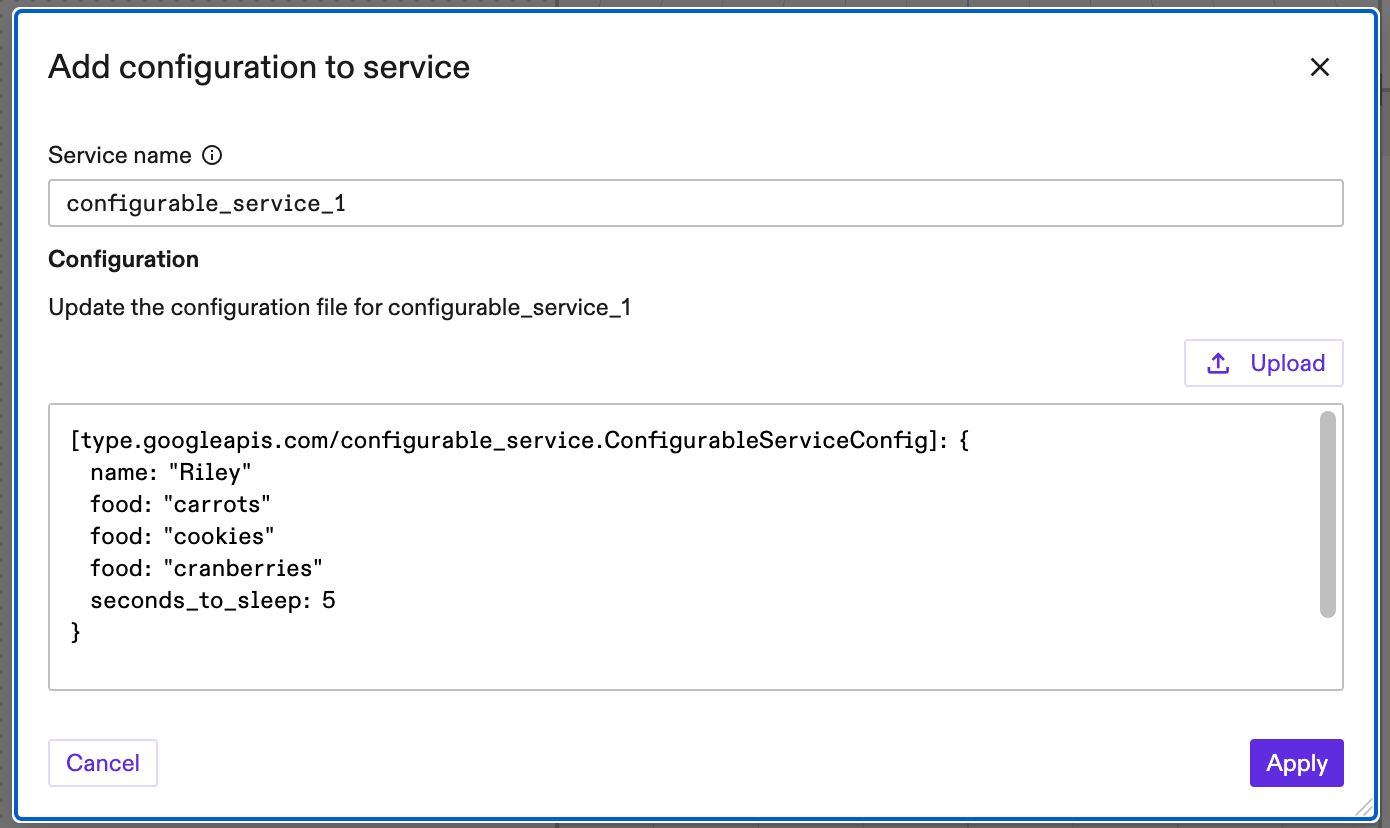
Add an instance of the service through the Flowstate web interface. Notice that the dialog shows the default configuration textproto you defined for the service. Modify this configuration in the dialog to configure your service, and then add it to your solution.
Stream logs from the service and observe the results.
$ inctl logs --follow --service configurable_service_1 --org $INTRINSIC_ORGANIZATION --solution $INTRINSIC_SOLUTION
INFO:root:--------------------------------
INFO:root:-- Configurable service starting
INFO:root:--------------------------------
INFO:root:My name is Riley, and I like to eat cookies
INFO:root:My name is Riley, and I like to eat carrots
INFO:root:My name is Riley, and I like to eat cookies
INFO:root:My name is Riley, and I like to eat carrots
INFO:root:My name is Riley, and I like to eat cookies
INFO:root:My name is Riley, and I like to eat cranberries