Create your first Service
Platform services (called services on this page) are programs that offer stateful capabilities to skills. This guide walks through how to create a stopwatch service, and then the guide walks through how to create skills to start and stop the stopwatch.
Prerequisites
Before attempting this guide you must:
- Deploy a solution
- Set up your development environment
- Connect VS Code to your cloud organization
- Know how to create skills
If you have already setup you development environment, make sure it is up to date by following the "Update your development environment" steps.
If you don't already have a bazel workspace, run these commands to create one:
mkdir my_bazel_ws
cd my_bazel_ws
inctl bazel init --sdk_repository https://github.com/intrinsic-ai/sdk.git --sdk_version latest
Why create a service?
Skills are intended to be stateless, which means skills are not supposed to retain any information when they are executed. A stateless skill cannot behave like a stopwatch because tracking how much time has passed would require retaining the time when the stopwatch was started.
Services are allowed to have state. A service can act like a stopwatch, and then skills can communicate with the service to start and stop it.
Create files for the service
Let's create the files needed for the stopwatch service. Later sections will explain what to put in them.
For a complete reference, the stopwatch service example shows all files as they should appear after completing this tutorial. Refer to it if you're unsure where to make an edit.
-
Create a new bazel package called
stopwatchin your bazel workspace.cd `bazel info workspace`
mkdir stopwatch
touch stopwatch/BUILD -
Create a file
stopwatch_service.prototo hold a gRPC service definition.touch stopwatch/stopwatch_service.proto -
Create a file
stopwatch_service_manifest.textprototo hold metadata about the service.touch stopwatch/stopwatch_service_manifest.textproto -
Create a file
stopwatch_service.pyto contain the implementation of the stopwatch service.touch stopwatch/stopwatch_service.py
Adding service dependencies
The service you are implementing in this guide uses gRPC to communicate with the rest of the system.
In order to use the gRPC library from python, it is necessary to specify it as a dependency in bazel, using the mechanism described in Get python packages from the Python Package Index.
If you don't already have them, create two more files at the root of your workspace for Python dependencies used later in this guide.
touch BUILD
touch requirements.txt
Add the following line into requirements.txt:
grpcio==1.65.0
Add the following content into MODULE.bazel
bazel_dep(name = "rules_python", version = "1.6.3")

python = use_extension("@rules_python//python/extensions:python.bzl", "python")

python.toolchain(
    is_default = True,
    python_version = "3.11",
)

pip = use_extension("@rules_python//python/extensions:pip.bzl", "pip")
pip.parse(
    hub_name = "stopwatch_pip_deps",
    python_version = "3.11",
    requirements_lock = "//:requirements.txt"
)
use_repo(pip, "stopwatch_pip_deps")
Note that the hub_name specified above is stopwatch_pip_deps.
This is important for including the dependency in our service.
Define the gRPC service
Services need to offer a network-based API for other skills and services to interact with it.
Let's define a gRPC service to do that.
Put the following content into stopwatch/stopwatch_service.proto.
syntax = "proto3";

package stopwatch;

message StartRequest {
}

message StartResponse {
    // True if the stopwatch was started.
    bool success = 1;
    // A human readable error message if the stopwatch could not be started.
    string error = 2;
}

message StopRequest {
}

message StopResponse {
    // The time in seconds since the stopwatch was started.
    double time_elapsed = 1;
    // True if the stopwatch was stopped.
    bool success = 2;
    // A human readable error message if the stopwatch could not be stopped.
    string error = 3;
}

service StopwatchService {
  rpc Start(StartRequest) returns (StartResponse) {}

  rpc Stop(StopRequest) returns (StopResponse) {}
}
The gRPC service offers two APIs:
Startwhich starts the stopwatch, or returns an error if it couldn't be startedStopwhich stops the stopwatch and returns the time elapsed, or returns an error if it couldn't be stopped
Add the following code to stopwatch/BUILD to generate a Python library for our service.
load("@com_github_grpc_grpc//bazel:python_rules.bzl", "py_grpc_library", "py_proto_library")
load("@com_google_protobuf//bazel:proto_library.bzl", "proto_library")
load("@stopwatch_pip_deps//:requirements.bzl", "requirement")

proto_library(
    name = "stopwatch_service_proto",
    srcs = ["stopwatch_service.proto"],
)

py_proto_library(
    name = "stopwatch_service_py_pb2",
    deps = [":stopwatch_service_proto"],
    visibility = ["//visibility:public"],
)

py_grpc_library(
    name = "stopwatch_service_py_pb2_grpc",
    srcs = [":stopwatch_service_proto"],
    grpc_library = requirement("grpcio"),
    visibility = ["//visibility:public"],
    deps = [":stopwatch_service_py_pb2"],
)
Note that the grpc_library argument matches the hub_name specified above in the MODULE.bazel and the package name comes from requirements.txt.
Create an executable for the service
The service needs an executable to run. The stopwatch service must do all these things:
- Use the STDERR stream for log messages
- Parse the file
/etc/intrinsic/runtime_config.pbto get the runtime context - Host a gRPC stopwatch service at the port specified in the runtime context
- Act like a stopwatch
Let's start with configuring logging to use STDERR.
Put the following code into stopwatch/stopwatch_service.py:
#!/usr/bin/env python3

import logging
import sys

logger = logging.getLogger(__name__)

def main():
    pass

if __name__ == '__main__':
    logging.basicConfig(stream=sys.stderr, level=logging.INFO)
    main()
The above code:
- Imports the Python
loggingmodule - Instantiates a logger instance
- Configures logging to write to the STDERR output stream.
Next let's make the service parse the runtime context.
Add the following import into stopwatch/stopwatch_service.py:
from intrinsic.resources.proto import runtime_context_pb2
Now add the following function to parse the runtime context:
def get_runtime_context():
    with open('/etc/intrinsic/runtime_config.pb', 'rb') as fin:
        return runtime_context_pb2.RuntimeContext.FromString(fin.read())
Next add the following code to the main function of stopwatch/stopwatch_service.py:
context = get_runtime_context()
The above code causes the program to immediately read the special file /etc/intrinsic/runtime_config.pb and parse a RuntimeContext instance from it.
The Intrinsic Platform creates this file when it starts our service.
Next lets implement the actual logic of the stopwatch service.
Add the following imports into stopwatch/stopwatch_service.py:
import time

import grpc

from stopwatch import stopwatch_service_pb2 as stopwatch_proto
from stopwatch import stopwatch_service_pb2_grpc as stopwatch_grpc
Now put the following class definition into stopwatch/stopwatch_service.py:
class StopwatchServicer(stopwatch_grpc.StopwatchServiceServicer):

  def __init__(self):
     self._start_time = None

  def Start(
      self,
      request: stopwatch_proto.StartRequest,
      context: grpc.ServicerContext,
  ) -> stopwatch_proto.StartResponse:
    response = stopwatch_proto.StartResponse()
    if self._start_time is None:
        self._start_time = time.monotonic()
        logging.info(f"Starting stopwatch {self._start_time}")
        response.success = True
    else:
        response.success = False
        response.error = "Cannot start stopwatch because it is already started"
        logging.error(response.error)
    return response

  def Stop(
      self,
      request: stopwatch_proto.StopRequest,
      context: grpc.ServicerContext,
  ) -> stopwatch_proto.StopResponse:
    response = stopwatch_proto.StopResponse()
    if self._start_time is not None:
        response.time_elapsed = time.monotonic() - self._start_time
        self._start_time = None
        logging.info(f"Stopping stopwatch {response.time_elapsed}")
        response.success = True
    else:
        response.success = False
        response.error = "Cannot stop stopwatch because it is not started"
        logging.error(response.error)
    return response
The logic for our stopwatch service exists, but nothing creates a gRPC server for it.
The gRPC server must be started on the port defined by the runtime context.
Let's add a function to do that.
First add the following import to stopwatch/stopwatch_service.py:
from concurrent.futures import ThreadPoolExecutor
Then put the following function into stopwatch/stopwatch_service.py:
def make_grpc_server(port):
    server = grpc.server(
        ThreadPoolExecutor(),
        options=(('grpc.so_reuseport', 0),),
    )

    stopwatch_grpc.add_StopwatchServiceServicer_to_server(
        StopwatchServicer(), server
    )
    endpoint = f'[::]:{port}'
    added_port = server.add_insecure_port(endpoint)
    if added_port != port:
        raise RuntimeError(f'Failed to use port {port}')
    return server
Lastly, make the main function start the gRPC service using this new function.
Put the following into the main function in stopwatch/stopwatch_service.py:
    logging.info(f"Starting Stopwatch service on port: {context.port}")

    server = make_grpc_server(context.port)
    server.start()

    logging.info('--------------------------------')
    logging.info(f'-- Stopwatch service listening on port {context.port}')
    logging.info('--------------------------------')

    server.wait_for_termination()
Add the following code to stopwatch/BUILD to generate a Python binary for this service.
py_binary(
    name = "stopwatch_service_bin",
    srcs = ["stopwatch_service.py"],
    main = "stopwatch_service.py",
    deps = [
        ":stopwatch_service_py_pb2_grpc",
        "@ai_intrinsic_sdks//intrinsic/resources/proto:runtime_context_py_pb2",
        requirement("grpcio"),
    ],
)
Create an OCI image for the service
We now have an executable that implements the stopwatch service, but that's not enough. The Intrinsic Platform needs an OCI image. The OCI image must run our service binary when the Intrinsic Platform starts the service. Lets use bazel to create the OCI image.
Choose a base OCI image
Let's start with a base OCI image instead of building one from scratch. Since we're using Python, let's pick a base image that includes a Python interpreter. Distroless is a good option.
Put the following at the bottom of your MODULE.bazel file to download the distroless Python image.
bazel_dep(name = "rules_oci", version = "1.8.0")

oci = use_extension("@rules_oci//oci:extensions.bzl", "oci")

oci.pull(
    name = "distroless_python",
    digest = "sha256:e8e50bc861b16d916f598d7ec920a8cef1e35e99b668a738fe80c032801ceb78",
    image = "gcr.io/distroless/python3",
    platforms = ["linux/amd64"],
)

use_repo(oci, "distroless_python")
Use python_oci_image to create an OCI image
Let's create a new OCI image with our service code on top of the base image we downloaded.
The Intrinsic SDK includes a bazel macro python_oci_image that does most of the work.
Add the following code to stopwatch/BUILD to create an OCI image for the stopwatch service.
load("@ai_intrinsic_sdks//bazel:python_oci_image.bzl", "python_oci_image")

python_oci_image(
    name = "stopwatch_service_image",
    binary = "stopwatch_service_bin",
    base = "@distroless_python",
    entrypoint = ["python3", "-u", "/stopwatch/stopwatch_service_bin"],
)
This macro creates a tar archive of an OCI image. The entrypoint starts our python binary when the Intrinsic Platform runs our service.
Define metadata for the service
The Intrinsic Platform needs some metadata to be able to run a service. It needs:
- An ID for the service
- The capability provided by the service
- What OCI image to start to launch the service
Put the following into stopwatch/stopwatch_service_manifest.textproto:
# proto-file: https://github.com/intrinsic-ai/sdk/blob/main/intrinsic/assets/services/proto/service_manifest.proto
# proto-message: intrinsic_proto.services.ServiceManifest

metadata {
  id {
    package: "com.example"
    name: "stopwatch_service"
  }
  vendor {
    display_name: "Intrinsic"
  }
  documentation {
    description: "A service that acts as a stopwatch."
  }
  display_name: "Stopwatch Service"
}
service_def {
  service_proto_prefixes: "/stopwatch.StopwatchService/"
  real_spec {
    image {
      archive_filename: "stopwatch_service_image.tar"
    }
  }
  sim_spec {
    image {
      archive_filename: "stopwatch_service_image.tar"
    }
  }
}
You've seen the metadata section when working on skills.
Lets look closer at the service_def section.
The field service_proto_prefixes declares the capability provided by the service.
The capability name must be enclosed by / characters.
Remember this field.
This value will be used again when making a skill communicate with the stopwatch service.
The sections real_spec and sim_spec define what OCI images are to be run on a real workcell and simulated workcell respectively.
Each section list the name of the OCI image to be run.
stopwatch_service_image.tar is the name of the archive created by the python_oci_image macro in stopwatch/BUILD.
The stopwatch service uses the same OCI image for both simulated and real workcells.
Create the service bundle
The last step is to create the service bundle.
This is an archive that contains both the OCI images and the metadata.
Use the intrinsic_service() bazel rule to create it.
Add the following to stopwatch/BUILD:
load("@ai_intrinsic_sdks//intrinsic/assets/services/build_defs:services.bzl", "intrinsic_service")

intrinsic_service(
    name = "stopwatch_service",
    images = [
        ":stopwatch_service_image.tar",
    ],
    manifest = ":stopwatch_service_manifest.textproto",
    deps = [
        ":stopwatch_service_proto",
    ],
)
Build your service
Open a terminal and run the following command to build the service:
bazel build //stopwatch:stopwatch_service
This should build successfully.
Add your service to a solution
There are two parts to adding a service to a solution:
- Install the service
- Add an instance of the installed service
You must gather some information first.
Determine where the service bundle is
Use the bazel cquery command to find out where the service bundle is.
bazel cquery --output=files //stopwatch:stopwatch_service
It will return a path similar to this one.
bazel-out/k8-fastbuild/bin/stopwatch/stopwatch_service.bundle.tar
Save this path as an environment variable so it can be used by commands below.
STOPWATCH_SERVICE_BUNDLE=`bazel cquery --output=files //stopwatch:stopwatch_service`
Determine your organization
Save your organization name as an environment variable.
This will be passed using the --org option to every command below.
For example, if your organization is intrinsic@intrinsic-prod-us then enter the folowing into the terminal.
export INTRINSIC_ORGANIZATION=intrinsic@intrinsic-prod-us
Determine your solution's ID
Run the following command to get a list of your running solutions.
inctl solution list --filter running_in_sim,running_on_hw --org $INTRINSIC_ORGANIZATION
You should see output like the following:
$ inctl solution list --filter running_in_sim,running_on_hw --org $INTRINSIC_ORGANIZATION

Name                                               State           ID
Your solution                            RUNNING_IN_SIM on vmp-abcd-12345678 abcd1234-ab12-cd34-ab12-a0123456789bc_APPLIC
In this case Your solution ID would be abcd1234-ab12-cd34-ab12-a0123456789bc_APPLIC,
Save your solution ID to an environment variable to be used by commands below.
export INTRINSIC_SOLUTION=abcd1234-ab12-cd34-ab12-a0123456789bc_APPLIC
Install the service into the solution
Run the following command to install the stopwatch service into your solution. It may take a few minutes.
inctl asset install --org $INTRINSIC_ORGANIZATION --solution $INTRINSIC_SOLUTION $STOPWATCH_SERVICE_BUNDLE
When the command is finished, look for the text near the end that looks like this:
2024/12/16 21:51:48 Installing service "com.example.stopwatch_service"
2024/12/16 21:51:48 Awaiting completion of the installation
2024/12/16 21:51:48 Finished installing "com.example.stopwatch_service"
The end of that line is the installed service ID. Store the installed service ID in an environment variable.
export MY_INSTALLED_SERVICE=com.example.stopwatch_service
Verify the service is installed with inctl:
inctl asset list --asset_types="service" --org $INTRINSIC_ORGANIZATION --solution $INTRINSIC_SOLUTION
Add an instance of the installed service to the solution
Installed services need to be instantiated before they can be used. They can be instantiated through the Flowstate GUI or the command line. Let's install the service through the command line as that is more convenient while developing a service. Run the following command to add an instance of your installed service.
inctl service add $MY_INSTALLED_SERVICE --name=stopwatch_service --org $INTRINSIC_ORGANIZATION --solution $INTRINSIC_SOLUTION
The service instance should now be visible in the Services Panel in Flowstate.

Note that the service instance was given a name: stopwatch_service.
The service instance name can be anything you want, but remember the name you choose.
It is needed to view the service logs.
View logs
Use the command inctl logs to view logs from your service.
Pass the service instance name (in this case stopwatch_service) into it using the --service argument.
inctl logs --follow --service stopwatch_service --org $INTRINSIC_ORGANIZATION --solution $INTRINSIC_SOLUTION
When you are done looking at the logs, hit CTRL + C to kill the inctl logs command.
View logs without cloud access
To circumvent the need for cloud access in the case where the workcell exists in the local network, you can specify --onprem_address.
The value of the flag should be <ip-address>:<port> of the workcell.
To make sure the logging service is addressable via the local network, run the following command on the workcell (ssh if required).
socat TCP-LISTEN:<port>,fork,reuseaddr TCP:localhost:17080
After this, you can fetch the logs via:
inctl logs --follow --service stopwatch_service --org $INTRINSIC_ORGANIZATION --onprem_address <ip-address>:<port>
Create skills to start and stop the stopwatch
You have a stopwatch service, but nothing uses it yet. Let's create a skill to start and stop the stopwatch. Create two skills with the following settings:
First skill:
- Language:
Python - Skill ID:
com.example.start_stopwatch - Folder name:
stopwatch
Second skill:
- Language:
Python - Skill ID:
com.example.stop_stopwatch - Folder name:
stopwatch
Insert code into both skills
Both skills will need to create a gRPC client to communicate with the stopwatch service.
Add the following imports to both stopwatch/start_stopwatch.py and stopwatch/stop_stopwatch.py:
import grpc

from intrinsic.util.grpc import connection
from intrinsic.util.grpc import interceptor

from stopwatch import stopwatch_service_pb2 as stopwatch_proto
from stopwatch import stopwatch_service_pb2_grpc as stopwatch_grpc
Paste the following code as a top-level function in both stopwatch/start_stopwatch.py and stopwatch/stop_stopwatch.py:
def make_grpc_stub(resource_handle):
    logging.info(f"Address: {resource_handle.connection_info.grpc.address}")
    logging.info(f"Server Instance: {resource_handle.connection_info.grpc.server_instance}")
    logging.info(f"Header: {resource_handle.connection_info.grpc.header}")

    # Create a gRPC channel without using TLS
    grpc_info = resource_handle.connection_info.grpc
    grpc_channel = grpc.insecure_channel(grpc_info.address)
    connection_params = connection.ConnectionParams(
        grpc_info.address, grpc_info.server_instance, grpc_info.header
    )

    intercepted_channel = grpc.intercept_channel(
        grpc_channel,
        interceptor.HeaderAdderInterceptor(connection_params.headers),
    )
    return stopwatch_grpc.StopwatchServiceStub(
        intercepted_channel
    )
Both skills need to specify additional dependencies.
Add the following dependencies to the start_stopwatch and stop_stopwatch py_library targets in stopwatch/BUILD:
        ":stopwatch_service_py_pb2_grpc",
        ":stopwatch_service_py_pb2",
        "@ai_intrinsic_sdks//intrinsic/util/grpc:connection",
        "@ai_intrinsic_sdks//intrinsic/util/grpc:interceptor",
Both skills need to declare they require the stopwatch service in their skill manifests.
Remember the service_proto_prefix field from the stopwatch service manifest?
The value of that field must be put into the capability_names field of the dependency in the skill manifest.
Add the following dependency to both stopwatch/start_stopwatch.manifest.textproto and stopwatch/stop_stopwatch.manifest.textproto:
dependencies {
  required_equipment {
    key: "stopwatch_service"
    value {
      capability_names: "stopwatch.StopwatchService"
    }
  }
}
Finish the start stopwatch skill
The start stopwatch skill must create a gRPC client to the stopwatch service, and then ask the stopwatch service to start the stopwatch.
Put the following code into the execute method inside stopwatch/start_stopwatch.py:
        stub = make_grpc_stub(context.resource_handles["stopwatch_service"])

        logging.info("Starting the stopwatch")
        response = stub.Start(stopwatch_proto.StartRequest())
        if response.success:
            logging.info("Successfully started the stopwatch")
        else:
            logging.error(f"Failed to start the stopwatch: {response.error}")
Install the skill into your solution.
Finish the stop stopwatch skill
The stop stopwatch skill must create a gRPC client to the stopwatch service, and then ask the stopwatch service to stop the stopwatch.
Put the following code into the execute method inside stopwatch/stop_stopwatch.py:
        stub = make_grpc_stub(context.resource_handles["stopwatch_service"])

        logging.info("Stopping the stopwatch")
        response = stub.Stop(stopwatch_proto.StopRequest())
        if response.success:
            logging.info("Successfully stopped the stopwatch")
        else:
            logging.error(f"Failed to stop the stopwatch: {response.error}")
Install the skill into your solution.
Create a process using the stopwatch service
Create a process with three skills in sequence:
start_stopwatchsleep_forstop_stopwatch
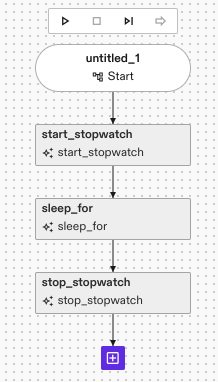
Set the Timeout parameter of the sleep_for skill to five seconds.

Run this command to view view the logs from your service.
inctl logs --follow --service stopwatch_service --org $INTRINSIC_ORGANIZATION
Run the process. You should see logs from the service like the following:
INFO:root:Starting Stopwatch service on port: 9090
INFO:root:--------------------------------
INFO:root:-- Stopwatch service listening on port 9090
INFO:root:--------------------------------
INFO:root:Starting stopwatch 28752.913811547
INFO:root:Stopping stopwatch 5.0543031329980295
Remove your service
As you make changes to your service you will need to remove and re-add it to your solution. This is done in two parts:
- Delete the service instance
- Uninstall the service
Delete the service instance
Use the command inctl service delete to delete an instance of your service.
You must give it the same service instance name that you gave to the inctl service add command, which in this case is stopwatch_service.
inctl service delete stopwatch_service --org $INTRINSIC_ORGANIZATION
You should see output like the following:
$ inctl service delete stopwatch_service --org $INTRINSIC_ORGANIZATION
2024/06/25 19:59:24 Requesting deletion of "stopwatch_service"
2024/06/25 19:59:25 Awaiting completion of the delete operation
2024/06/25 19:59:25 Deleted service "stopwatch_service"
Uninstall the service
Use the command inctl asset uninstall to uninstall a version of your service from your solution.
Run the following command
inctl asset uninstall $MY_INSTALLED_SERVICE --org $INTRINSIC_ORGANIZATION
You should see output like the following:
$ inctl asset uninstall $MY_INSTALLED_SERVICE --org $INTRINSIC_ORGANIZATION
2024/12/16 21:58:52 Awaiting completion of the removal
2024/12/16 21:58:52 Finished uninstalling "com.example.stopwatch_service"