Make controllable contact
This page provides an overview of how to use the move_to_contact skill to
bring a frame on the robot to a contact with the environment.
Setting the Frame and Motion Direction
The user starts by specifying the tool frame for which motion and forces are being commanded.
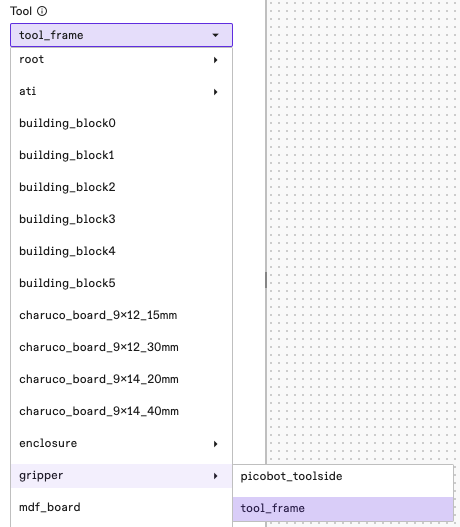
The user can then continue by specifying the motion direction that tool frame
moves by specifying the fixed_vector or target. Here is what specifiying the fixed vector might look like:
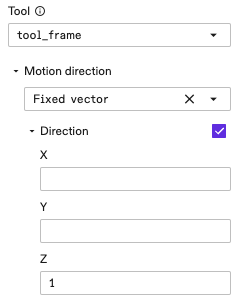
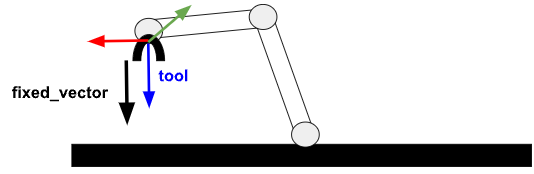
In the preceding parameter selection example, the user specifies that the robot is moving in the direction of the z-axis of the tool frame, as illustrated below.
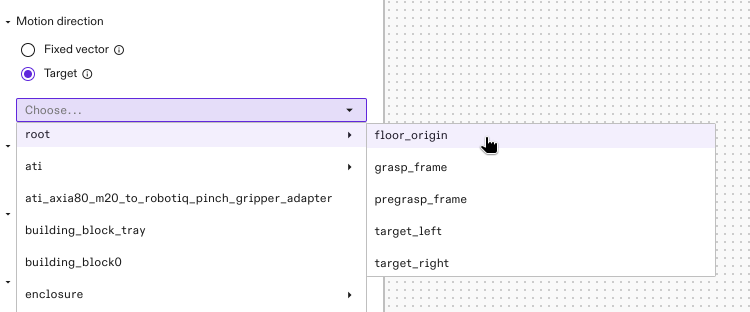
Here is what specifying the target might look like:
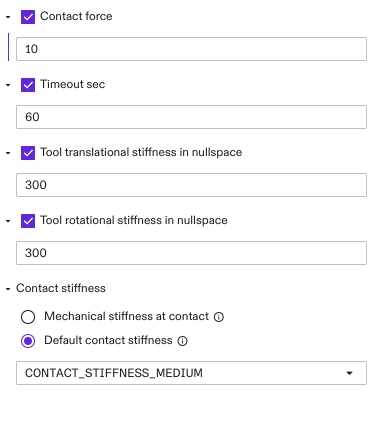
Other parameters that the user needs to set for the move_to_contact skill
are as follows.
-
Contact force: Defines how much interaction force (in Newton) that the robot maintains when the specified tool frame has made a contact with the environment.
-
Timeout sec: Defines the duration (in seconds) starting at the beginning of the skill execution, beyond which the skill terminates with a timeout error.
-
Tool translational stiffness in nullspace: Defines the translational stiffness in directions perpendicular to the motion direction. In other words, this parameter defines the translational compliance in directions perpendicular to the motion direction; the bigger this value the more stiff and the less compliant the robot is in these directions.
-
Tool rotational stiffness in nullspace: Defines the rotational stiffness in directions perpendicular to the motion direction. In other words, this parameter defines the rotational compliance in directions perpendicular to the motion direction; the bigger this value the more stiff and the less compliant the robot is in these directions.
-
Contact stiffness: Defined as
Mechanical stiffness at contactorDefault contact stiffness. See below: -
Default contact stiffness: Predifined stiffness values which should handle most applications.
-
Mechanical stiffness at contact: The value that needs to be specified or tuned to approximate the stiffness in the interface between the robot and the environment. For example, the presence of a mechanical compliance device on the arm's end-of-arm-tooling (EOAT), or a soft surface on which the tool is making contact should be modeled here. Typically in the range between 50,000 and 200,000. This value needs to be tuned especially if the user observes oscillations when the tool is making contact with the environment. The bigger this value, the smaller the oscillation should be, but the slower the system response. A good way to tune this, is to start with a low value, and then incrementally increase the value until the oscillation disappears.