Propose grasps via segmentation
The skill segment_and_propose_grasps proposes top N grasp poses, but does not
execute the grasps.
The segment_and_propose_grasps skill performs model-free grasping by
segmenting a point cloud into graspable surfaces and proposing suction grasp
poses. Unlike traditional grasping skills that require object meshes or trained
perception models, this skill works directly with raw point cloud data to handle
unknown objects in cluttered or non-cluttered scenes.
Skill workflow
The skill performs three main steps:
-
Segmentation: Divides the point cloud into smooth surface regions.
-
Plane fitting: Fits one plane to each segmented region.
-
Grasp selection: Scores and selects the best grasp poses.
Usage example
-
Add the skills needed to acquire a point cloud, e.g. the
estimate_point_cloudskill. Refer to https://flowstate.intrinsic.ai/docs/skill_guides/perception/estimate_point_cloud for more information on how to set upestimate_point_cloud. -
Add the skill
segment_and_propose_grasps. -
Connect the required point_cloud input with the output of
estimate_point_cloud.
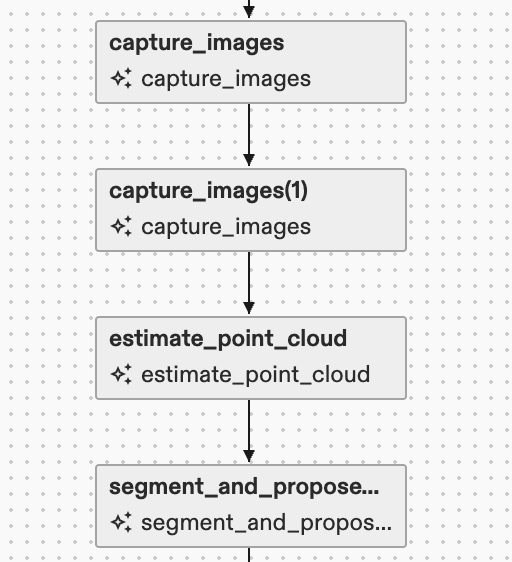
- Configure parameters based on your scene. The following is an example.
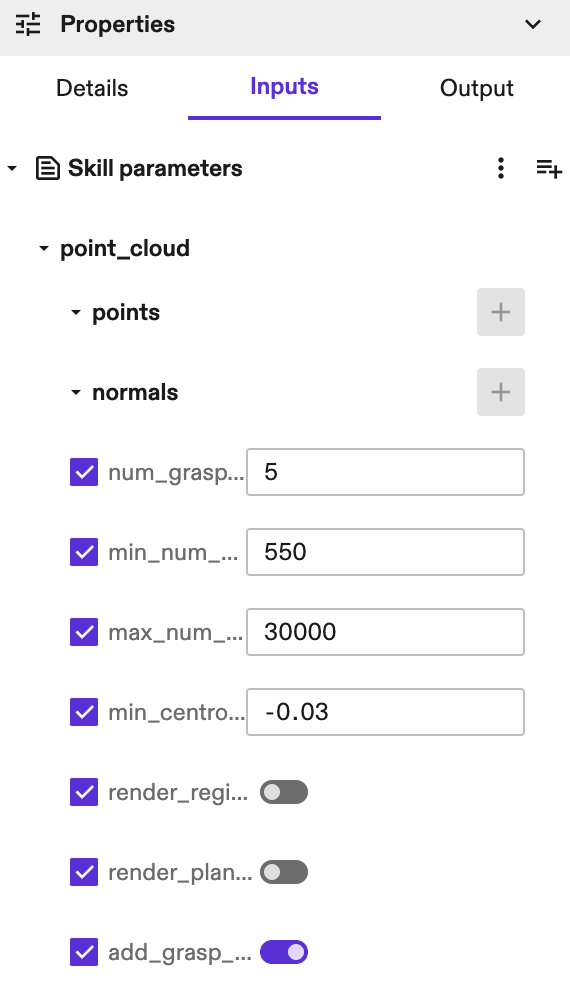
-
Use visualizations to tune parameters and verify segmentation quality. Refer to the
Parameter tuning guidesection below for more information. -
Execute the skill and use the output grasp poses with execution skills like
move_robot,control_suction_gripper, etc..
Parameter tuning guide
Proper parameter tuning is crucial for good performance. Follow the following 3-step tuning process.
Step 1: Segmentation tuning
Goal: Achieve proper segmentation where each smooth surface is one region, with no over-segmentation (breaking one surface into multiple regions) or under-segmentation (merging separate surfaces).
Visualization: Set render_regions_in_world=True to see segmentation results.
Parameters to tune:
normal_estimation_radius (default: 0.0035m)
Too small: Normals become noisy → over-segmentation
Too large: Normals oversmoothed → under-segmentation
Tuning: Start with default, increase if over-segmented, decrease if under-segmented
smoothness_threshold_radians (default: 0.035)
Too small: Over-segmentation (strict merging)
Too large: Under-segmentation (loose merging)
Tuning: Increase if surfaces are broken up, decrease if separate surfaces merge
curvature_threshold (default: 0.8)
Too small: Over-segmentation (splits at small curvature changes)
Too large: Under-segmentation (ignores important curvature boundaries)
Tuning: Decrease if missing important edges, increase if splitting smooth surfaces
number_of_neighbours (default: 20)
Too small: Unstable region growing
Too large: Slower computation
Tuning: Adjust if region boundaries are inconsistent
Step 2: Plane fitting tuning
Goal: Ensure each segmented region is properly fitted with a plane.
Visualization: Set render_planes_in_world=True to see plane fitting results.
Parameters to tune:
distance_threshold (default: 0.005m)
Too small: May miss valid plane points
Too large: May include outlier points
Tuning: Increase if planes are incomplete, decrease if planes include outliers
Step 3: Grasp selection tuning
Goal: Select the most reliable grasp poses.
Visualization: Set add_grasp_pose_frames_in_world=True to see proposed grasps.
Parameters to tune:
min_num_points (default: 100)
Too small: May include noise planes
Too large: May miss small valid planes
Tuning: Decrease if missing small objects, increase if getting noisy planes
max_num_points (default: 5000)
Too small: May miss large valid planes
Too large: May include environment surfaces
Tuning: Increase if missing large objects, decrease if including table/background
min_centroid_height
Filters grasps below this height
Tuning: Set to just above your table/worksurface height
z_offset_in_meters
Adjusts grasp depth
Tuning: Positive values move grasp deeper into object
Troubleshooting
Problem: Over-segmentation (too many small regions)
Solution: Increase normal_estimation_radius, increase smoothness_threshold_radians, or decrease curvature_threshold
Problem: Under-segmentation (merged surfaces)
Solution: Decrease normal_estimation_radius, decrease smoothness_threshold_radians, or increase curvature_threshold
Problem: Missing small objects
Solution: Decrease min_region_size and min_num_points
Problem: Including environment/table
Solution: Set appropriate min_centroid_height, decrease max_num_points
Problem: Long runtime
Solution: Increase normal_estimation_radius, increase min_region_size
Best practices
-
Start with default parameters.
-
First tune segmentation (Step 1) using region visualization.
-
Then tune plane fitting (Step 2) using plane visualization.
-
Finally adjust grasp selection (Step 3).
-
For complex scenes, begin tuning with simpler, uncluttered scenes.