Save and load motions
This page provides an overview of how to save and load planned motions through the move_robot skill.
Example
Consider the following scenario. A user tries a robot motion from pose A to pose B in a pick and place application.
The user specified the desired parameters for the move_robot skill and runs the motion in a simulated environment.
Once the user is satisfied with the robot motion, they want to "lock" this motion so the robot will follow the same
trajectory regardless of changes in the environment while still guaranteeing its safety.
In this case, the user can save this motion under an ID. Later the user can load the motion using the ID and run it
on the real robot hardware.
Moreover, when loading a motion, the user can optionally choose a subset of motion segments to replan instead of replaying
the loaded motion.
How to save a motion
This section assumes the user has already configured a move_robot skill and the skill can be successfully executed.
To save the motion:
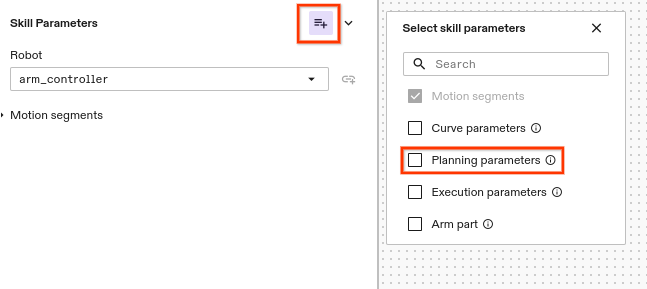
- Enable the Planning parameters in the optional parameter menu
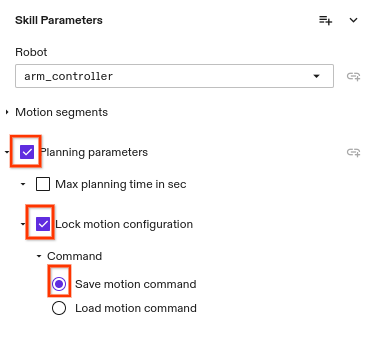
- Select Planning parameters >> Lock motion configuration >> Save motion command
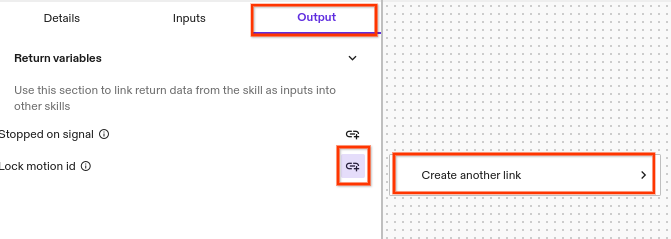
- The skill will output the saved motion ID through its output variables. Select Output >> Add Link under Lock motion id
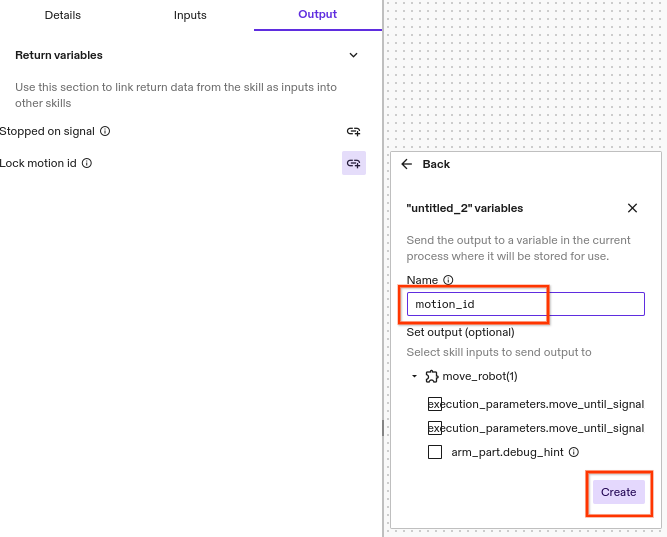
- Set any desired name and click Create
- After the skill is executed, the ID can be retrieved from the Variables tab.

The output saved motion ID changes every time the skill is executed.
Make sure to copy the full value of the motion ID for retrieval later.
How to load a motion
This section assumes the user has this section assumes the user has already configured a move_robot skill and
used it to save a motion and copied its motion ID. To load the saved motion:
- In the same skill, select Planning parameters >> Lock motion configuration >> Load motion command and fill the Motion id.
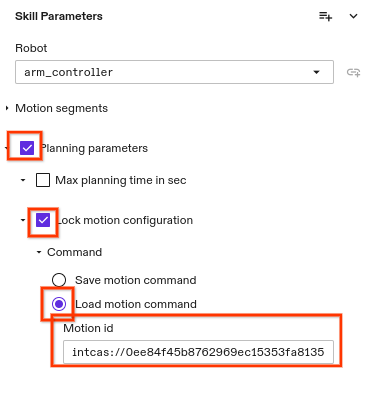
- Executing the skill will load and execute the saved motion if it is valid and safe.
How to load a motion and replan a subset of motion segments
In Step 1 above, add and specify one or more segments to replan during loading.
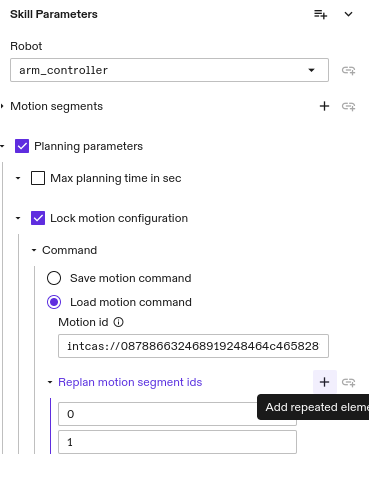
The motion segment marked for replan can have different a motion target from when it was saved.
Error message explanations
Message: Cannot load motion since motion_id is not specified
This error message means the Motion id is not provided in Load motion command.
Message: Cannot load motion. No motion is saved with ID XXX
This error message means the filled Motion id does not exist. Make sure the full content of the saved motion ID is copied. The ID should not include any spaces.
Message: The motion segment id X in replan_motion_segment_ids is greater or equal to the number of motion segments X in the motion specification
This error message means at least one Replan motion segment ids is larger than the total number of motion segments. The segment id should start with 0.
Message: Cannot load motion. The motion saved with the given ID does not match the given request
This error message could be due to any of the following reasons:
- This means the skill used to load the motion does no have the same parameter values as when the motion was saved
- This means the robot does not start at the same joint configurations as when the motion was saved
- This means the poses of motion targets are not the same as when the motion was saved
Message: Cannot load motion. The motion saved with the given ID is not in limits or collision free
This error message means replaying the saved motion would result in collision or robot out of limits.