Connect to ROS in a Skill
The Robotics Operating System (ROS) is an open source robotics middleware that is used in the robotics industry. This guide shows you how to connect a Flowstate skill with ROS-based software. Once you implement this skill, you skill can interact with ROS-based services
Prerequisites
This guide assumes the reader is familiar with the following topics:
Install prerequisite software
You must have Docker Engine installed outside of the dev container. If you have used the dev container before, then you likely already have this installed.
You must install ROS on your machine. While this guide is not distribution-specific, it is recommend to use ROS Jazzy in order to get the latest long term support (LTS) version.
Why create a skill with ROS
ROS is an open source middleware that is frequenty found when building complex robotics applications. There primary reasons to create a ROS-enabled skill in Flowstate are:
- Bridging existing systems: If you have pre-existing ROS-based systems or components, creating ROS-based skills and services provides a seamless bridge for integrating them into the Intrinsic platform.
- Familiarity and Productivity: For developers already proficient in ROS, this approach offers a familiar environment and toolset, accelerating development and reducing the learning curve.
- Leveraging the existing ROS ecosystem: There is a substantial repository of algorithms, drivers, and tools. Building upon this foundation saves significant devleopment time and effort, freeing the developer to focus on application-specific logic.
- Future-Proofing and Flexibility: Creating ROS-based skills provides a potential migration path for gradually transitioning exsting ROS-heavy applications into the Intrinsic platform.
Overview
The Create your First Skill guide taught you how to create skills via the Intrinsic SDK's bazel rules. This guide supplements that by showing you how to build a skill with ROS's CMake-based buildsystem for those who are more familiar with that tooling.
In a ROS system, components with similar functionality are grouped into nodes. These nodes communicate with each other via a publish-subscribe mechanism called topics, a remote-procedure call (RPC) mechanism called services, and a more sophisticated RPC mechanism called actions. These topics, services and actions form the API of a node. When integrating ROS with Flowstate, ROS nodes can be integrated as platform services, and then used from skills by using the topics, services and actions. The guide covers creating a basic ROS node that publishes messages on a ROS topic, which can be subscribed to from a ROS node inside a platform service, created in this guide.
Create a ROS node
The first step is to create a ROS node that can be used in the platform. In this case, we will implement a simple "talker" node that will publish to a topic when that skill is executed in the process. To begin with, we will implement the ROS specific portions of the node.
Create the ROS workspace
After ROS has been installed as outlined in the prerequisites section, the next step is to create a workspace to contain the SDK and ROS code.
First create a folder and clone the Intrinsic SDK:
source /opt/ros/jazzy/setup.bash
mkdir -p ~/flowstate_ws/src
cd ~/flowstate_ws/src
git clone https://github.com/intrinsic-ai/sdk-ros
Install the necessary dependencies of the Intrinsic SDK:
rosdep install --from-paths ~/flowstate_ws/src -ri
Create a ROS package
Then create a package to contain the node implementation:
source /opt/ros/jazzy/setup.bash
ros2 pkg create --build-type ament_cmake --license Apache-2.0 sdk_examples_ros_skills --dependencies intrinsic_sdk_ros rclcpp std_msgs
Your terminal will return a message verifying that the package was correctly created along with all necessary files and folders.
Write the publisher node
The following code will create a ROS 2 C++ node named minimal_publisher with a single publisher on the topic topic.
The Publish method publishes a single message on the topic topic with the message argument when called.
Create the directory that the talker skill will reside in:
mkdir ~/flowstate_ws/src/sdk_examples_ros_skills/src/talker_skill
Create a new file called minimal_publisher.hpp in the talker_skill directory and put the following into it:
// src/talker_skill/minimal_publisher.hpp
#ifndef MINIMAL_PUBLISHER_HPP_
#define MINIMAL_PUBLISHER_HPP_

#include <memory>

#include "rclcpp/rclcpp.hpp"
#include "std_msgs/msg/string.hpp"

class MinimalPublisher: public rclcpp::Node
{
  public:
    MinimalPublisher();
    void Publish(const std::string & message);

  private:
    rclcpp::Publisher<std_msgs::msg::String>::SharedPtr publisher_;
    rclcpp::TimerBase::SharedPtr timer_;
};

#endif  // MINIMAL_PUBLISHER_HPP_
Create a new file called minimal_publisher.cpp in the talker_skill directory and put the following into it:
// src/talker_skill/minimal_publisher.cpp
#include "minimal_publisher.hpp"

MinimalPublisher::MinimalPublisher()
: rclcpp::Node("minimal_publisher")
{
  publisher_ = this->create_publisher<std_msgs::msg::String>("chatter", 10);
  timer_ = this->create_wall_timer(
      std::chrono::seconds(1), [this](){ this->Publish("Heartbeat");});
}

void MinimalPublisher::Publish(const std::string & message)
{
  auto ros_message = std_msgs::msg::String();
  ros_message.data = message;
  RCLCPP_INFO(this->get_logger(), "Publishing: '%s'", ros_message.data.c_str());
  publisher_->publish(ros_message);
}
Add a ROS main function
To test that the node works as expected, add a basic main function by creating the file src/talker_skill/talker_skill_main.cpp and adding the following content:
// src/talker_skill/talker_skill_main.cpp

#include "minimal_publisher.hpp"
#include "rclcpp/rclcpp.hpp"

int main(int argc, char * argv[])
{
  rclcpp::init(argc, argv);
  rclcpp::spin(std::make_shared<MinimalPublisher>());
  rclcpp::shutdown();
}
Compile the ROS node
Create a CMakeLists.txt file in src/talker_skill/ and add the following content:
# src/talker_skill/CMakeLists.txt
add_executable(talker_skill_main
  talker_skill_main.cpp
  minimal_publisher.cpp
)

target_link_libraries(
  talker_skill_main
  rclcpp::rclcpp
  ${std_msgs_TARGETS}
)

# Install the talker_skill
install(
  TARGETS talker_skill_main
  DESTINATION lib/${PROJECT_NAME}
)
Modify the root CMakeLists.txt file to add the add_subdirectory call directly below the find_package calls.
# Root CMakeLists.txt
cmake_minimum_required(VERSION 3.8)
project(talker_skill)

if(CMAKE_COMPILER_IS_GNUCXX OR CMAKE_CXX_COMPILER_ID MATCHES "Clang")
  add_compile_options(-Wall -Wextra -Wpedantic)
endif()

# find dependencies
find_package(ament_cmake REQUIRED)
find_package(rclcpp REQUIRED)
find_package(std_msgs REQUIRED)

add_subdirectory(src/talker_skill)

if(BUILD_TESTING)
  find_package(ament_lint_auto REQUIRED)
  ament_lint_auto_find_test_dependencies()
endif()

ament_package()
Build the node with the following command:
cd ~/flowstate_ws
colcon build --packages-up-to sdk_examples_ros_skills --cmake-args -DCMAKE_C_COMPILER=/usr/bin/clang-19 -DCMAKE_CXX_COMPILER=/usr/bin/clang++-19
Running the node locally
In a new terminal, start the skill node:
source ~/flowstate_ws/install/setup.bash
ros2 run sdk_examples_ros_skills talker_skill_main
On a second terminal, echo published messages to the console:
source ~/flowstate_ws/install/setup.bash
ros2 topic echo /chatter
You should see this in the first terminal:
$ ros2 run sdk_examples_ros_skills talker_skill_main
[INFO] [1725047609.532789502] [minimal_publisher]: Publishing: 'Heartbeat'
[INFO] [1725047610.532788681] [minimal_publisher]: Publishing: 'Heartbeat'
[INFO] [1725047611.532793810] [minimal_publisher]: Publishing: 'Heartbeat'
[INFO] [1725047612.532799089] [minimal_publisher]: Publishing: 'Heartbeat'
You should see this in the second terminal:
$ ros2 topic echo /chatter
data: Heartbeat
---
data: Heartbeat
---
Setup the Flowstate skill
Add support files
Now modify the ROS node to work in the Flowstate platform.
Create src/talker_skill/talker_skill.proto, the Protocol Buffers messages for your skill's parameters and return type:
// talker_skill/talker_skill.proto
syntax = "proto3";

package com.example;

message TalkerSkillParams {
  // Service to call
  string message = 1;
}

message TalkerSkillResult {
}
Create src/talker_skill/talker_skill.manifest.textproto, the metadata needed by Flowstate to run your skill:
# proto-file: https://github.com/intrinsic-ai/sdk/blob/main/intrinsic/assets/services/proto/service_manifest.proto
# proto-message: intrinsic_proto.services.ServiceManifest

id {
  package: "com.example"
  name: "talker_skill"
}
display_name: "Simple ROS Talker"
vendor {
  display_name: "Intrinsic ROS Example"
}
documentation {
  description: "Skill that contains a ROS publisher."
}
options {
  supports_cancellation: true
  cc_config {
    create_skill: "::talker_skill::TalkerSkill::CreateSkill"
  }
}
dependencies {
}
parameter {
  message_full_name: "com.example.TalkerSkillParams"
}
return_type {
  message_full_name: "com.example.TalkerSkillResult"
}
Add the skill functionality
Create the C++ files to manage a Flowstate skill and connect that functionality to the ROS node.
First, create the header src/talker_skill/talker_skill.hpp and add the following content:
// src/talker_skill/talker_skill.hpp
#ifndef TALKER_SKILL_HPP_
#define TALKER_SKILL_HPP_

#include <memory>
#include <string>

#include "absl/status/statusor.h"
#include "intrinsic/skills/cc/skill_interface.h"
#include "intrinsic/skills/proto/skill_service.pb.h"
#include "minimal_publisher.hpp"

class TalkerSkill final : public intrinsic::skills::SkillInterface {
 public:
  // Factory method to create an instance of the skill.
  static std::unique_ptr<intrinsic::skills::SkillInterface> CreateSkill();

  // Called once each time the skill is executed in a process.
  absl::StatusOr<std::unique_ptr<google::protobuf::Message>>
  Execute(const intrinsic::skills::ExecuteRequest& request,
          intrinsic::skills::ExecuteContext& context) override;

 private:
  MinimalPublisher minimal_publisher_node_;
};

#endif  // TALKER_SKILL_HPP_
Then create the implementation src/talker_skill/talker_skill.cpp and add the following content:
// src/talker_skill/talker_skill.cpp

#include "talker_skill.hpp"
#include "talker_skill.pb.h"

#include <memory>

#include <rclcpp/node_options.hpp>
#include <rclcpp/node.hpp>
#include <rclcpp/rclcpp.hpp>

#include "absl/log/log.h"
#include "absl/status/status.h"
#include "absl/status/statusor.h"
#include "absl/synchronization/notification.h"
#include "intrinsic/skills/cc/skill_utils.h"
#include "intrinsic/skills/proto/skill_service.pb.h"
#include "intrinsic/util/status/status_conversion_grpc.h"
#include "intrinsic/util/status/status_macros.h"

using ::com::example::TalkerSkillParams;
using ::com::example::TalkerSkillResult;

// -----------------------------------------------------------------------------
// Skill signature.
// -----------------------------------------------------------------------------

std::unique_ptr<intrinsic::skills::SkillInterface> TalkerSkill::CreateSkill() {
  return std::make_unique<TalkerSkill>();
}

// -----------------------------------------------------------------------------
// Skill execution.
// -----------------------------------------------------------------------------

absl::StatusOr<std::unique_ptr<google::protobuf::Message>> TalkerSkill::Execute(
    const intrinsic::skills::ExecuteRequest& request,
    intrinsic::skills::ExecuteContext& context) {

  // Get parameters.
  INTR_ASSIGN_OR_RETURN(
    auto params, request.params<TalkerSkillParams>());

  minimal_publisher_node_.Publish(params.message());

  auto result = std::make_unique<TalkerSkillResult>();
  return result;
}
Replace the content of CMakeLists.txt in the talker_skill directory with the following:
add_library(
  minimal_publisher
  minimal_publisher.cpp
)

target_link_libraries(minimal_publisher
  rclcpp::rclcpp
  ${std_msgs_TARGETS}
)

# Create Intrinsic Skill
intrinsic_sdk_generate_skill(
  SKILL_NAME talker_skill
  SOURCES talker_skill.proto
  MANIFEST talker_skill.manifest.textproto
  PROTOS_TARGET talker_skill_protos
)

# Generate the main function for this skill
intrinsic_sdk_skill_main(
  SKILL_NAME talker_skill
  CREATE_SKILL_HEADER talker_skill.hpp
  CREATE_SKILL_FUNCTION "::TalkerSkill::CreateSkill"
  MAIN_FILE ${CMAKE_CURRENT_BINARY_DIR}/talker_skill_main.cpp
)

add_executable(talker_skill_main
  talker_skill.cpp
  ${CMAKE_CURRENT_BINARY_DIR}/talker_skill_main.cpp
)

target_include_directories(talker_skill_main
  PRIVATE
  ${CMAKE_CURRENT_SOURCE_DIR}
)

target_link_libraries(talker_skill_main
  intrinsic_sdk::intrinsic_sdk
  talker_skill_protos
  minimal_publisher
)

add_dependencies(talker_skill_main talker_skill_skill_config)

install(
  TARGETS talker_skill_main
  DESTINATION lib/${PROJECT_NAME}
)

install(
  FILES ${CMAKE_CURRENT_BINARY_DIR}/talker_skill_skill_config.pbbin
  DESTINATION "share/${PROJECT_NAME}"
)
Build the skill
Once the source is prepared, a skill container can be built and saved to be installed to the platform. To help with this, we provide scripts to automate the common tasks. The final container will have the skill executable as well as the ROS and Intrinsic SDK dependencies required to connect to the rest of the system.
To begin with, ensure that the docker engine is setup correctly:
cd ~/flowstate_ws
./src/sdk-ros/scripts/setup_docker.sh
This will additionally create an images directory for outputs to be stored.
Build the container by running the following command:
cd ~/flowstate_ws
./src/sdk-ros/scripts/build_container.sh \
  --skill_package sdk_examples_ros_skills \
  --skill_name talker_skill
Install your skill
After you build and save the skill container, save the address of the skill image:
export SKILL_IMAGE=~/flowstate_ws/images/talker_skill/talker_skill.tar
Find the cluster that you will install the skill into. The cluster ID can be found by looking at the URL you are viewing the solution with. For instance, if the url is https://flowstate.intrinsic.ai/content/projects/intrinsic-prod-us/uis/frontend/clusters/vmp-8d29-alkff04p, then, the cluster would be:
export INTRINSIC_CLUSTER=vmp-8d29-alkff04p
Run the following command to install the skill into your solution.
inctl asset install $SKILL_IMAGE --org $INTRINSIC_ORGANIZATION --cluster $INTRINSIC_CLUSTER
Once the skill installation is successful, you should see output similar to:
writing image "direct.upload.local/skill-ai--intrinsic--sdk-examples-ros-skills--talker-skill@sha256:b7f840d90e38b462ac4730e7d82604b9c4a3c5c084f8041cfa8d45b22a272023"
finished writing image "direct.upload.local/skill-ai--intrinsic--sdk-examples-ros-skills--talker-skill@sha256:b7f840d90e38b462ac4730e7d82604b9c4a3c5c084f8041cfa8d45b22a272023"
2024/08/30 15:02:41 Installing skill "ai.intrinsic.sdk_examples_ros_skills.talker_skill.0.0.1+8ffdc5f8-f011-4b45-bf57-03d84e26712b"
2024/08/30 15:02:42 Finished installing, skill container is now starting
2024/08/30 15:02:42 Waiting for the skill to be available for a maximum of 180s
2024/08/30 15:02:45 The skill is now available.
Run the solution
The skill is installed, but running your solution won't execute your skill yet. To use the skill, add it to your solution's behavior tree first.
-
Open the Intrinsic VS Code extension, and click the Open solution button next to your target solution
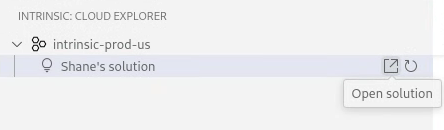
This opens a browser window to Flowstate.
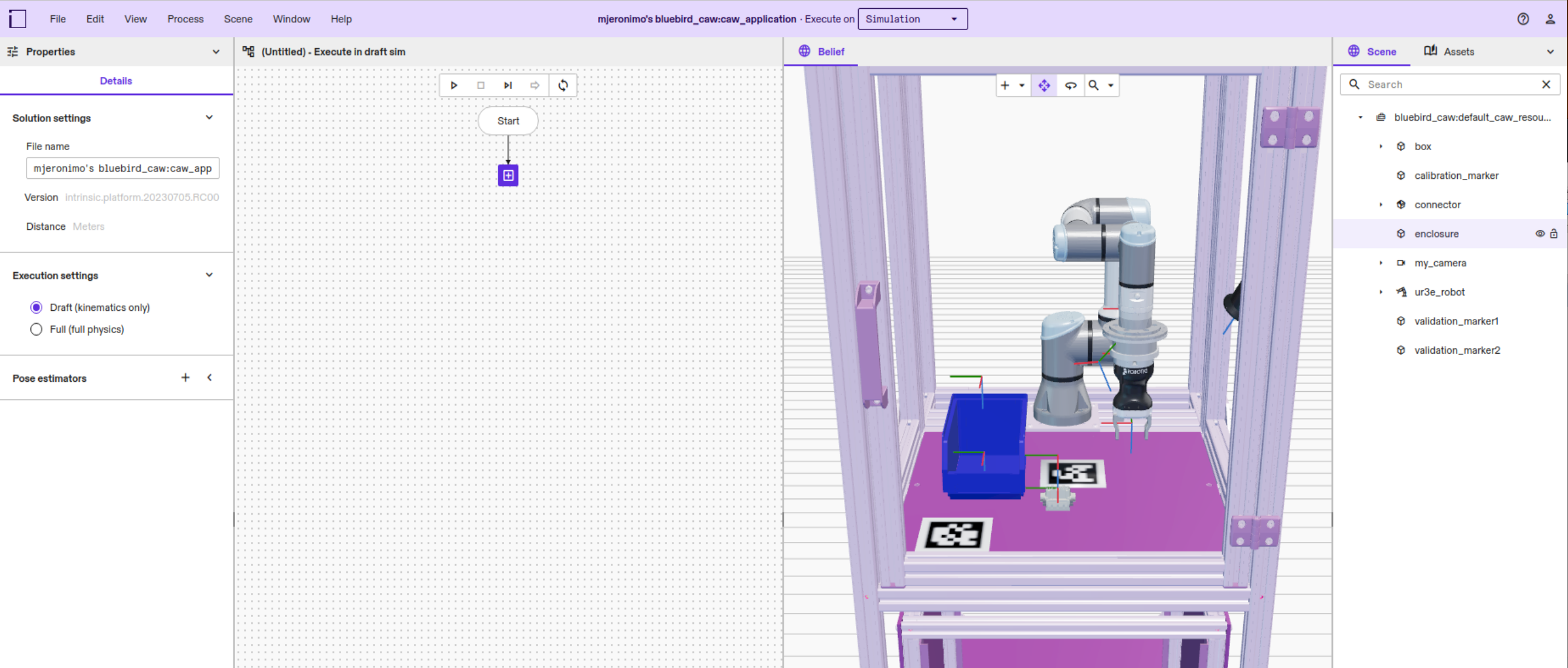
-
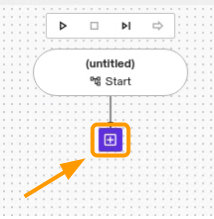
Click the + icon in the Process Editor.
-
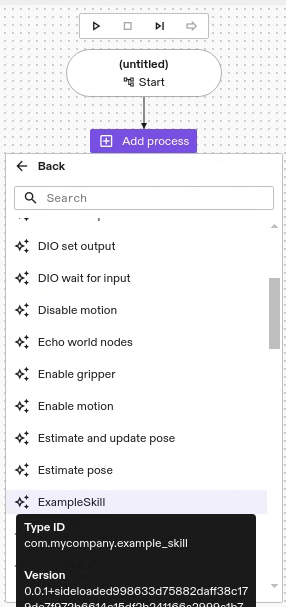
Click Skills | ExampleSkill to add your skill to the behavior tree.
-
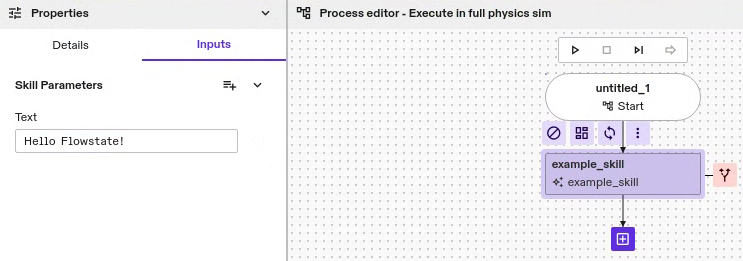
Select your skill in the Process Editor, then click the Inputs tab. Put some text in the Text input.
-
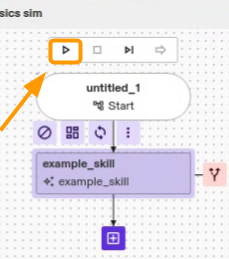
Click the Run process button in the Process Editor.
Connect with other ROS services
Once you have created a ROS-based skill, you can now interact with other ROS-based services in the platform.
To learn more about debugging ROS-based skills and services, follow the Use Flowstate with ROS guide.
To get started building a ROS-based service, follow the Create a ROS-based service guide.