Service inspection
Service Assets can provide runtime information for inspection and debugging, such as connection state or an event history. Each Service can declare whether it provides this information. If it does, it is assigned a Pub/Sub topic.
To inspect this data, Flowstate provides a generic UI, as described below.
SDK users can subscribe to service inspection topics to inspect running Services from custom HMIs, or they can provide inspection data from their own custom Services.
Service Inspector
To open the Service Inspector UI, navigate to File | Service Manager. In the Service Manager UI, each Service row has a button to open the Service Inspector for that specific Service. If a Service does not support Service inspection, this button is disabled.
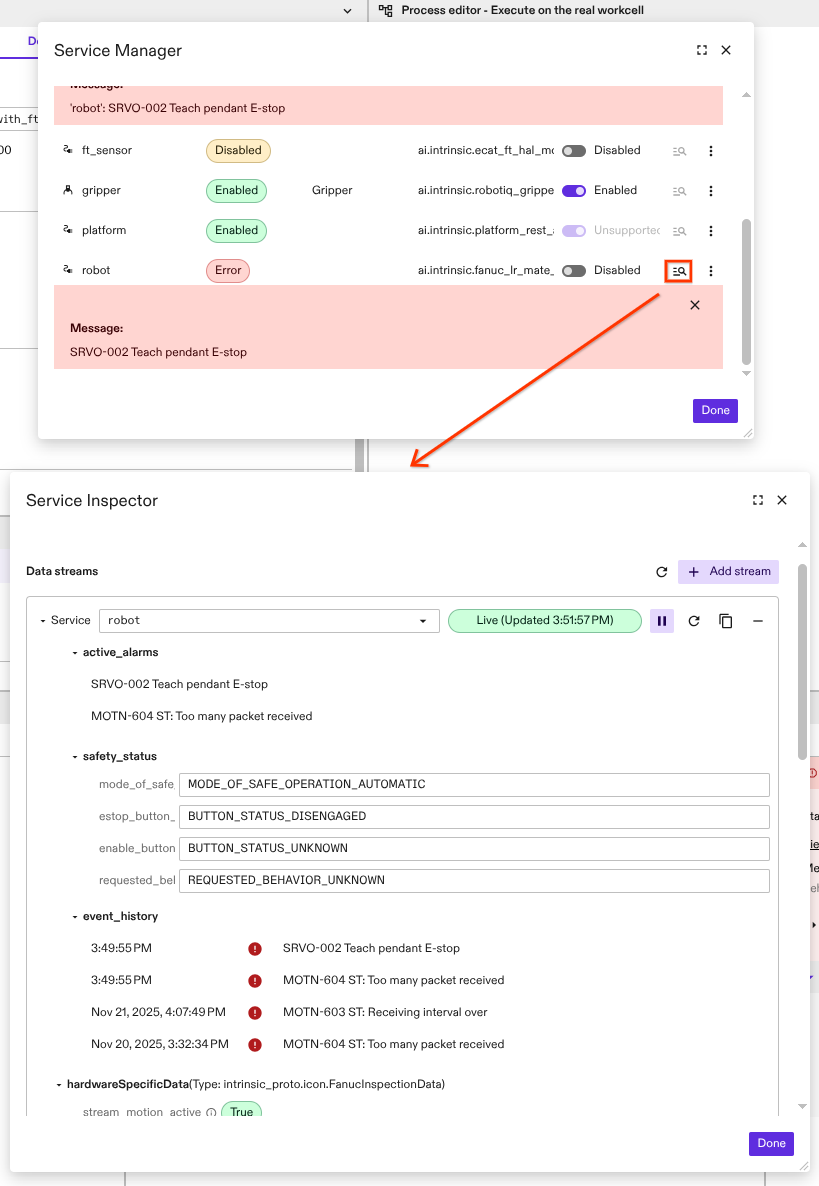
Service Inspector feature overview
- Discover Services that provide inspection data
- Display live Service inspection data using WebRTC
- View data from multiple Services in a single dialog
- Copy the displayed data in textproto format
- Check the health status of the displayed data
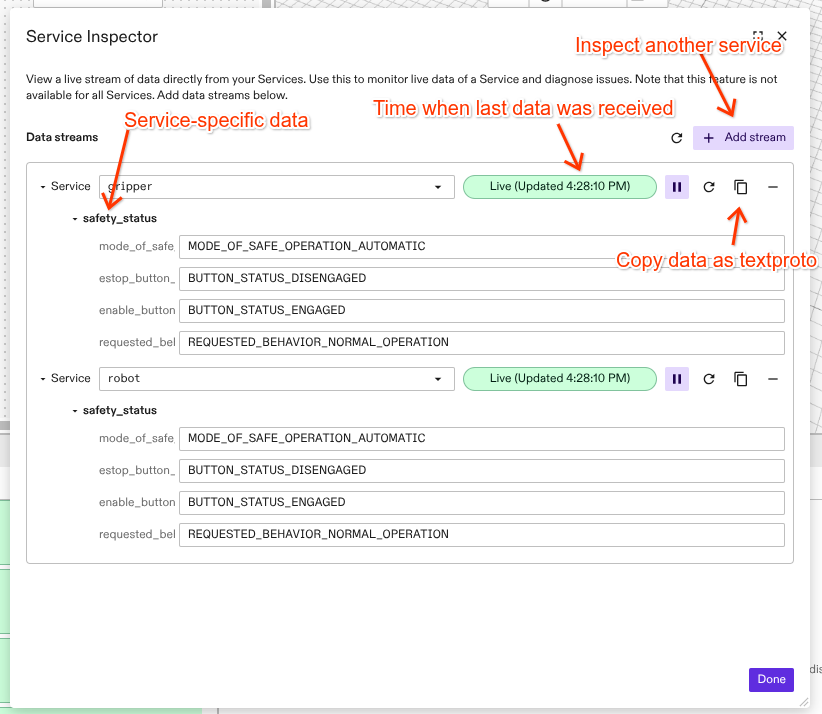
Provide Service inspection data
Services can publish inspection data to a specific topic. This requires two steps:
- Declaration in the Service manifest and Bazel rule
- Publishing data in the Service implementation
Declaration in Service manifest and Bazel rule
To enable Service inspection, the Service must declare the specific protobuf message type used in the data field of ServiceInspectionData (proto definition on github). This declaration is added directly to the Service manifest's service_def field. (proto definition on github).
To enable Service inspection, the Service must declare the specific protobuf message type used in the data field of ServiceInspectionData. This declaration is added directly to the Service manifest's service_def field.
For example:
service_def: {
  service_inspection_config {
    data_proto_message_full_name: "intrinsic_proto.icon.v1.HardwareModuleInspectionData"
  }
}
Additionally, all protobuf messages used in the published protobuf message must be declared as the protobuf-bazel target in the deps field of the intrinsic_service Bazel rule. This step is important because subscribers will be unable to decode the published data otherwise.
For example:
intrinsic_service(
  name = "my_service",
  # ...
  deps = [
    # Also export the base proto type.
    "@ai_intrinsic_sdks//intrinsic/assets/services/proto/v1:service_inspection_proto",
    ":my_service_inspection_proto",
  ],
)
Implementation
Services can query the topic name using intrinsic_proto.config.RuntimeContext.service_inspection_topic, which is provided to each Service at runtime through the runtime context.
The published data (via Pub/Sub) needs to have the type intrinsic_proto.services.v1.ServiceInspectionData.
Inside of the ServiceInspectionData, the Service can provide the declared custom protobuf message type in the google.protobuf.Any field named data.
Guidelines for Service inspection data publishing:
- The published data should not be used as a communication channel to another Service. It should just provide insight for a user into the current state of a Service.
- The published data should contain data that is only available while the Service is running, such as Service quality metrics, an event history, camera FPS etc. (e.g., not configuration data).
- Publish the data at ~1-3 Hz. This feature is not intended for high-frequency sensor data.
- Do not publish large protobuf messages such as images.
Inspect running Services using the SDK
Subscribers (e.g. HMIs) can use intrinsic_proto.resources.ResourceInstance.service_inspection_topic from the ResourceRegistry (proto definition on github) to query which Service provides Service inspection. If the topic name is not empty, the Service provides Service inspection.
This topic name can then be used to subscribe to the topic.
Since the topic contains custom protobuf messages, the protobuf FileDescriptorSet is needed to decode the received data.
It is possible to retrieve these file descriptors of an asset using the intrinsic_proto.resources.ResourceInstance.type_id and the ProtoRegistry(proto definition on github)(Note: This requires that the authors of the Services added the protobuf definitions to the intrinsic_service bazel rule, as described above).
In the following Python snippet, inside a Service we get the FileDescriptorSet from the ProtoRegistry and convert a protobuf Any message to JSON. PubSub subscription is omitted in the following example for brevity. See Pub/Sub to learn how to subscribe to a topic.
from intrinsic.proto_tools.proto import proto_registry_pb2
from intrinsic.proto_tools.proto import proto_registry_pb2_grpc
from intrinsic.resources.proto import resource_registry_pb2_grpc
from intrinsic.resources.proto import resource_registry_pb2
from google.protobuf import json_format
import grpc

_GRPC_INGRESS_ADDRESS = 'istio-ingressgateway.app-ingress.svc.cluster.local:80'

def get_asset_instance_descriptor_pool(instance_name: str) -> descriptor_pool.DescriptorPool:
  channel = grpc.insecure_channel(_GRPC_INGRESS_ADDRESS)
  grpc.channel_ready_future(channel).result(timeout=10)
  proto_registry = proto_registry_pb2_grpc.ProtoRegistryStub(channel)
  resource_registry = resource_registry_pb2_grpc.ResourceRegistryStub(channel)

  res_response = resource_registry.GetResourceInstance(
    resource_registry_pb2.GetResourceInstanceRequest(name=instance_name))

  request = proto_registry_pb2.GetNamedFileDescriptorSetRequest(
    asset_id=res_response.type_id)
  response = proto_registry.GetNamedFileDescriptorSet(request)

  pool = descriptor_pool.DescriptorPool()
  for file_descriptor_proto in response.file_descriptor_set.file:
    pool.Add(file_descriptor_proto)

  return pool

def any_to_json(msg: Any, pool: ...) -> str:
  return json_format.MessageToJson(
    any_message, indent=2, descriptor_pool=pool)

any_message = get_inspection_payload(...)
pool = get_asset_instance_descriptor_pool(instance_name="robot")
json_data = any_to_json(any_message, pool)