Implement ServiceState for your Service
Prerequisites
Before you follow this guide, you must:
- Set up your development environment
- Read the Create your first service guide
- [Optional] Read about states of a Service
In this guide, we'll use Service with a capital 'S' to mean Intrinsic Service and service with a lowercase 's' will represent RPC service.
ServiceState
The System Service State service determines a Service's operational state
by monitoring the health of the kubernetes container in which it runs.
If the container is healthy and the Service is running, ServiceState provides
an optional and additional mechanism for the running Services to self-report its
state. ServiceState is implemented by Service authors and it also provides
functionality to disable the Service and clear errors related to the Service
either from the Service Manager dialog in the Flowstate Editor, or through
the inctl command line interface. This optional service can be useful for
hardware drivers, detection algorithms, and much more.
We will first define the gRPC service ServiceState and its requirements for authors, followed by a comprehensive example. The protobuf definition can be found in our SDK.
StateCode
There are 3 official states that the Service can report:
STATE_CODE_ERROR: Indicates the Service instance is in an error state. When a state is in STATE_CODE_ERROR, the Service must now allow interaction with the services that it provides.STATE_CODE_DISABLED: When a Service is disabled, it must not allow interaction with the services that it provides.STATE_CODE_ENABLED: When a Service is enabled, it allows interactions with the services that it provides.
The 4th state is STATE_CODE_UNSPECIFIED, which means the Service instance is in an unspecified state.
When this occurs, interaction with the Service's ServiceState through the Service Manager dialog is disabled since the state is unknown.
To interact with the state, it is expected that the Service instance to be in the 3 official states.
ServiceState Service
service ServiceState {
  // Returns the current state of the Service instance.
  rpc GetState(GetStateRequest)
    returns (SelfState) {}

  // Enables the running Service instance. If the state was previously in
  // STATE_CODE_ERROR, it is expected for the Enable routine to perform the
  // necessary steps to resolve the error before enabling.
  // Enabling an already enabled Service should have no effect.
  rpc Enable(EnableRequest)
    returns (EnableResponse) {}

  // Disables the running Service instance. Disabling a Service that is already
  // disabled or in an error state should have no effect since the Service
  // should not be operating and should not be servicing requests.
  rpc Disable(DisableRequest)
    returns (DisableResponse) {}
}
Requirements
GetState(): If this returnsSTATE_CODE_ERRORit is expected that the Service is not operating and not accepting external servicing requests until it's in an enabled state. Listed in theextended_statusmessage should detail what occurred and how to resolve the issue. If the return isSTATE_CODE_DISABLED, the Service is not in an error state but is also not operating (seeDisable()below for more details).Disable(): Disabling an Intrinsic Service should stop all functionality and interactions with the Service including not allowing RPC calls be made to the Service, stopping hardware interactions, and stopping any running threads.Enable(): When trying to enable an Intrinsic Service that was in aSTATE_CODE_ERROR, the Service should try to resolve any errors before re-enabling its functionality. Checking that the requirements are met and the Service is operational. If successful, the return of the nextGetState()call should beSTATE_CODE_ENABLED. If enabling the Intrinsic Service fails, the reported state from subsequent calls toGetState()should beSTATE_CODE_ERRORwith a clear explanation about how to fix the issue.
SelfState message
The SelfState message consists of:
// Contains details about the state of a Service.
message SelfState {
  // Current code of the state of the running Service instance (see above 3 official states).
  StateCode state_code = 0;

  // Optional explanation for the current Service's state, unless the Service
  // is in STATE_CODE_ERROR. When in STATE_CODE_ERROR, it is expected that
  // extended_status includes information on what and/or why the Service
  // failed and how to resolve the failure state.
  optional intrinsic_proto.status.ExtendedStatus extended_status = 1;

  enum StateCode {
    STATE_CODE_UNSPECIFIED = 0;
    STATE_CODE_ERROR = 1;
    STATE_CODE_DISABLED = 2;
    STATE_CODE_ENABLED = 3;
  }
}
Note, the ExtendedStatus proto contains several fields. The only fields that are currently supported through the Service Manager are:
title: Short one line description of the notice.timestamp: This should be the time that the notice (info or error) occurred within the author's Intrinsic Service. This should not be filled in theGetState()call since the event has already occurred, unless the event just happened.user_report: This should list the details of why theextended_statusmessage is filled out. If the Service is enabled or disabled, this could include information that could be helpful for a user to see within the Service Manager. For errors, this should include details on what occurred and how to resolve the error.
Service Manifest
When an Intrinsic Service supports ServiceState, the supports_service_state: true boolean needs to be added to the
Service manifest under the service_def field:
# proto-file: https://github.com/intrinsic-ai/sdk/blob/main/intrinsic/assets/services/proto/service_manifest.proto
# proto-message: intrinsic_proto.services.ServiceManifest
metadata {
  id {
    package: "com.example"
    name: "some_service"
  }
  vendor {
    display_name: "Intrinsic"
  }
  ...
}
service_def {
  ...
  supports_service_state: true
  ...
}
Example
In this example, we will not go over the full configuration and setup of the Intrinsic Service but the basics
for implementing ServiceState. For setting up your Intrinsic Service, please see
creating a service guide.
Let's look at the Intrinsic Service example that implements ServiceState called random_number_service,
which takes a range and generates back a random number.
After NUM_REQUESTS_BEFORE_ERROR requests, the Service sets itself to an error state to demonstrate errors in the
Service manger and that Flowstate expects the user to use the Service Manager dialog to re-enable the Service.
First, we add the supports_service_state: true field to the Service manifest under Service definition:
# proto-file: https://github.com/intrinsic-ai/sdk/blob/main/intrinsic/assets/services/proto/service_manifest.proto
# proto-message: intrinsic_proto.services.ServiceManifest
metadata {
  id {
    package: "com.example"
    name: "random_number_service"
  }
  # ...
}
service_def {
  supports_service_state: true
  # ...
}
Next, the Service must inherit from the ServiceState gRPC service:
from intrinsic.assets.services.proto.v1 import service_state_pb2 as state_proto
from intrinsic.assets.services.proto.v1 import service_state_pb2_grpc as state_grpc

class RandomNumberServicer(..., state_grpc.ServiceStateServicer):
At initialization, the internal state of your Service should be defined.
In this example, the random_number_service is enabled by default, but that is not a requirement.
def __init__(self):
    self._state = state_proto.SelfState(
        state_code=state_proto.SelfState.STATE_CODE_ENABLED,
    )
Then, we implement the three ServiceState's gRPC methods GetState(), Enable(), and Disable().
def GetState(
    self,
    request: state_proto.GetStateRequest,
    context: grpc.ServicerContext,
) -> state_proto.SelfState:
    return self._state
In this simplified example, the method directly returns the current state.
For more complex Intrinsic Service implementations, the author may want to consider incorporating other internal
validation checks before returning the reponse to ensure the state of the Service is accurate.
For example, a camera driver may want to verify that it's still connected before returning STATE_CODE_ENABLED.
def Disable(
    self,
    request: state_proto.DisableRequest,
    context: grpc.ServicerContext,
) -> state_proto.DisableResponse:
    if self._state.state_code == state_proto.SelfState.STATE_CODE_ERROR:
        raise grpc.RpcError(grpc.StatusCode.FailedPrecondition, "Cannot disable Service in error state.")
    elif self._state.state_code == state_proto.SelfState.STATE_CODE_DISABLED:
        # Already disabled, do nothing.
        return state_proto.DisableResponse()

    self._state = state_proto.SelfState(
        state_code=state_proto.SelfState.STATE_CODE_DISABLED
    )

    return state_proto.DisableResponse()
Looking closely at the logic for Disable(), a user should not call Disable() on a Service that is in STATE_CODE_ERROR.
If the Service is already Disabled, this should be a no-op, meaning nothing extra happens.
Otherwise, we set the state to STATE_CODE_DISABLED, which means any interaction with the Service
and any running threads should be stopped.
In our random_number_service example, this means requests will not be processed.
For example, if a skill requests a random number from the Service,
the skill will error since the Service is not accepting requests.
Now, let's look closely at the rules for Enable.
def Enable(
    self,
    request: state_proto.EnableRequest,
    context: grpc.ServicerContext,
) -> state_proto.EnableResponse:
    if self._state.state_code == state_proto.SelfState.STATE_CODE_ERROR:
        logging.info("Error was acknowledged, resetting request count.")
        self._curr_num_requests = 0
    elif self._state.state_code == state_proto.SelfState.STATE_CODE_ENABLED:
        # Already enabled, do nothing.
        return state_proto.EnableResponse()

    self._state = state_proto.SelfState(
        state_code=state_proto.SelfState.STATE_CODE_ENABLED,
    )

    return state_proto.EnableResponse()
When an Intrinsic Service is in a STATE_CODE_ERROR, Flowstate expects any additional procedures that are required
to get the state out of error should be done within the Enable() function.
In our simple random_number_service example, this means resetting the number of requests.
Other Services may require more indepth handling to get the Service out of error including re-initializing to a
default configuration or sending signals to hardware to restart the device.
Situations like hardware not being reachable should be clearly stated in the SelfState.extended_status message
and include instructions for the user to attempt to resolve the error.
If a Service is already enabled, then this should be a no-op.
In our random_number_service example, the Service provides a GetRandomNumber RPC:
# ... other imports
from intrinsic.util.grpc import error_handling

def GetRandomNumber(
    self,
    request: random_num_proto.RandomNumberRequest,
    context: grpc.ServicerContext,
) -> random_num_proto.RandomNumberResponse:

    if self._curr_num_requests == NUM_REQUESTS_BEFORE_ERROR:
        # This is to force an error for our example.
        timestamp = timestamp_proto.Timestamp()
        timestamp.FromDatetime(datetime.datetime.now())
        self._state = state_proto.SelfState(
            state_code=state_proto.SelfState.STATE_CODE_ERROR,
            extended_status=ext_status_proto.ExtendedStatus(
                title="An error occurred.",
                user_report=ext_status_proto.ExtendedStatus.UserReport(
                    message="We've reached the maximum number of requests. Toggle enable to reset the number of requests."
                ),
                timestamp=timestamp,
            )
        )

    if self._state.state_code is state_proto.SelfState.STATE_CODE_DISABLED:
        status = error_handling.make_grpc_status(
            code=grpc.StatusCode.FAILED_PRECONDITION,
            message='Cannot make calls to a disabled Service; use the Service manager to enable the Service.',
            details=[],
        )
        logging.error(f'Cannot make calls to a disabled Service; use the Service manager to enable the Service.')
        context.abort_with_status(status)
    elif self._state.state_code is state_proto.SelfState.STATE_CODE_ERROR:
        status = error_handling.make_grpc_status(
            code=grpc.StatusCode.FAILED_PRECONDITION,
            message="Cannot make calls to a Service in an error state; use the Service manager to acknowledge and reset the Service.",
            details=[],
        )
        logging.error(f'Cannot make calls to a Service in an error state; use the Service manager to acknowledge and reset the Service.')
        context.abort_with_status(status)

    self._curr_num_requests += 1
    result = random.randint(request.range_start, request.range_end)
    return random_num_proto.RandomNumberResponse(result=result)
In our example Service, we expect to encounter an error after NUM_REQUESTS_BEFORE_ERROR of requests are received,
which causes the SelfState.state_code to be STATE_CODE_ERROR. The details that need to be filled out in
SelfState.extended_status are shown above. This includes the title, user_report containing details on what occurred and
how to get the Service out of error, and timestamp specifying the time at which the error occurred.
When the Intrinsic Service is STATE_CODE_DISABLED or STATE_CODE_ERRORED, Flowstate expects the Service to
return a gRPC exception. In Python this can be done through context.abort_with_status as shown above and in C++
this can be done through grpc::Status(grpc::StatusCode::<status_code>, "Some error message").
Note that in Python, for a Skill to be able to extract the code and message from the exception,
use the error_handling package from intrinsic.util.grpc.
The full random_number_service example can be found in the SDK examples repository:
https://github.com/intrinsic-ai/sdk-examples/tree/main/services/random_number
And a Skill that interacts with the random_number_service can be found here:
https://github.com/intrinsic-ai/sdk-examples/tree/main/skills/get_random_number
Build and Run the Example
-
Start a blank solution from flowstate.intrinsic.ai.
-
Run the following command to clone the SDK examples in your development environment.
git clone https://github.com/intrinsic-ai/sdk-examples.git
cdinto thesdk-examplesrepository.
cd sdk-examples/
- Build the
random_number_serviceService.
bazel build //services/random_number:random_number_service
- Install the Service into the solution. If not done so already, please set the organization and solution environment variables.
inctl asset install bazel-bin/services/random_number/random_number_service.bundle.tar --org $INTRINSIC_ORGANIZATION
- Add an instance of the installed Service to the solution.
inctl service add com.example.random_number_service --name random_number_service --org $INTRINSIC_ORGANIZATION
- Build the
get_random_numberSkill.
bazel build //skills/get_random_number:get_random_number_skill
- Install the Skill into the solution.
inctl asset install bazel-bin/skills/get_random_number/get_random_number_skill.bundle.tar --org $INTRINSIC_ORGANIZATION
- In the Flowstate frontend, add the Skill to the process.
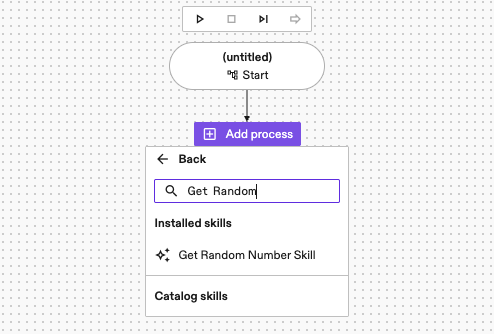
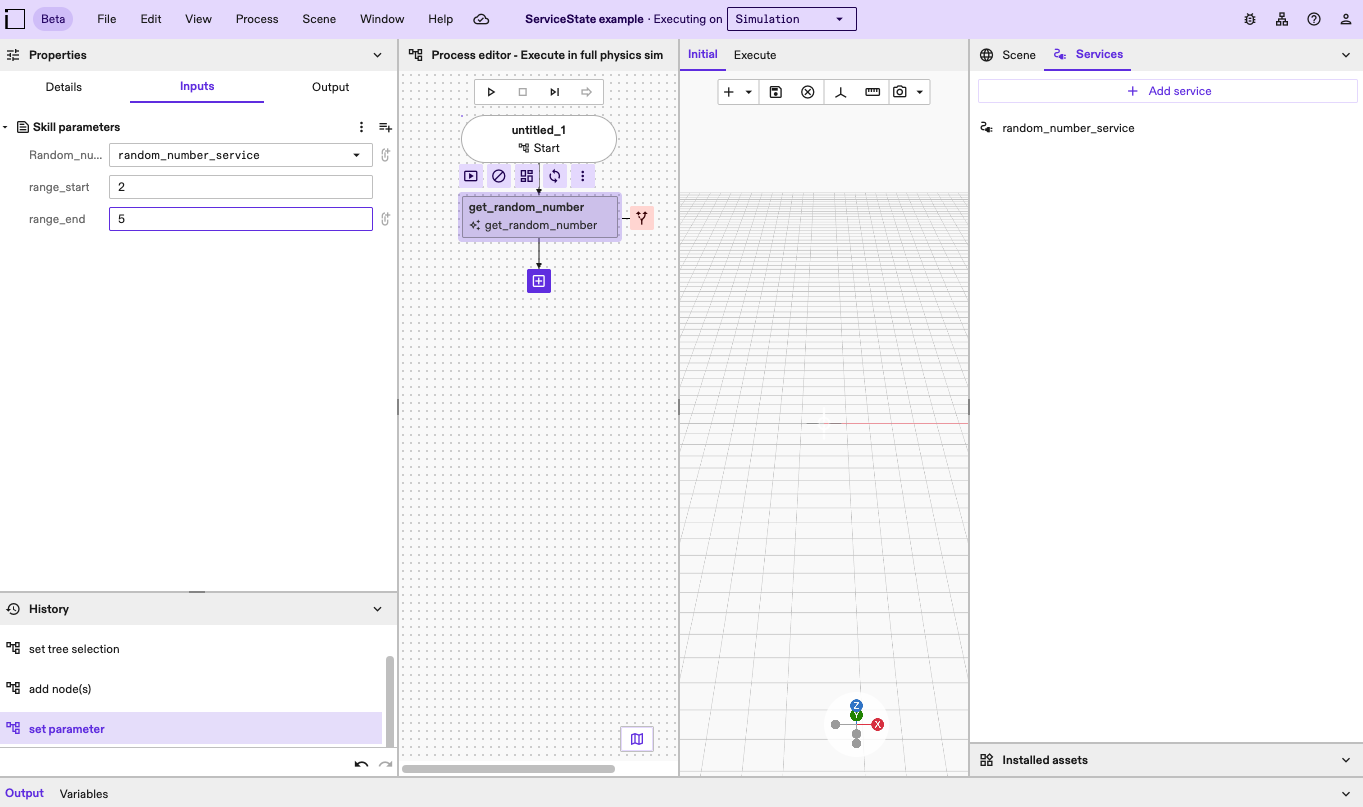
- Update the Skill's start and end range to be a range of integers, in this example, we'll use
2and5.
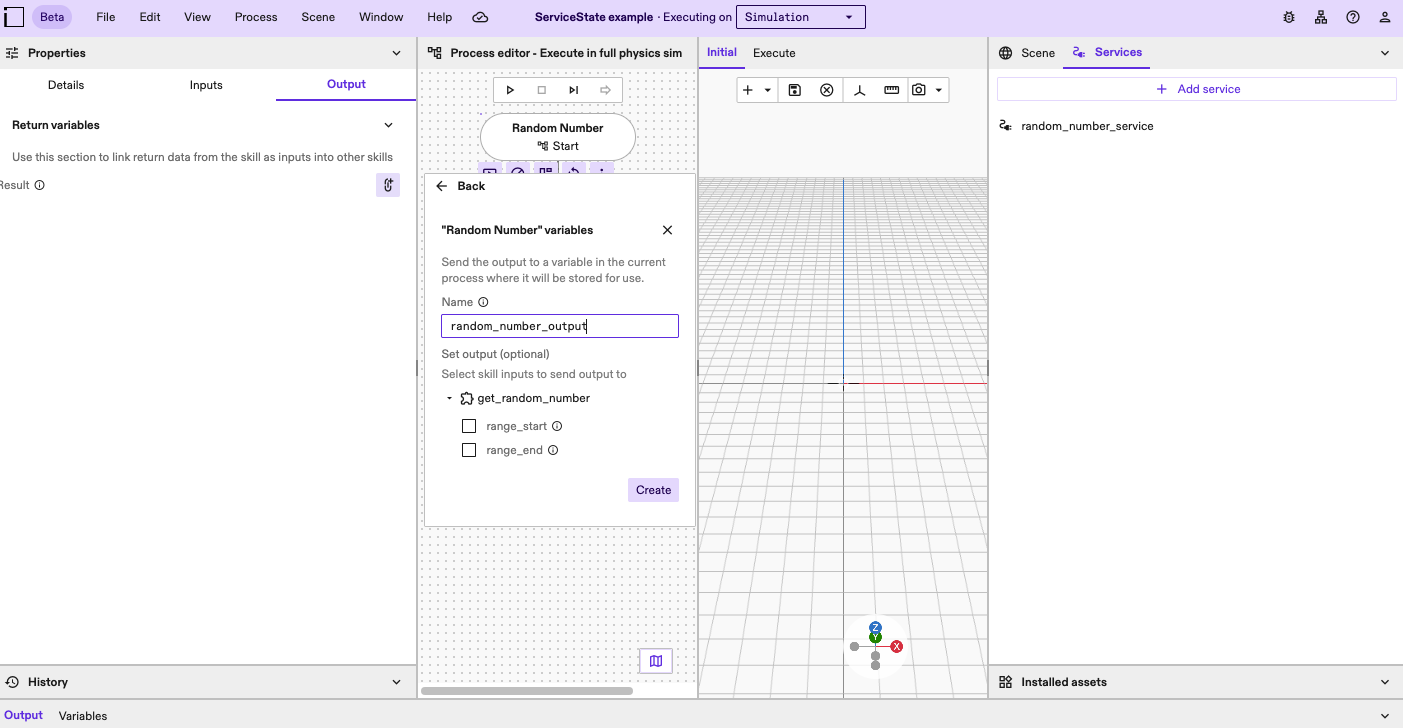
- Create a variable to link the
random_number_service's output.
- Check the Service Manager dialog, see the
random_number_serviceis enabled.
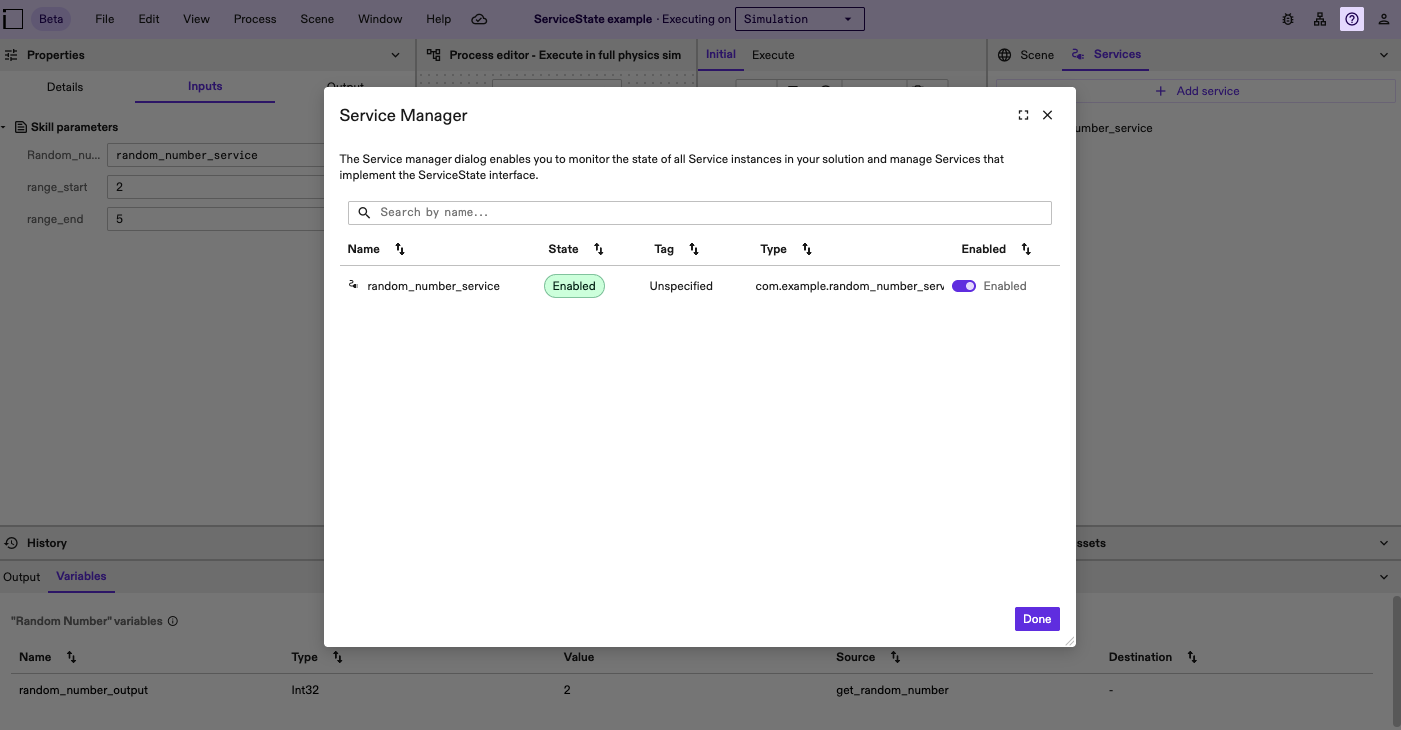
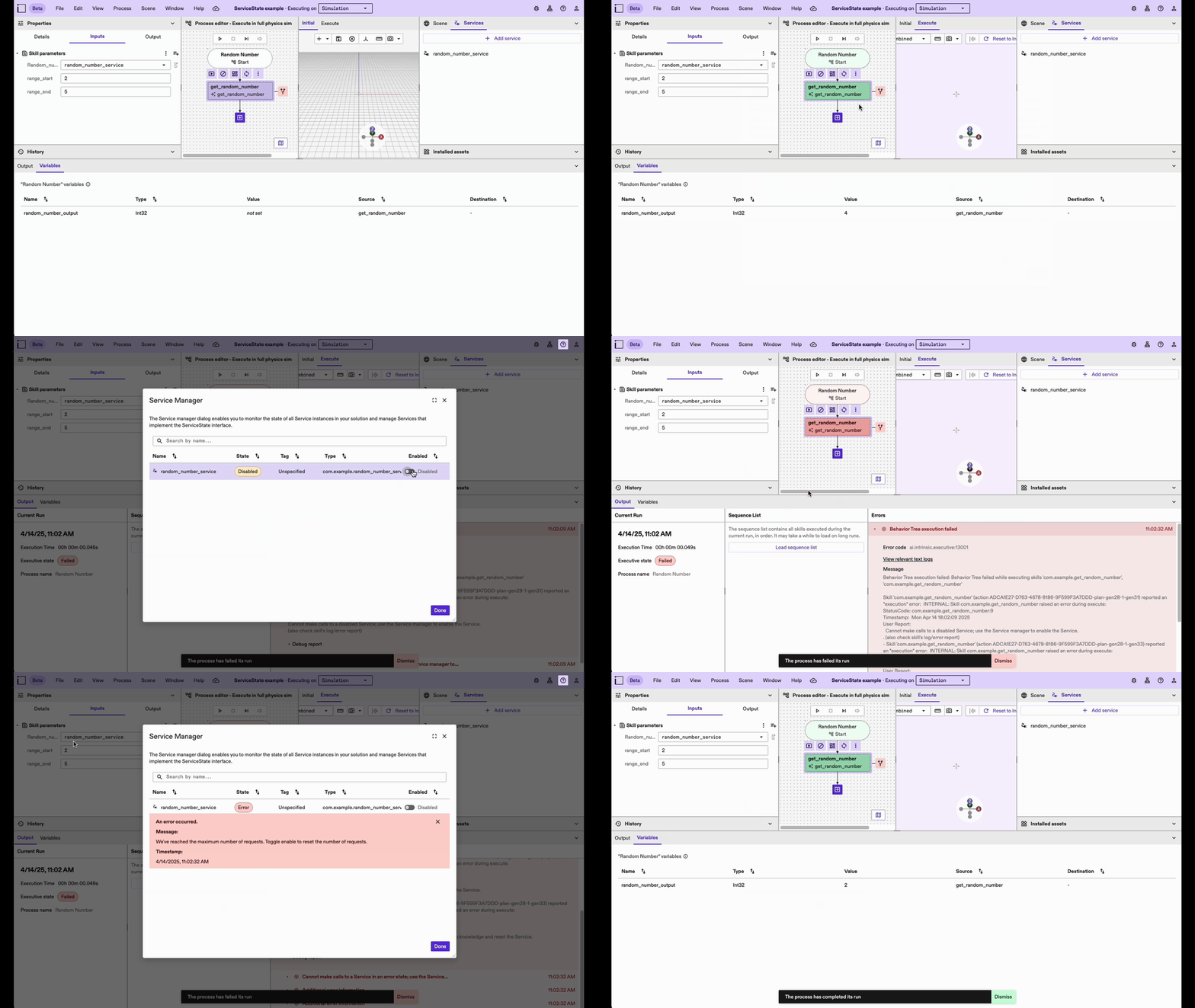
- Play with the process, see the output. Try disabling the Service and running the process to see the output.
Remember in this example, after two successful calls, the next call to the
random_number_servicewill result in an error. After the error occurs, go to the Service Manager, toggle to enable, run the process again.