Configure NTP server on Intrinsic OS
IntrinsicOS requires fairly accurate clocks on the computer. When the internal clock of the IPC has a different time as the Intrinsic cloud services, it will not be able to connect to the cloud.
When the IPC is connected to the internet through permissive firewalls, it will use the Google time servers (time.google.com) to keep clocks synchronized.
When there is a restrictive firewall in place, or you prefer to use a local server, you have to configure the NTP server on the IPC. This page guides you through this process.
Even with restrictive firewalls in place, when the NTP server is advertised via DHCP, IntrinsicOS will configure it automatically.
Using the local configuration page before device registration is not supported yet.
Open the local configuration page
It's expected that your browser will inform you about an untrusted certificate when you first open this page. In this case it is ok to ignore this warning and continue.
Find the IP Address of the IPC following the find IP Address guide.
To configure the NTP servers, open https://192.168.208.211:2461/web/config/ntp in your browser.
Make sure you replace the IP Address (192.168.208.211) with the IP Address of your IPC.
When you have correctly entered the URL of the local configuration page, you should see the NTP configuration page which looks like this:
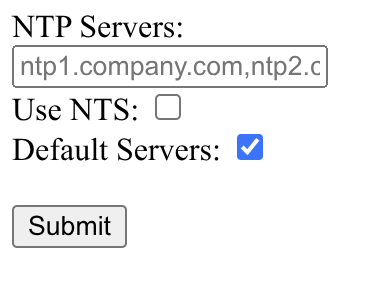
Changes are sent to the IPC when you press "Submit". They require a reboot to be fully applied.
Configure NTP servers
To configure the servers IntrinsicOS uses for time synchronization, enter them into the field under "NTP Servers".
This field takes a comma separated list of hostnames or IP addresses.
Enable NTS (Network Time Security)
Network Time Security is an extension for NTP to add cryptographic attestation to the time source. It can improve security when your time source is on the internet, but is not as widely supported as normal NTP. Most on-prem (local only) time servers will support plain NTP.
Enable this only when you know that your time source requires NTS. When NTS is enabled, IntrinsicOS will require NTS for all time servers.
Disable default NTP servers
When there is no server configured, IntrinsicOS will add time.google.com as default time source.
Additionally, IntrinsicOS will add NTP servers advertised via DHCP to the list of time sources.
If your environment blocks access to time.google.com it can make sense to disable this default.
There is no downside to leaving it enabled for the OS, but it can reduce unnecessary connection attempts blocked by the firewall.