Configure log server on Intrinsic OS
IntrinsicOS supports sending log messages to an external log server e.g. SIEM.
Using the local configuration page before device registration is not supported yet.
Open the local configuration page
It's expected that your browser will inform you about an untrusted certificate when you first open this page. In this case it is ok to ignore this warning and continue.
Find the IP Address of the IPC following the find IP Address guide.
To configure the log server, open https://192.168.208.211:2461/web/config/siem in your browser.
Make sure you replace the IP Address (192.168.208.211) with the IP Address of your IPC.
When you have correctly entered the URL of the local configuration page, you should see the log Server configuration page which looks like this:
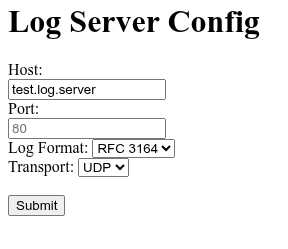
Changes are sent to the IPC when you press "Submit". They require a reboot to be fully applied.
Configure Log server
For IntrinsicOS to send logs to an external server, it needs to be told how to reach it via the "Host" field and potentially the port.
By default, logs will be sent over TCP, but you can configure the OS to use UDP as well.
Similarly, by default logs will be sent in RFC5424 format but can be configured to use RFC3164 instead.