Configure proxy settings on IntrinsicOS
To move your IPC between different networks, it may be necessary to configure a proxy as intermediary step to reach the internet. Or on the other side, it may be necessary to remove the proxy when moving it from a protected network to a more permissive test or customer environment.
This guide helps you with changing the proxy configuration on your IPC.
IntrinsicOS assumes that the proxy server is reachable via http and supports the HTTP CONNECT verb.
If this is not true for your environment, please reach out.
Using the local configuration page before device registration is not supported yet.
Open the local configuration page
It's expected that your browser will inform you about an untrusted certificate when you first open this page. In this case it is ok to ignore this warning and continue.
Find the IP Address of the IPC following the find IP Address guide.
To configure the proxy server, open https://192.168.208.211:2461/web/config/proxy in your browser.
Make sure you replace the IP Address (192.168.208.211) with the IP Address of your IPC.
When you have correctly entered the URL of the local configuration page, you should see the proxy configuration page which looks like this:
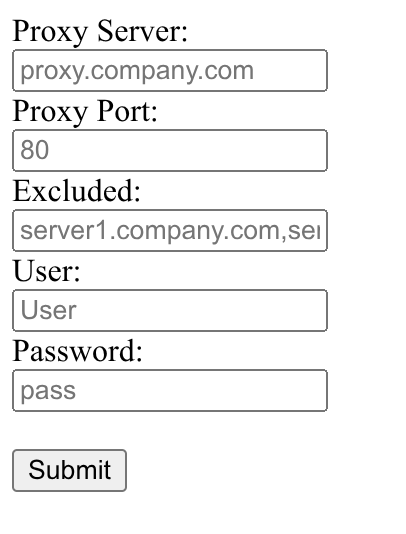
Changes are sent to the IPC when you press "Submit". They require a reboot to be fully applied.
Configure proxy server
To configure the server IntrinsicOS uses to reach the internet add the name in the field "Proxy Server". This field takes either a hostname or an IP Address.
If your proxy server does not listen on port 80 (the default for http) also set the appropriate port in "Proxy Port".
Authentication
IntrinsicOS only supports basic auth enabled proxy servers.
If the proxy server requires authentication, use the "User" and "Password" field to provide the credentials.
Exclude IP ranges or domains from the proxy
Some environments will require connections to hosts on the local network which are not reachable via the proxy.
To exclude a hostname (domain) or IP Address (network segment) from the proxy add it to the "Excluded" text field.
This field takes a comma separated list of exclusions. Exclusion can generally take the form of
- IP Address:
192.168.1.1 - Network Segment:
192.168.0.0/16 - Hostname:
company.com
The Hostname form will generally work as domain. I.e. server1.company.com will also be excluded.
This is ultimately exposed to software running on the IPC via the http_proxy environment variable.
This is not a formal standard, and some software might require special forms.
E.g. the standard library in .NET matches exact on hostnames but allows domains with a leading . like .company.com.