Release notes
The following release notes cover the most recent modifications or additions to Intrinsic software. You can find information on new features, breaking changes, bug fixes and deprecations for the Intrinsic platform and Flowstate.
Version 1.29 (March 30th, 2026)
For the specific VM versions in this release:
- Intrinsic runtime version: 0.20260316.0-RC13
- IntrinsicOS version: 20260226.RC02
Infrastructure
- HMI provides the option to reboot and shutdown the IPC. Reboot is needed so in case of an issue the IPC can be power-cycled to restore the cell. Shutdown will be used by ECs to power-down the cell if no production is planned to save energy.
- Retain asset text logs to disk, making them eligible for inclusion in recordings
- Cloud Zenoh routers are enabled in multi-tenant projects
- Adds the ability to specify consistency for kvstore writes via RPC. Default remains high.
- Support custom durations in create_recording skill.
- Renamed all default vmpools from
vmpool-defaultconftodefaultand fromvmpool-defaultconf-gputodefault-gputo have a more concise and less boilerplate naming pattern. Function is unchanged and the rollout of this change should be without downtime. Marked as breaking because possible scripting could exist e.g.inctl vm lease --pool vmpool-defaultconf-gpuneeds to be changed toinctl vm lease --pool default-gpu. Adoption rate is assumed to be low yet, so the probability of breakage of util scripts is very low.
- The customer was setting values in the KVStore with high consistency to the same key from multiple threads or processes. In that case, the writes will race and the losing writes timed out. This fix will allow the customer to receive the proper
abortevent.
Reduces log noise from Python skills
Perception
- Upgrade and do all necessary refactoring for V1.0 camera protos
- Stream camera images with a certain frame rate from cameras in the workcells
- The displayed camera view frustum now corresponds to the one set in the camera sdf file and hence in simulation renders exactly what is inside the visualized view frustum. Previously the visualized view frustum did not correspond to the frustum used for rendering.
- intrinsic_proto.perception.v1alpha1.SymmetryService provides methods to detect symmetries of 3d meshes
- Cameras will automatically try to clear faults and reset themselves after e.g. control was lost due to a short network or power outage.
- Updated the scan barcodes python example to use the v1 camera client.
- Updated the perception python API to v1
- When deserializing image buffers in python the pixel type is now attached to the numpy dtype metadata
- Previously cameras with very similar IDs, like for two Baslers (Basler-a2A3840-13gmPRO-40537040 and Basler-a2A3840-13gmPRO-40537041) the last digits were cropped when searching for the stream, so it always found the first one and displayed the stream of the first one for both cameras.
Process Development
-
Processes created from the Flowstate UI are now assets by default.This allows them to benefit from common Asset tooling and functionality, such as sharing and installation management. Existing (legacy) Processes can be upgraded to assets easily. This can be done per-Process by selecting a Process and using the upgrade button in its side panel. To upgrade all legacy processes in a solution, select ""Process"" > ""Upgrade..."" from the menu bar. Creation of legacy (non-Asset) Processes is still available for a limited time to enable transitioning existing workflows without disruption. This is deprecated and should only be used when absolutely necessary.
Important [Breaking]:
This change is non-breaking in the graphical UI and it also does not change the execution behavior. However, for Processes which have been migrated to Assets, installation and retrieval through APIs is now done with the InstalledAssetService instead of the SolutionService. See documentation for further details.
- Methods for inspecting the blackboard are available in the solution building library under
executive.operation.blackboard.
- Processes can be loaded into the executive by providing the asset id of an installed Process asset instead of providing the full behavior tree proto.
- In the solution building library,
BehaviorTree.find_tree_and_node_id()now returns aNodeIdentifierobject instead of a tuple. The function now fails when a node was found, which does not have an identifier.
- Specifying
type_urlonGetNamedFileDescriptorSetin the proto registry may no longer return the full descriptor set of the asset referenced in the type URL. Useasset_idwith the ID from the type URL if you require the old behavior.
- Behavior trees with conditions edited in the frontend can be loaded in the SBL without loosing the conditons.
-
Fix an issue where cancelling a skill is not registered correctly when the cancellation happens at exactly the same time that the skill is started.
-
This also fixes a rare situation where Process execution can get stuck in the cancelling state when the cancellation request happens at exactly the same time that the skill is started.
- When copying a skill such as
run_python_script (get -dim_z/2)with an input variablezand refactoring the name and logic toyit still requires thezvariable as input to successfully execute. Without the unusedzvariableget -dim_y/2does not work.
Robotics
- User interface available where in simulation the user can set digital and analog Inputs to true/false or to a specific value (float)
- annotate grasp works deterministically with the same object for all runs
- Placement constraints can be added to the parts
- Placement position is defined automatically based on the object information and shapes
- Allow user to use meta data from gripper to avoid collision between object and gripper
- Allow parallel execution of ADIO read and set skills.
SDK & Development Environment
- The
simulationargument for direct calls ofsolutions.Executionin the SBL has been removed. Usingsolutions.Executiondirectly is discouraged. Users should migrate to useSolution.executiveinstead (recommended) or update their calls tosolutions.Executionto remove thesimulationargument (not recommended). Thesolutions.simulationmodule is deprecated and will be removed in future.
- APIs for previously supported “Products” concepts have been deleted from the SDK, including the Solution Building Library. Users should use SceneObject Assets instead.
- Corrected a display error in the VS Code extension where installed services appeared as JSON strings; they are now presented in a clear, human-readable format.
Workcell Design & Simulation
- Users can change the name of the geometries in the object instance editor.
- Product APIs are deleted from the SDK, including Solution Building Library. Users should use SceneObject assets instead.
- Spawned objects in sim have the same name as in the belief world. Requires update to
CreateObjectskill andSpawnerservice.
- Objects with primitive shapes can be trained using pose estimators.
- Fixes an issue where a solution fails to deploy in sim due to the simulator failing to start up for the initial scene. When deploying a solution in sim, Gazebo is currently initialized before the declared ports in
gzserverandsimulation-serviceare ready. So solution deployment is blocked in sim on Gazebo being ready. This can add a deployment time cost of several seconds while Gazebo starts up. In the worst case, the solution deployment can be blocked for several minutes and appear to be stuck. This change unblocks solutions to be deployed in simulation without waiting for Gazebo to be ready. Users can make changes to the Initial scene without waiting for Gazebo to be deployed.
- This fixes an issue where the memory consumption of Gzserver increased heavily when a camera has been added. Memory use is now stable.
- The
Simulation::ResetAPI is deprecated in the Solution Building Library. Instead, please set the optionalstart_from_world_stateparameter when callingexecutive.run()/executive.run_async()/executive.start()to specify what world state the process/behavior tree should be started from. Seesdk-examples/notebooks/002b_executive_and_processes.ipynbfor example usage of thestart_from_world_stateparameter.
Customer Support
- Poses would unexpectedly change while editing or moving the robot in the execute tab
- In the frontend, Select the robot to jog it. The selected jogging base frame is on "world", but when trying to move "up", it moves down instead.
- The executive got stuck in the cancelling state. It seemed that the reason was preplan-motion.
Version 1.28 (February 23, 2026)
For the specific VM versions in this release:
- Intrinsic runtime version: 0.20260209.0-RC04
- IntrinsicOS version: 20260128.RC01
Perception
- Support for the Zivid 3 has been added, and all Zivid camera models now feature near and far plane parameters to define their optimal working volume.
- To provide more precise 3D modeling and improved field-of-view estimations, the Photoneo hardware resource has been modified to model-specific assets.
Infrastructure
- Get information about a single pool using the new inctl vm pool describe command
inctl vm pool describe --pool {pool_name} --org {your_org}@{project_name}
- Removes the previous limit on the number of log items per page in the
inctl logs cpcommand to improve the retrieval speed of structured logs.
Fixed a bug in the text log API that had caused some logs to be truncated.
- Fixed an issue with the sorting functionality in the Text log viewer API.
- The create_recording skill automates the creation of solution recordings, capturing structured logs from a defined timespan.
Process Development
- Extended status error messages will now be accompanied by AI generated summaries, providing a natural language explanation of the encountered error.
SDK & Development Environment
- Project name is now being set to the user config file by the Intrinsic Extension
This fixes issues in SBL where
deployments.connect_to_selected_solution()was failing due to missing project information.
- Corrected a display error in the VS Code extension where installed services appeared as JSON strings; they are now presented in a clear, human-readable format.
- SDK examples now contain scripts illustrating the use of solution recordings, which capture structured logs from a defined timespan. See README
Workcell Design and Simulation
Create Productimport UI has been removed. Users should use 'Create SceneObject(s)' assets workflow to import their 3D models instead.
- Products are no longer shown in the Installed Assets panel.
- Products are no longer supported and thus the product service is obsolete.
Users should use
SceneObjectassets instead. If your solution still uses the product service, please uninstall it through the SolutionEditor.
product_reader dep from estimate_sheet_parts skill
estimate_sheet_partsskill only works withSceneObjectsassets. Support for Product has been dropped.
- Adds an interactive kinematic control panel to the SceneObject import workflow, enabling users to validate joint movements and limits through real-time jogging and slider manipulation. The user can test and validate an object's kinematics directly without needing to install/ author services or a separate simulation setup.
world_tree to use signals and ChangeDetection.OnPush
- Fixed performance issue in the world tree UI that was causing significant UI slowdowns for scenes with many objects (100+)
- The Motion Planning Inspector automatically highlights 3D objects which dominate the computation time during collision checking. Additionally, toast notifications will alert user to the presence of these objects when detected and provide resources to help optimize performance.
ICON
- The default behavior for enforcing Cartesian acceleration constraints has been updated to limit the overall (2-norm) Cartesian acceleration of the end effector. This change better aligns with the common use case of limiting total motion speed, and may result in lower maximum acceleration or deceleration than in previous versions.
Version 1.27 (February 5th, 2026)
For the specific VM versions in this release:
- Intrinsic runtime version: 0.20260126.0-RC07
- IntrinsicOS version: 20251126.RC01
Account & Administration
- The Flowstate portal now offers the ability to make branches of a Solution
A set of connected Solution branches form a Solution tree. Solution trees allow
you to:
- Experiment on a copy of a Solution version in a child branch, without cluttering your main branch’s version history
- Copy a Solution version from one branch to another
- Move branches within, into, or out of a tree, so that you can migrate from using standalone Solutions to using Solution trees
- Group deployments as child branches of your “template” Solution, with each workcell having its own version history
Note that this feature does not include diff/merge. Learn more.
Control & Motion
- All trajectories are now validated with a safety check prior to execution. This reduces the risk of collisions, with a small increase in motion planning time.
- Grasp planning now can optionally account for placement constraints upfront, ensuring grasps are selected to best support successful object placement.
- You can now define a minimal contact region on the gripper fingers that must be covered by the object surface, enabling more robust and reliable grasps.
Infrastructure
- The onprem
kvstore_serviceis now accessible externally through Ingress. Applications running externally can use this to set, update, and delete keys for a particular workcell.
- KVStore client library provides a simple client library as part of the SBL to interact with a VM or workcell’s KVStore.
- Visualization_msgs/MarkerArray messages that are captured in Intrinsic recordings are now supported and will be shown as part of visualizations of those recordings.
- You can now restore your IPC network configuration from automatic created backups that are confidential and securely stored in the Intrinsic Cloud. This enables you to get your system connected faster in the case of a misconfiguration or to set up new systems with your default config. All relevant information can be found in our documentation.
- Self-service pool management now supports zero-downtime changes to runtime and intrinsicOS versions for VMPools. Documentation is available under BUILD → Get started → Build with code → CI/CD workflow guide.
- Improved exception handling in Intrinsic Pubsub python libraries.
Process Development
- Loop and retry node counters are now in sync with their configured
loop_counter_blackboard_key and retry_counter_blackboard_keywhile a process is running. Any updates to these keys, such as via the blackboard service, immediately affect the active node state. If you manually configure counter keys, each LoopNode and RetryNode running in parallel must use a unique key, as shared keys will now cause state conflicts and unintended execution flow. Flowstate automatically generates unique keys, so no changes are required when using the defaults.
- To assist with debugging, you can now inspect the output from Python script nodes—including “print()” statements—directly within the sequence list after a process has been executed.
- The executive service's CreateBreakpoint API has been updated: attempting to establish a breakpoint where one already exists now triggers an "already exists" failure immediately. This replaces the previous behavior where the call would initially succeed but fail later during runtime.
- Fixed an issue where an empty page or partial results may appear when listing assets in the catalog.
SDK & Development Environment
- Asset-specific install and release commands (e.g.
inctl skill install) that were deprecated back in October 2025 have now been removed. Use the genericinctl asset …commands instead.
SubscribeToSignal added to GPIOClient
- A new
SubscribeToSignalfunction has been added toGPIOClientto simplify subscription to signals.
Workcell Design & Simulation
UpdateUserData field
UpdateObjectPropertiesrpc of ObjectWorldService has been updated so you can now modify WorldObject's data viaUpdateUserDatafield.
- Adds support for mesh simplification and isotropic remeshing during scene object import and instance editing. These operations help optimize meshes to improve performance for tasks such as path planning and simulation.
- The start process dialog will now report which objects will change when resetting the belief world from initial.
- You can now transform visual geometries for a link entity from the instance editor, similar to colliders.
Version 1.26 (Dec, 15th, 2025)
For the specific VM versions in this release:
- Intrinsic runtime version: 0.20251208.0-RC02
- IntrinsicOS version: 20251126.RC01
Control & Motion
plan_grasp and grasp_object have been removed
- Please use their equivalent replacements:
gripper_object/collision_excluded_eoat->collision_excluded_eoat_parts,pose_estimates.category->pose_estimates.object_category,grasp_bbox_zone->grasp_zone,product_part_name->grasp_zone.object_category.
move_robot skill now supports visualization for both rotation cone and bounding box constraints.
- You now get a visualization preview that makes constraint configuration much clearer, particularly for rotation cones, which were previously difficult to interpret. This helps you see the effect of your adjustments and understand how the robot is likely to solve the motion.
move_robot skill now has a "shortcutting_combine_collinear_segments" parameter to shorten planning time
Using the "shortcutting_combine_collinear_segments" in the “Move robot” skill, you can now enable faster motion p
lanning for motions that are mostly straight lines in joint space, but at the expense of slightly longer
path lengths and trajectory durations. To use this functionality you may need to update your move_robot skill.
- This feature enables the use of analog inputs with FANUC robots by:
- Storing 16-bit integer values in FANUC digital inputs using a background logic program.
- Configuring the FANUC hardware module driver to convert these 16 digital input values back to analog values in Flowstate. Analog outputs function similarly. More information can be found in our FANUC stream motion documentation.
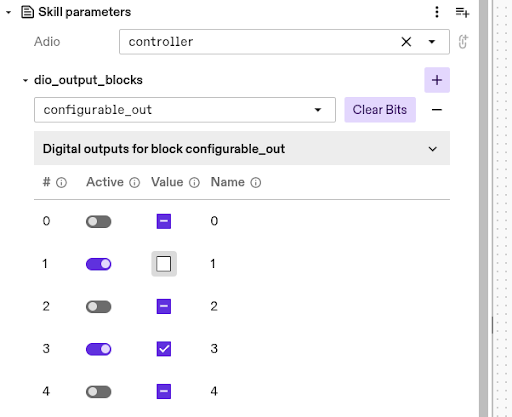
dio_set_output skill now has custom UI for selecting blocks and setting bits
-
Available output blocks and bits are read from the selected realtime control service. This allows selecting the output block from a dropdown, as well as selecting bits from the UI. Note: Adjusting the parameters is temporarily limited when the realtime control service is critically faulted.
- You now have full visualization of the point-at constraint in the
move robotskill. This makes it easier to understand what the robot is doing as you adjust the point-at constraint parameters. It also helps you clearly see the relationship between the minimum, maximum, and threshold radiuses and how they relate to the moving axis.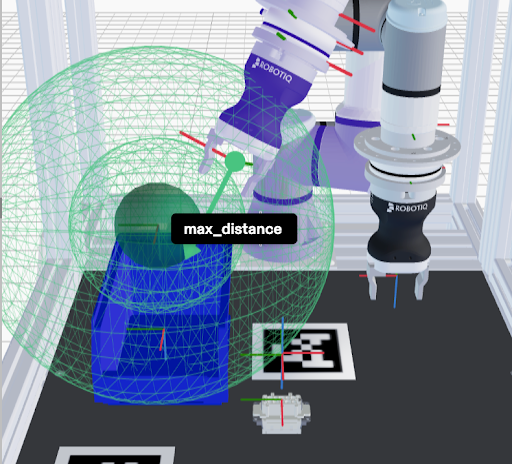
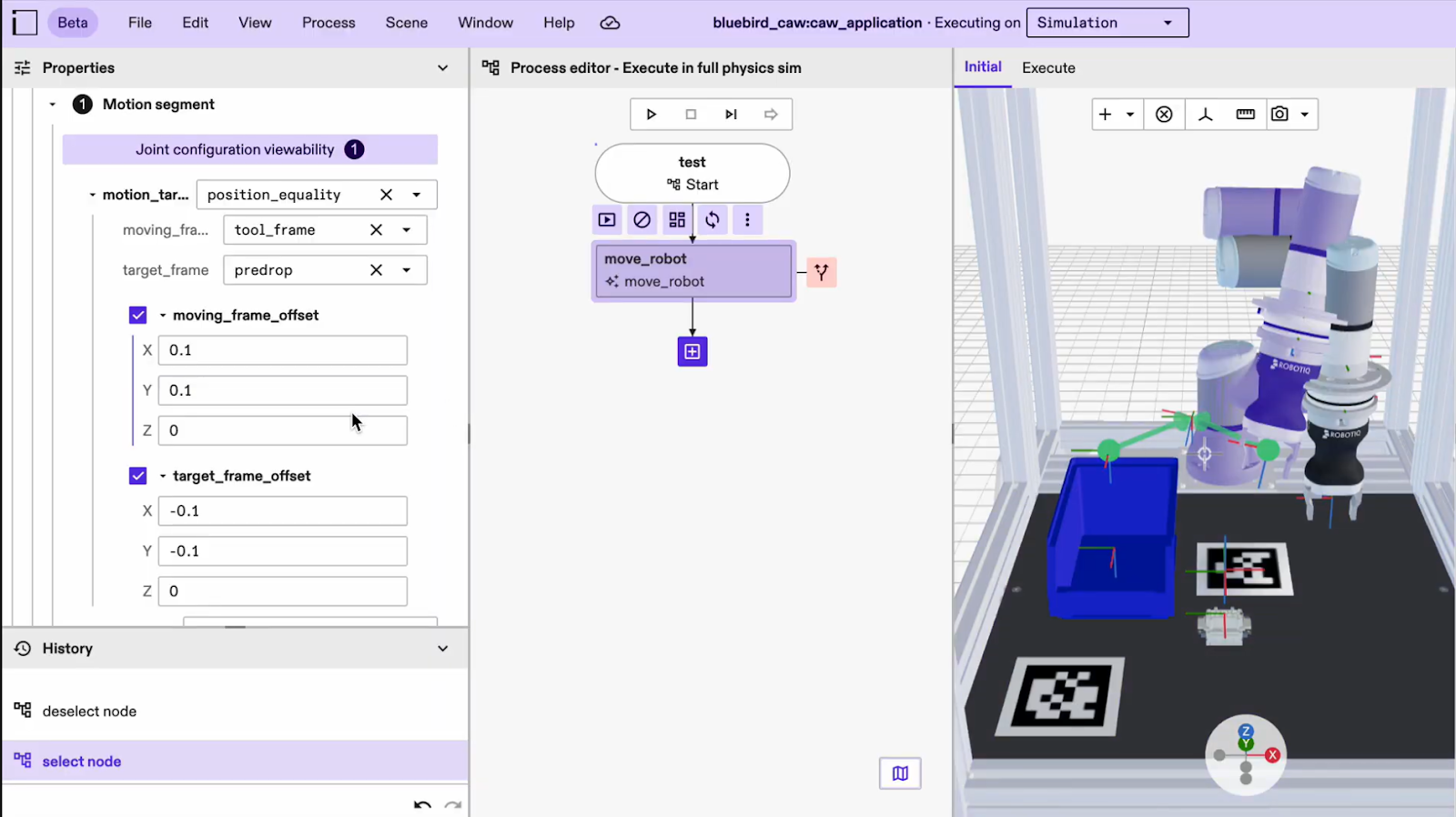
- You can now visualize how each offset frame relates to its parent frame. Several motion segments and constraints
in the “Move robot” skill include frame offsets from either the moving frame or the target frame.
This improvement helps you more easily understand and manage skills that involve both.
It is especially helpful in situations where both a moving and a target frame are present,
which can become confusing without clear visualization.
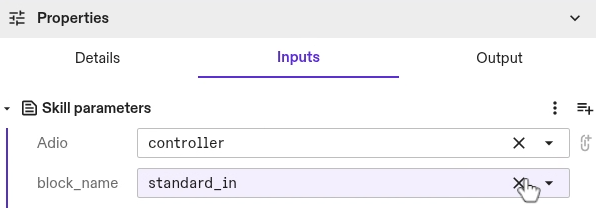
- The digital block to read can now be selected from a list, instead of manually looking up the correct string. String input is used as a fallback in case the lookup fails.
- If you previously attempted to jog a robot without application or system limits, the frontend would fail silently and behave in unexpected ways. Now, you will see a display error to alert you of the misconfiguration.
Documentation
- There is a known issue with the documentation site not loading properly in some cases. You will need to do a hard refresh (Ctrl+Shift+R) or (Cmd+Shift+R) on the browser to fix the issue.
Infrastructure
- You can now configure IntrinsicOS, so it shuts down gracefully in the case of a power outage using a UPS connected via USB or network. To configure a UPS, please refer to our UPS documentation.
- You can now restore your IPC configuration from an automatic created backup, that is created on every IPC configuration change. To restore, you can download the config file from the IPC manager and upload it using the local configuration interface on the IPC. Detailed instructions can be found in our documentation.
- You can now stream logs from services and hardware devices as well as skills. The previous skill-only dropdown has been replaced with a searchable asset-selection panel, letting you choose multiple installed assets using grouped checkboxes.
- With this launch you can now use recordings regardless of whether you are running your solution on an IPC or a VM. This enables you to access recordings as a debugging/troubleshooting mechanism earlier in the development cycle, without the need for any hardware commissioning. Please refer to our documentation for more information.
- The text logging viewer is redesigned and now has the ability to query logs for all assets (previously only allowed skills).
Perception
- The camera-to-robot calibration UI will no longer function until required updates are applied. To restore functionality, you must install the calibration_service from the asset catalog, add an instance of it to your solution, and update the collect_calibration_data skill to the latest version.
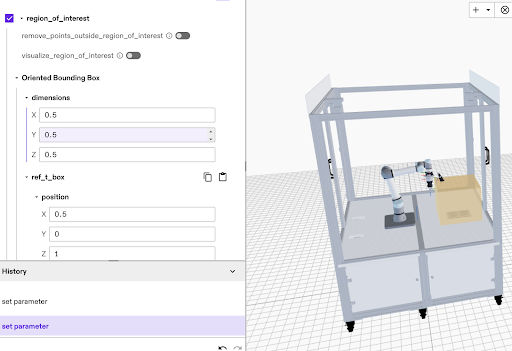
- This enables retrieval of the ROI via an HMI and the ability to inject the ROI into a digital twin for visualization.
- You can now use a powerful new service to compute a 3D reconstruction of a scene.
By providing a set of stereo pairs, which are two cameras capturing the same scene
from different viewpoints, you can generate an accurate 3D model of the environment.
This reconstruction can help you with tasks such as collision avoidance for unknown
objects or retrieving depth images for other downstream processes. You can access
this functionality directly through the estimate_point_cloud skill.
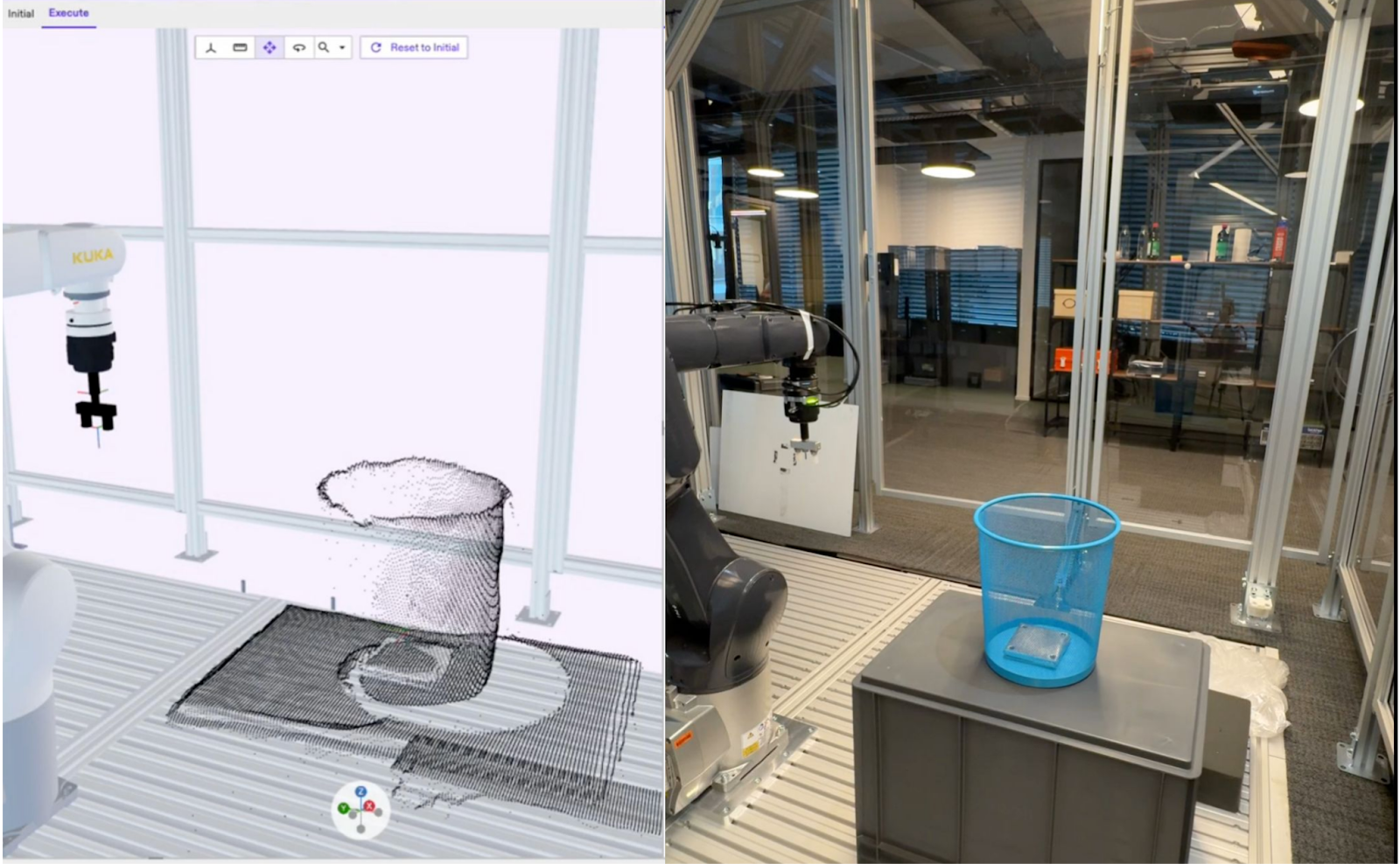
- Training jobs now display both progress percentage and ETA. You’ll also see your queue position, based on your user tier and GPU availability, along with the projected date when you can submit your next training run.
- Simulation now supports selecting depth, point sensor, or both image types in
Capturerequests for RGBD cameras. Previously, only the point sensor image was available when running in simulation
- You can now use a Manual inference mode for pose estimation. This update gives you full control over when the pose estimation is performed, helping you avoid long inference times caused by complex parameter changes. You can make all the desired parameter adjustments before running the calculation, ensuring faster and more efficient results.
Process Development
- The process variable panel now has a search field to filter which variables are shown. In addition to that, the actual values are now shown on the right side of the panel with the opportunity to show either the proto or a UI representation of it.
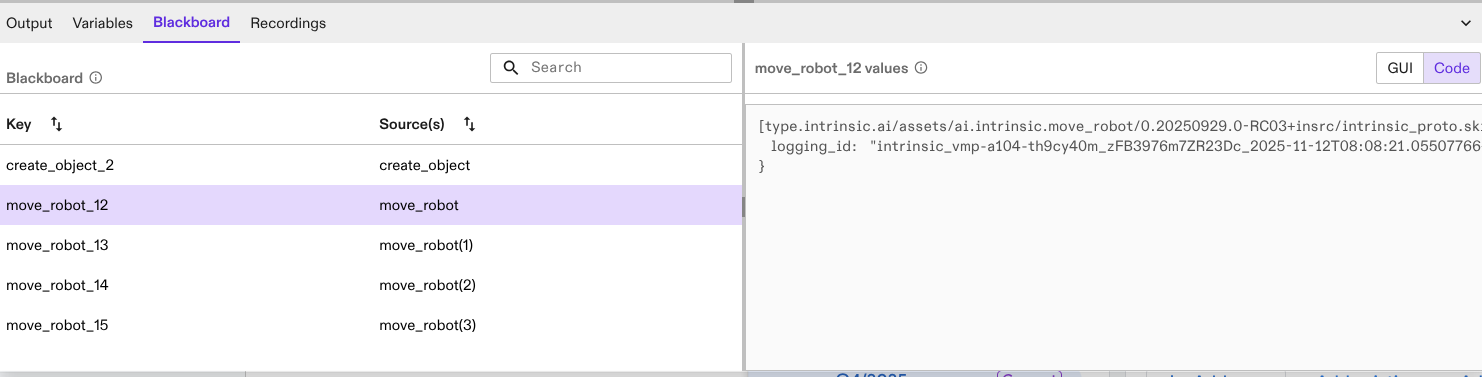
- A new panel has been added next to the process variables panel. This new panel shows the blackboard
content after executing a process. The blackboard contains keys with output data for each skill
or node that produces such output data during the run. This can help you inspect skill return values after a process run.
SDK & Dev Environment
- In the skill "dio_set_output", the deprecated parameters "block_name", "indices", and "values" are removed. Existing solutions will continue to work since they tag the skill version. If you use these skill parameters, edit your skill to use the repeated field "dio_output_blocks" instead.
- We are deprecating the field
geometriesinintrinsic_proto.world.GeometryComponent.GeometrySetin favor of a named_geometries field. In the process of migration, we still keep the deprecating geometries field around for clients that reads aGeometryComponentor creates aGeometryComponentfrom scratch. Clients are advised to migrate client code to use the newnamed_geometriesfield. Breaking: If the client code gets aGeometryComponentproto from the world and modifiesGeometryComponent.GeometrySet.geometriesin place, then use this modifiedGeometryComponentin a subsequent world mutation request, the modified geometries will not be read. The user is advised to modifyGeometryComponent.GeometrySet.named_geometriesinstead.
inctl asset release commands will be removed
- Individual inctl
<asset-type>release commands will be removed in the next platform release V1.27. Use inctl asset release instead.
- The previously deprecated inctl skill logs command has now been removed. Please use inctl logs –skill instead, which in addition allows streaming logs from multiple assets at the same time.
- Processes will now be handled as assets with their own asset type in solutions.To prepare this, the SBL
has been extended to handle assetized processes (create, save, delete). Process assets
can be accessed under solution.processes.
<>(previously solution.behavior_trees.<>). Usage is explained in more detail in the example notebook. All changes are backwards compatible, such that legacy processes are still supported
- Introducing SkillCanceller::Wait/StopWait. This update fixes a long-standing lifetime issue with skill cancellation. Previously, any callback you wrote had to capture references (often an icon::Session) that didn’t live long enough, outliving the skill but not the SkillCanceller. This made safe cancellation difficult or impossible. With this change, you no longer need to rely on callbacks inside skills. You use a slightly more explicit pattern, but in return you get a memory-safe and thread-safe cancellation mechanism that behaves reliably in all scenarios.
Any proto in the callback to python
- The python PubSub bindings now support subscription without the need to specify
which protobuf message type is expected. This function overload will provide the proto
Any.
- You no longer need to build a separate web server, backend, and frontend to create an HMI service. There is now a specialized service asset that handles the web-server component for you. The content to host on the web server is provided through a data asset, following the platform’s existing asset model. The static content service asset is available in the catalog, and its source code is published in the sdk-examples repository, along with instructions on building it from source and creating the required data asset. This gives you a flexible starting point that you can customize without having to start from scratch.
- To match the license change of the SDK to Apache-2.0, the SDK examples are now also licensed Apache-2.0. Using the Apache-2.0 license helps users navigate license concerns because it is well known, permissive, and OSI-approved.
- A new interface-based dependency system enables Assets to interact with gRPC services and proto data provided by other Assets, allowing Skills, Services, and HardwareDevices to seamlessly use interfaces exposed by Services, HardwareDevices, and Data Assets.
Workcell Design & Simulation
Product as a concept will be removed in the next major release. Use scene object assets instead
- Product-specific skills like
clear_product_objects,request_product,remove_productandsync_product_objectsskills are considered deprecated and are no longer maintained. Instead, please usecreate_objectandremove_objectskills. The corresponding functionality is now provided directly via scene object assets.
- You can now fully preview and validate objects and devices during the import process. Before creating an asset, you can:
- Preview the object or device.
- See mesh details, such as face count, to understand complexity.
- Preview the results of mesh simplification before applying them.
- Preview material properties and their effects.
- View the object's origin and all associated frames.
- Review the entity tree structure.
- Upload a new geometry file if the original selection was incorrect.
- Navigate, measure, and inspect the object just as you would in the main scene.
- These improvements give you immediate visual feedback, helping you avoid common issues such as selecting the wrong file, applying mesh cleanup without understanding the outcome, working with overly complex meshes, or discovering incorrect origin frames only after assetization. This early-stage visibility saves time, reduces errors, and makes the import process more reliable.
plan_grasp and grasp_object have been removed
- Please use their equivalent replacements:
gripper_object/collision_excluded_eoat->collision_excluded_eoat_partspose_estimates.category->pose_estimates.object_categorygrasp_bbox_zone->grasp_zoneproduct_part_name->grasp_zone.object_category
geometries in intrinsic_proto.world.GeometryComponent.GeometrySet will be removed in favor of a named_geometries field
- The deprecated
geometriesfield remains temporarily available for clients that read or construct aGeometryComponent, but you should begin migrating your client code to the newnamed_geometriesfield. Breaking change: If you client retrieve and aGeometryComponentfrom the world, modifiesGeometryComponent.GeometrySet.geometriesin place, and then uses that modified component in a subsequent request, those changes will no longer be applied; all updates must now be made throughnamed_geometriesinstead.
position_bounding_box field for outfeed service configuration will no longer be supported
- Please use
remove_objectskill instead to specify the bounds dynamically during process execution.
spawner service configuration fields will no longer be supported
- Please use
create_objectskill instead to specify the randomization arguments during process execution.
- All world calls are now optimized and can significantly improve various world-related operations, for example making motion planning faster. The level of improvement scales with the number of objects in the world, with scenes with more objects benefiting the most.
ImportSceneObject RPC response now includes visual and collision geometry summary statistics (e.g., bounding box, volume) for the imported object
- The summary statistics provide properties of the imported scene that help verify the quality of the geometries that compose the scene. Unexpected values in the summary statistics are an indicator that the uploaded scene may have degeneracies and/or requires repair.
CreateObject skill supports specifying the naming schema for the created objects.
- This improvement will provide you more control over how the objects are named during the process execution.
register_geometry_v1 to ObjectWorldClient python client
- As part of the migration of geometry protos to v1.geometry, a new method
register_geometry_v1has been added toObjectWorldClientpython client. Please use the newregister_geometry_v1as a replacement ofregister_geometry."
- You can use a keyboard shortcut (Shift+ArrowDown) to snap an object to the surface below it. For example, you can now conveniently snap objects to the floor of the enclosure.
- Fixed an issue where small pose changes (less than 1mm) in the scene editor were being ignored.
Reset to initial no longer fails due to ICON real-time control service configuration error
- Previously the action would fail with an error message saying
Failed to reset simulation. With this fix, the action succeeds, but the ICON real-time control service may continue to be in anErrorstate.
Version 1.25 (Oct 27th, 2025)
For the specific VM versions in this release:
- Intrinsic runtime version: intrinsic.platform.20251023.RC05
- IntrinsicOS version: 20250912.RC01
Control & Motion
- If you write your own skills or services using ICON clients, and are also using the
intrinsic_proto.icon.v1.Conditionproto message type, you will need to update the included dependencies to include theintrinsic/icon/proto/v1/condition_types.protofile and corresponding targets.
move_robot skill now supports motion events based on Cartesian arc-length and time based offset
- You can now define motion events for the
move_robotskill using Cartesian arc-length relative to the start and end of the trajectory. This allows for more precise control, enabling you to trigger I/O changes based on traversal of motion trajectories.
Infrastructure
- You can now use a new set of inctl commands for VM and VM pool management. These commands allow you to lease VMs with specific versions and configurations, manage VM lifecycles by extending, shortening, or returning them early, and create dedicated VM pools tailored to your team or project needs. For full command syntax please refer to the inctl documenation. New APIs are documented in the GRPC reference section.
Assets
- JSON output from
inctl asset list_released_versionsis now a list of descriptions rather than a dictionary containing an "asset" element as a list of descriptions. Please update any scripts to account for the change in data type.
- The deletion_strategy field and enum has been removed. Please remove any usages of the field in calls to AssetDeploymentService.DeleteResourceRequest. Previously built assets will continue to function normally.
Perception
- To improve precision and reduce processing time, you can now define a specific region of interest for pose estimation which will restrict the visible working volume.
SDK & Dev Environment
- You can now use the command line for deploying solutions using
inctl solution start <solution-name>. Previously, starting solutions was only possible through Flowsate Portal. This new functionality is particularly beneficial for automated continuous integration (CI) workflows, as you can specify the solution to deploy using its solution name.
- The
inctl logscommand now supports multiple targets in a single command, allowing you to monitor log output from a single terminal. This can help you stream logs from different skills or services.
inctl logswill now serve as the main command to stream logs of skills and services. Theinctl skill logswill be deprecated and removed in an upcoming release.
Workcell Design & Simulation
- Some geometry proto fields have been renamed in intrinsic/geometry/proto/geometry_service.proto and intrinsic/geometry/proto/geometry_service_types.proto with a_v0 suffix in preparation for deprecating these fields and replacing their usage with v1 geometry protos. The generated code for GeometryService and related protos has been updated, and client code should be adjusted accordingly.
- Deprecated _v0 proto fields in intrinsic/geometry/proto/geometry_service.proto and intrinsic/geometry/proto/geometry_service_types.proto. For most GeometryService clients, changing the type of proto messages involved should be enough. If a GeometryService client has changed client code to _v0 suffixed fields, the client should switch to the newly introduced v1 proto fields without_v0 suffix. The _v0 fields will be removed in an upcoming release.
OrientedBoundingBox3
- The OrientedBoundingBox3 skill parameter will now be visualized as 3D boxes in the scene editor.
Version 1.24 (Oct 6th, 2025)
Control & Motion
- CiA/DS402 devices connected via EtherCAT can now be homed (define the 0 position) through Flowstate using the homing skill. As a prerequisite, the EtherCAT hardware module needs to be configured to expose the homing interfaces, and the real-time control framework (ICON) needs to be configured to interface with them.
- When controlling multiple robots with distinct robot control service instances, Flowstate would in some cases only update the belief world position of one of the robots. Now all robots are tracked correctly in the belief world.
Documentation
- You can now preview our AI-powered documentation search which is still under development. With this feature, you may extract better explanations and answers from Intrinsic documentation, especially when the complete answer may be in multiple sources. You'll find it under the "?" menu (top-right of the Flowstate Solution Editor) by selecting Search documentation (preview).
- A complete reference for protos and gRPC APIs is now available in the SDK. You can view it here. The gPRC and proto reference serves as a comprehensive list of the interfaces that are used in the Intrinsic SDK. You can use this reference to get an understanding of the functionality available through our platform API.
Infrastructure
- Text logs are now part of Intrinsic recordings and replays when the workcell is in “operate” mode.
Process Development and Execution
- You can now import and export multiple processes at once in Flowstate using the new Import and Export options in the Process menu. This enables moving multiple processes from one solution to another much more efficiently than before.
-
The DRAFT execution mode option has been renamed to PREVIEW throughout APIs, the solution building library and Flowstate. This now aligns with terminology on skill level, as the functionality is based on the
previewinterface of skills.For API use: Please update all occurence of
execution.Executive.SimulationMode.DRAFTwithexecution.Executive.SimulationMode.PREVIEW.
SDK & Dev Environment
inctl data {list, list_released, uninstall},inctl service {list, list_released, list_released_versions, uninstall}, andinctl skill {list_released, list_released_versions, uninstall}have been removed. Use the equivalentinctl asset ...command instead.
- Support for generic protos (e.g., skill returns) in loop nodes using for-each generators are deprecated. Please note that for-each generators have already been deprecated before. We recommend using while loops instead. For guidance, refer to the following examples: Data and For-Each example Dataflow example.
- Tooling has been added to the SDK for defining, installing and releasing both hardware devices (as long as they reference existing scene objects in the asset catalog) and data assets. The tooling for hardware devices is the
intrinsic_hardware_devicebazel rule, theinctl asset installfor installing a hardware device into a solution, and theinctl asset releasecommand for releasing it to the asset catalog. The tooling for data assets is theintrinsic_databazel rule, theinctl asset installfor installing a data asset into a solution, and theinctl asset releasecommand for releasing it to the asset catalog.
Workcell Design and Simulation
- Removed the previous restriction requiring the lower joint limit of new pinch gripper hardware devices to be 0. You can now define any finite lower and upper joint limits, as long as the upper limit is strictly greater than the lower limit. This change provides greater flexibility in configuring pinch gripper kinematics to better match your CAD models. Please view our documentation for gripper creation.
- Fixed an issue where a solution would crash when the gripper config was empty.
- Fixed an issue where sim, combined, and belief views in the Execute tab did not show updated robot and object motions (e.g. after jogging a robot) until a process was run or "Reset to Initial" was clicked.
Version 1.23 (Sep 1, 2025)
Account & Administration
- Flowstate now supports solution versioning, making it easier to iterate on your work without having to continuously save different copies of your solution. With versioning, you can commit snapshots of your Solution to build a complete version history over time. If needed, you can restore any previous version directly from the Solution Editor or Portal for quick recovery and uninterrupted development. All versions are permanently saved and remain unchanged once created. Learn more.
Control & Motion
- The real-time control service now allows certain hardware components to remain active even when operational hardware (e.g., robots) is disabled or faulted. This enables independent control tasks—such as handling door access requests or setting digital outputs over a fieldbus—to continue running. The disable_realtime_control and enable_realtime_control skills can selectively affect operational hardware, allowing more flexible control behavior across the workcell. With this feature, you can wait for access requests, cleanly pause robot streaming control and implement a pause in a process. Learn more.
- The skills “Enable motion” and “Disable motion” have been renamed to “Enable realtime control” and “Disable realtime control” to better reflect that they only affect the real-time control service and its connected hardware—not all motion. Existing solutions are unaffected, as the previous skill versions are preserved. New solutions should use the updated skill names.
- You can now use Flowstate while EtherCAT and GPIODialogs are open. This enables you to observe GPIOs while parameterizing skills, or configuring ICON.
- Jogging a robot in the Initial view now behaves as expected—positions no longer reset after movement. Additionally, joint jogging correctly updates the intended joints.
- Fixed an issue where the motion planning inspector could not open logging IDs if the org name had underscores.
- Fixed an issue that caused the debug tool "run_plan_trajectory_offline" to fail with errors.
- Fixed an issue where ENI upload was not working when using Flowstate.
- Fixed an issue where small motions of type relative_cartesian_pose resulted in no motion.
Infrastructure
- IntrinsicOS now supports network configuration via a local web interface. You can configure network interfaces, NTP server, Proxy server and a log server. The configuration can be changed pre-registration of an IPC as well as after the IPC is registered in Flowstate. Refer to our documentation on how to access the configuration pages. If you install IntrinsicOS on a new IPC, these features will be only available after you update the IPC to the latest version. This will be changed with the next release.
- You can now configure a log server (e.g., a SIEM system) to receive system logs from IntrinsicOS. This feature provides a secure and reliable way to forward crucial system data to a centralized analysis platform. Logs sent include system events such as SSH connections and system reboots, which are essential for complying with audit-logging and security analysis requirements. Refer to our documentation on how to locally access the configuration pages.
- The logger now allows setting custom retention per data streams enabling certain data streams like extended status messages to be retained for up to 7 days on-premise. Learn more.
Perception
- To use perception-related skills and UI elements in Flowstate (e.g. training, calibration wizard, scene alignment), you must now install a perception service via the “Add service” button in the Services panel. This enables you to select specific versions of pose estimation and calibration algorithms, ensuring compatibility and allowing quicker testing of fixes by installing updated versions. It's recommended to install only one instance of the perception service (named “perception”). UI components that require perception will automatically connect to an installed perception service instance, but if multiple are installed, one will be selected at random. To avoid this, keep only one instance by deleting extras in the UI. If no instance is installed, you’ll see a prompt to add one. Make sure all perception skills are updated to the latest version. If you're generating behavior trees via scripts, ensure the perception parameter points to the correct installed service.
Process Development
- Skills that fail as a result of an unmet precondition now show as “Failed” in the sequence list instead of “Selected”.
Solution Editor
- Previously, catalog assets that were installed but had no instances in the solution were not saved or shown anywhere in the solution. As a result, they were not reinstalled after saving and redeploying the solution.
Version 1.22 (Aug 11th, 2025)
Account & Administration
- Each organization can now assign the admin role to one or more members through the “people” tab in Account Settings (accessed via the person icon in the top-right corner of Flowstate portal). Admins have the ability to self-manage seats within their organization, including appointing or removing other admins, inviting users, resending or canceling invitations, and removing users. If you’d like to be added as an admin, please contact your Intrinsic point of contact.
Control & Motion
- If you manually modified a hardware module config and added SimBusModuleConfig, note that while most deprecated fields require no action,
resource_ids_for_devicesmust be replaced withnew_sim_api_config(geometry_asset_name: 'my_resource'), but only ifmy_resourcediffers from the name of the associated resource.
- You can now design and deploy solutions using the FANUC M20id/25 robot, available in the asset catalog in Flowstate.
- This new software extension enables you to configure EtherCAT topology (ENI), add devices via device description (ESI) and scan the EtherCAT bus for configuration or debugging reasons.
move_gripper_joints skill now handles joint limits
- The
move_gripper_jointsskill now checks for the initial joint position against limits before executing the movement. If the initial position is out of the limits, it raises an error. If the position is within the tolerance of the limits, the initial position is clipped to the limits.
- Jerk-limited motions are now up to 10% faster on average.
- Fixed an issue where running a cached motion plan after changes to the robot’s application limits could result in motions that exceed the newly configured limits. For example, if the “Move robot” skill was used, followed by a reduction in joint velocity limits, and then the skill was run again, the motion could still reflect the previous (higher) limits—potentially exceeding the new constraints. To ensure correct behavior, please update your solutions to the latest platform version. Refer to our instructions on how to update an IPC.
- Fixed an issue where in some instances the I/O panel was not appearing in the settings tab
Perception
- Create one-shot pose estimation models in just minutes. Unlike traditional AI systems, this model can be prompted with any object’s CAD model to instantly detect and estimate its pose within a scene—no additional training required. It adapts seamlessly to new objects, environments, and lighting conditions. While this feature is available in Flowstate, access is currently limited. If you're interested in exploring one-shot pose estimation, please contact your Intrinsic point of contact for more information.
- This new API enables operators to monitor camera health during production. HMI builders can use it to inform operators on past faults and let them clear existing faults directly from the camera.
- A new capture button has been added to Flowstate during Intrinsic calibration so you can now manually trigger frame acquisitions. This can be used to acquire a select set of frames for the calibration.
Process Development
- The sequence list for executed processes now includes expanded visibility into sub-processes when their entries are expanded. This enhancement is especially useful for nested processes that include "estimate_pose" skills, as their image results are now visible directly within the sequence list. Additionally, entries now display node names instead of skill IDs for improved readability.
SDK & Dev Environment
- Upgrade Protobuf to 30.1 and gRPC to 1.72 to resolve a build failure related to system_python in workspaces initialized with inctl bazel init. To ensure compatibility in existing workspaces, follow the update instructions to update your MODULE.bazel file.
- To fix warnings when building sdk-examples, please use ParseFromString instead of ParseFromCord
- You can now create services in Python to write digital outputs and read digital inputs from I/O modules on your system. This enables custom skills and services to control hardware devices like light stacks, grippers, tool changers, conveyors and more to be authored in Python and not be constrained to C++ as a development language.
Solution Editor
- Service states are now visible in the Service Manager, giving you clearer insight into the status of each service instance. Error reporting has been improved, and you can now view detailed error messages—including those from the underlying Kubernetes container—directly in the Service Manager dialog. You can also restart service instances through the Flowstate, making troubleshooting and recovery easier.
Workcell Design & Simulation
ObjectWorldClient's reparent_object API supports parenting an object to a frame
- This update adds new functionality to an existing API in the SDK. Unit tests have also been included to confirm that parenting a frame or an object to a frame under another object works as expected.
- Changes to application limits in Flowstate are now automatically kept in sync between the initial and belief worlds. Previously, these limits could become out of sync, leading to inconsistencies between the two.
- Fixed an issue where the relative transforms in Flowstate didn’t match the Python API. Now, the relative frames in Flowstate are calculated using quaternions directly.
- Fixed an issue where child objects were being incorrectly reparented.
- Fixed an issue where large meshes did not apply the scale directly on ingestion and caused timeout later in the pipeline.
Version 1.21 (July 14th, 2025)
Control & Motion
- The
AIO Read Inputskill can be used to read analog signals exposed by real-time controller adio parts and returned from the skill. TheAIO Set Outputskill can be used to set specific analog outputs analog signals exposed by real-time controller adio parts.
- To improve debugging, the FANUC hardware module driver now provides a clear, actionable error message when single step mode is enabled. Previously, it only displayed a generic “Could not start program” message.
apply_force_actions skill now has sensed torques as state variables for ICON conditions
- Sensed torque around the axis where torque is applied can now be used as a condition to transition between actions in the apply_ force_actions skill using ICON.
move_robot skill has new geometric constraint for relative motions
- move_robot skill has new geometric constraint for relative motions. This update makes it easier to define relative movements and enables motion with respect to fixed frames that are not attached to the robot.
- If you have a mix of devices on your EtherCAT bus (e.g., drives and DIOs), and your drives are configured to "disable" on a safety signal, the EtherCAT hardware module driver can now be set up to avoid faulting. This allows DIOs to remain operational while the drives are safely stopped.
disable_motion and enable_motion skills can be used to request a pause in real time control
- The disable_motion and enable_motion skills have been reinstated. You can now use them to disable/enable real time control by shutting down and starting streaming connections to robot hardware. This can help you better control the robot cell and door. The behavior of ClearFaults (in the UI and HMIs) remains the same: real-time control is re-enabled if the fault is successfully cleared.
- To help with grasping circular objects, the annotate_grasp skill and service now supports 3-finger grippers and other centric grippers. The centric gripper can be selected as an option in the
annotate_graspskill, and its parameters, such as minimum closed radius, maximum open radius, and finger length, can be set using the analog input.
- For automatic grasp annotation, you can now specify grasp constraints to prevent annotating grasp frames in a certain region of interest. This can be specified using the
annotate_graspskill.
- You can now recover fatal faults directly from the robot control panel, without needing to manually clear them through the service manager for each hardware driver module.
- Jogging a robot in “Initial” view now provides smoother visual motions and supports undo/redo actions.
- Service manager and EtherCAT dialogs no longer block the use of Flowstate. For instance, the service state can be observed while interacting with the solution.
Infrastructure
- If you encounter the error message “Not supported on real hardware: try starting another solution, a blank solution, or use simulation”, please update your cluster (IPC) to the latest software version. For instructions on updating your IPC, refer to this documentation.
Perception
capture_images skill is now available
- A new capture_images skill is now available in the catalog. This skill allows you to capture sensor images and pass them to other skills, enabling image reuse and dynamic camera setting adjustments at runtime.
- You can now manually select waypoints during the camera-to-robot calibration process, offering an alternative to the existing automatic waypoint sampling method. This provides greater control in situations where automatic sampling may lead to collisions or uncontrolled paths of the robot.
Process Development
- A new execution mode, Fast Preview, is now available for running processes. This mode is designed to rapidly execute the
preview()implementations of each skill, providing quick insight into what a process will do and whether it is correctly configured. Unlike the existing Draft Sim mode, Fast Preview skips visualization output and runs the process as quickly as possible. In the Flowstate Editor, Fast Preview can be selected in the Execution Settings section of the properties panel on the left side. At the API level, enable Fast Preview by setting thesimulation_modeparameter when starting an operation with the executive service.
- Proto editor support has been expanded to include all asset types, with added flexibility through code-based editing. This improvement allows asset configurations such as skill parameters and service settings to be modified using either a graphical interface or direct text proto editing.
- Reusable processes can now be uninstalled from the solution through the Uninstall button in the properties side panel. This removes them from the list of installed processes that is shown in the Add Process menu. Skills can also be uninstalled by right-clicking them in the installed assets panel and selecting “Uninstall Asset”.
ExtendedStatus
- Fallback nodes in processes can now be configured to handle specific failure types by targeting specific failures using ExtendedStatus codes. In addition, their visual representation has been enhanced to more clearly show how fallbacks are selected and executed. For further details, please see the documentation.
SDK & Dev Environment
State to SelfState
- If you use the SDK to read or write a service state (for example, you developed a custom intrinsic_service or hardware driver that exposes its state or an HMI that displays a service state), you need to rename
StatetoSelfStateif you see any compiler errors. (see proto)
- inctl doctor is a command-line interface tool for automated diagnostic checks of your development environment and configurations. Please refer to our documentation for more information.
Executive::StartOperation call now accepts a scene_id parameter that can be set to an initial world id
- If this parameter is set to a valid world id, the executive belief world will be reset from this 'scene' world id before starting the process. If the solution is deployed in simulation, the simulator will also be reset from this 'scene' world id. Please refer to our documentation for more information.
- A service's manifest now specifies the full name of its configuration proto in ServiceManifest.service_def.config_message_full_name. If no default configuration is specified, the default becomes an empty instance of this message (see proto).
- Added a C++ client library to access the GPIO service (see /intrinsic/hardware/gpio)
- INCTL and INBLD binaries are now also available outside of the Intrinsic development container. You can find them in the assets of the SDK release.
Workcell Design & Simulation
- Solutions with scene objects using the product spawner and product outfeed may no longer work. Please follow our documentation for how to update your solution(s) using new workflows.
ForceTorqueDevicePlugin in world/scene conversion has been deprecated
- This only applies to installing custom hardware devices with force torque sensors to Flowstate. The
<plugin filename="static://giza::simulation::ForceTorqueDevicePlugin">tag no longer needs to be specified in your device .sdf file and should be removed. If you need to specify sensor noise for simulation, please add a<force_torque>tag with the required noise characteristics as per the SDFormat spec.
- User data added to an object during import can now be viewed by selecting the object in the scene tree, clicking the Scene tab in the properties panel, and clicking the 'View object userdata' button.
create_at_frame feature now available within the create_object skill
- The
create_objectskill now supports acreate_at_frameparameter, allowing you to create objects relative to a specified frame. You can also optionally attach the created objects to that frame.
Version 1.20 (June 9th, 2025)
Control & Motion
- The new
jogging_service.protodefinition enables you to control robot jogging through a gRPC service. The service allows for both joint and Cartesian jogging, with support for specifying jogging frames and defining velocity scaling. It provides methods to start a jogging session, send jogging commands, and query available parts with their respective capabilities and limits. This service can be used to develop custom HMIs.
- For greater flexibility, the new recompute feature in the motion planning inspector lets you modify the input motion specifications of previously logged data and trigger a re-planning of the motion. Additionally, the trajectory playback slider allows you to scrub through the trajectory, updating the robot’s joint values in the displayed world view as you interact with the slider.
- Before, the digital inputs of FANUC robots were only reported when the robot was enabled. Now it is possible to inspect the current digital input values also when the robot is faulted, e.g. due to the emergency stop. This can help visualize input values at all times on an HMI or help during debugging.
- In the robot control panel you can now distinguish between configuration errors (missing realtime control service) and infrastructure errors (where Flowstate is unable to reach the backend to even check whether there is or isn't a realtime control service).
- The file size has increased from a 1MiB limit to a 10MiB limit.
hardware_module_without_geometry now functions properly
- Fixed an issue where ICON fails to connect to the simulated hardware driver module, leading to a broken simulation.
- Fixed an issue where joint angles were being incorrectly displayed using the “execute” view.
- Fixed an issue where Cartesian jogging was switching between world and TCP frames.
- Fixed an issue where the selected FANUC program could not be switched.
Documentation
- We've introduced a redesigned menu structure on our documentation site to better align with the typical journey of building, deploying, and operating solutions. This update introduces a more intuitive organization of content, making it quicker and easier to find what you need. You may notice some content has moved to different sections and certain pages have updated titles. If you’re having trouble locating anything in the new structure, please don’t hesitate to submit a support ticket.
Perception
- You can now create a pose estimator (which might include a training step) via an API call, e.g. from an HMI. Creation progress can then be monitored, and the resulting pose estimator saved to the solution and used in a skill.
- To simplify aligning the belief and real worlds, the scene alignment dialog now includes a snapping feature that automatically matches objects between the real environment and the digital twin. Previously, you could overlay a real-world image with the belief world and manually adjust objects to reduce the sim-to-real gap. With this new feature, you can use pose refinement to semi-automatically align objects, making the process faster, easier, and more accurate.
Process Development
- Improved the startup performance and state handling for process execution in simulation. When a process is played from the frontend, the wait time before executing the first skill is now reduced by up to 50%. A new PREPARING state has been introduced to reflect the transition phase between clicking play and starting execution. If an error occurs during this state, the error panel will display a detailed explanation. Additionally, processes can now be cancelled or suspended during the PREPARING state, just like in the RUNNING state.
SDK & Dev Environment
- Please create hardware modules using
intrinsic_serviceinstead and install them usinginctl asset install.
- Please use the asset panel in flowstate or inctl asset uninstall to uninstall a skill. Alternatively, you can update your SDK to the latest release. The hwmodule tool will no longer work.
clear_default has been removed
- Please use inctl asset
update_release_metadatainstead.
- inctl service add now requires an IPC running intrinsic.platform.20250113.RC01 or later and an SDK of intrinsic.platform.20250414.RC03 or later. Unimplemented errors may be seen otherwise.
ai.intrinsic.create_object skill
- We have changed how the
ai.intrinsic.create_objectskill retrieves information about the target object. Please update to a newer version of the skill if executing it returns an error message that says, "invalid view AssetViewType_ASSET_VIEW_TYPE_ALL".
//intrinsic/geometry/ have been consolidated into //intrinsic/geometry/proto
- Please import the generated files from
//intrinsic/geometry/proto.
- For processes with selector node, use the branches field instead. In the SBL call
bt.Selector(branches=[bt.Selector.Branch(condition=<selectionConditon>, node=<childNode>), …]). In the frontend load and save a behavior tree created before this change to migrate it.
get_released command
- A new inctl asset
get_releasedcommand has been added to fetch information about a released version of an asset from the catalog.
update_release_metadata
- A new inctl asset
update_release_metadatahas been added to update the release metadata (e.g., default and org_private flags) of a released version of an asset in the catalog.
Workcell Design & Simulation
- In order to upgrade, you should first uninstall any existing spawners and outfeeds in their solutions before adding the newest versions.
Any skills that may use these assets (namely
request_productandremove_product) will simply need to be updated. The existing spawners and outfeeds are now deprecated but will continue to work until the next major release.
remove_object skill is now available in the catalog
- In addition to the
create_objectskill introduced in our V1.19 release, we’re also launching a newremove_objectskill, which lets you remove objects from both the simulation and belief worlds. Together, these skills enable you to create and remove objects directly within your chosen world, making multi-world workflows more seamless and eliminating the need to manually create objects. Using both skills together, you can place objects precisely using a frame, region, or list of poses, or opt for random placement. When removing objects, you can target individual instances or clear all objects within a specific region.
get_object skill is now available in the catalog
- You can now use the
get_objectskill to get the reference of an object from the object name in a process. When working with objects, you may encounter situations where one skill outputs an object name as a String, while the next skill expects an ObjectReference. You can now use theget_objectskill to easily convert a String into anObjectReference, ensuring smoother skill chaining and reducing manual data handling.
create_object skill now includes the ability to spawn in sim world
- Previously, the
create_objectskill (ai.intrinsic.create_object) only created objects in the belief world. Now, you can use the newcreate_in_worldparameter to specify an object's creation location, choosing between belief, sim, or belief_and_sim. When you select sim or belief_and_sim, the skill will also create objects in the simulation world. This update makes it easier for you to simulate object creation directly from a scene object asset.
- When importing single-scene objects, you’ll now be prompted to confirm whether you want to create an instance of the imported object in the scene. Additionally, you can specify user data for imported scene objects, either as a text string or using supported protobuf formats. A new Check formatting button lets you validate the user data to ensure it matches recognized protobuf types, helping you maintain data accuracy during import.
- The pose UI in the object panel and skill parameters now share consistent behavior. Copy and paste buttons have been added to skill parameter pose fields, allowing you to seamlessly copy poses between the object panel and skills.
- This fix applies specifically to kinematic scene objects which are neither gripper (hardware) devices nor associated with a ICON hardware module.
Version 1.19 (May 12th, 2025)
Control & Motion
- The Motion Planning Inspector (MPI) helps you visualize historical robot motion planning data, rendering input parameters, output trajectories, and 3D environment snapshots. It highlights any planning errors, making it easier to debug and understand motion behavior.
- Enabling the hardware driver module now triggers an automatic update of the current configuration. Any incorrect configurations will be rejected. For guidance on adjusting the configuration using this new validation feature, please refer to Step 3 in the Fanuc stream motion setup guide.
- You can now design and deploy solutions using three new FANUC M-10iD/12 robot models available in the catalog. You can use our guide to set them up in Flowstate.
- Resolved an issue where sideloaded custom hardware module drivers would fail to initialize properly, ensuring they now start as expected.
- When ICON initialization fails, RobotStatus will now be published on PubSub topics. This ensures that consumers of these topics can accurately report initialization failures instead of experiencing timeouts. Consequently, the output of
GetOperationalStatus()and subscriptions to the robot status topic will now be consistent.
- Fixed joints will no longer be counted as joints within
WorldScene.
- To improve robustness, GazeboHwm will now initiate the shared-memory server regardless of configuration errors. This update ensures the server starts even when misconfigurations are present.
- The robot control panel now identifies and interacts with the nearest robot ancestor instead of the topmost one when a user clicks an element. This change ensures that the system controls the most relevant robot in the hierarchy.
- Previously, recovering from simulation errors required users to manually reset to the initial state. The
RealtimeClockwill now be automatically reset during thePrepare()function, eliminating the need for manual resets.
- The websocket jogging API now features improved part selection. The fallback to the 'arm' part has been removed. Consequently, either the designated robot part (gripper, arm, etc.) will move, or no movement will occur, and the frontend will display an error message.
- Added support for copy-pasting joint vectors in degrees, including prismatic joints in the robot control panel’s joint section.
HMI
Perception
- The 'resource_registry' positional argument is no longer used in the updated constructor. To avoid issues, do not include this argument when instantiating the class.
- Existing cameras must be deleted and then re-added or reconnected to a solution. To better reflect the real driver's functionality, the simulated photoneo now returns only intensity images and point clouds by default.
- Please use intrinsic/perception/v1/pose_estimator_id.proto instead.
SDK & Dev Environment
- Learn how to report your service state here.
- The SDK repository has been moved from https://github.com/intrinsic-dev to https://github.com/intrinsic-ai. This will not impact any existing solutions or software you’ve built with the SDK.
Workcell Design &Simulation
- Enable optional material override in the scene object import dialog. Selecting 'None' will preserve the settings contained in the imported file.
- Externalize scene_object_import.proto to the SDK. Use this service to import scene files into Intrinsic SceneObject.
spawn_primitive_skill is now available.
- This
spawn_primitive_skillcan spawn primitive geometry in the world. It can spawn either a cuboid or a cylinder. It takes a list of poses and spawns the requested primitive at all of these poses. Please see inline help information for this skill in Flowstate.
- Assets can now be uninstalled from the asset panel by right-clicking on an asset and selecting 'Uninstall asset' from the context menu.
- The skill can create a world object in the belief world for an installed SceneObject asset. Please see inline help information for this skill in Flowstate.
Version 1.18 (Apr 21st, 2025)
This software release includes several breaking changes that may impact solutions running in both simulation (VM) and on hardware. We strongly recommend reviewing the V1.18 Software Release Update Guide to understand the necessary actions if you encounter any issues.
Control & Motion
- When using the Move-robot skill to preview motion segments, the visualization now incorporates path constraints and collision settings, offering a more accurate representation of the robot's motion. If a collision occurs, the object in collision will be highlighted, making it easier to identify problematic areas, especially in scenes with many objects.
- The Apply-force-actions skill now supports force-controlled pushing with a small oscillation, ideal for tasks like inserting connectors into tight housings. Additionally, it can now be configured to be compliant only in the motion direction while remaining stiff in all other directions.
- Fixed an issue in the robot posing panel where only the last updated joint value would take effect when adjusting multiple joints. Now, all specified joint values are correctly applied.
Infrastructure
- Software release V1.18 is not backwards compatible with previous versions of software running on your Intrinsic-configured PC (IPC). If you have disabled automatic updates for your IPCs, you will need to manually update the IPC to continue.
- To make it easier to understand the sequence of actions and how they relate to each other, the logs for different skills are now shown in chronological order, based on their timestamps, in the text logs viewer.
- To quickly access the text logs viewer, you can now go to the “Window” drop down menu and select “Open Text Logs Viewer.”
Perception
- You can now specify post-modification pose filters in the “Modify-pose” skill, allowing filters to be applied after the modifiers. Previously, filters were applied before the modifiers, which in some cases led to them being ignored. With this update, applying the filter after the modifier ensures it is no longer overlooked.
Process Development
- The process editor has a minimap to make navigation in large processes easier, as you can now pan the minimap canvas to quickly jump to another position in the main process window.
- When selecting multiple nodes in your Flowstate process, it's now easier to see whether they are connected or not. Disconnected nodes are highlighted with a dashed border, while connected nodes have a solid border. Additionally, the total number of selected nodes will now be displayed.
SDK & Dev Environment
- To avoid any issues using our SDK, please update to Bazel 8.1.1 by following these instructions.
- The following elements have been deprecated and will be removed in future releases:
- The behavior_tree_state will no longer be supported. Please use operation_state to identify the canonical state of an operation moving forward
- The
cel_expressionoption in the data node has been deprecated. Replace theblackboard_keywith thecel_expressionin all places that use theblackboard_key. E.g., for a data node with blackboard key 'foo' and cel_expression 'skill_return.bar', when 'foo' is used in any assignment, replace that assignment by 'skill_return.bar'. - The
from_worldoption in the data node has been deprecated. Replace this, e.g., by a task node with Python code execution. - Data nodes with the
protosfield and for each loops have been deprecated. Please use a while loop instead. - Executive clients must not assume that there is always just a single operation any more to properly implement the API.
use_default_planhas been deprecated when creating a new executive operation. You should now specify a behavior tree explicitly.- The
instance_namefield in a BehaviorCall has been deprecated and should no longer be set. - The
skill_execution_datafield in the BehaviorCall has been deprecated and should no longer be read or set. - The behavior_tree_state field in the executive RunMetadata has been replaced by operation_state. Use this instead for the canonical state of an operation and handle the additional state PREPARING appropriately. PREPARING is active when an execution has been requested, but the tree has not started, yet, waiting, e.g., for a simulation reset.
Solution Editor
- The top bar menu in the Flowstate now includes a persistence state indicator. This provides feedback on your solution’s save status—showing when all components are saved, and if not, specifying which elements (e.g., process, scene, pose estimators) remain unsaved.
Workcell Design and Simulation
- You can now easily track your actions in the process and scene editors with the new "history panel" in Flowstate. Located on the left side, beneath the properties panel, the history panel displays a list of process and scene edits currently in the undo/redo queue, with the most recent edit highlighted. Actions that can’t be undone will appear greyed out and will be skipped during undo and redo.
- The following visual indicators make it easier to identify changes in the scene tree and clarify which actions can be taken:
- Delta symbol: modifications to instances in the Execute world, whether by process, user, or service, that differ from the Initial world will be marked with a "Delta" icon in the scene tree.
- Plus symbol: instances added directly to the "Belief" world, such as frames or product instances, will be highlighted with a "+" symbol, indicating they are missing from the Initial world.
- Globe symbol: frames with the globe symbol can be renamed, reparented, and deleted. These global frames are not tied to a specific type. Frames tied to a type can only have their pose adjusted.
- To simplify toggling visibility, hiding or unhiding an object in the scene tree will now hide or unhide both the parent object and all its child objects. You can also toggle visibility for individual child objects to control each instance separately.
- To save time iterating on your workcell, toggling the visibility or locking an object in either the Initial or Belief worlds will now automatically update the other. Visibility settings are retained when executing a process.
- Flowstate now automatically computes inertial parameters for objects that don’t have user-specified values. Previously, objects without specified parameters defaulted to 1kg mass and 1kg-m² inertia, which caused unrealistic behavior in simulations, especially for small models. Now, inertial parameters are calculated based on the provided collision geometry. If a non-default mass or density is specified for the mesh, that value will be used for the computation.
- You can now save and load your camera view in Flowstate. To save the current view, simply go to the ‘View’ menu and select “Save Camera View.” To load it, click “Load Camera View.” The saved view persists even after a browser refresh, making it easier to focus on specific areas, like the robot or a particular viewpoint, while observing the process.
- You can now start or save a solution even if some "world updates" are missing or invalid. This allows you to continue working without getting blocked, and you can still reach out to support with error messages if needed.
- Instead of cameras failing to render in sim, you will now be notified if you accidentally set height or width to zero. A camera configuration with either non-positive image width or height specified in the sensor intrinsic parameters is no longer considered valid. Existing solutions with such camera configurations will continue to work, only new camera instances will be subject to the strict validity check.
Version 1.17 (Mar 17th, 2025)
Control & Motion
- You can now develop custom hardware driver modules to expand support for additional robotic hardware and real-time devices (e.g., new robot brands) within the Intrinsic Control Framework (ICON). Using our C++ SDK, you can create custom hardware drivers which work alongside the real-time control service to send control setpoints and receive sensor data. Follow our guide on how to develop and deploy custom drivers.
- You can now temporarily deactivate ICON's connection to hardware driver modules and prevent the instantiation of parts, simplifying testing and troubleshooting by isolating individual components. This feature can be accessed through the Settings tab after selecting an ICON real-time control service asset. For example, you can deactivate a misconfigured or faulted robot arm hardware module and its corresponding ICON part, allowing you to focus on configuring and testing an EtherCAT module and its associated ICON ADIO part.
- Previously, the “Set-payload” skill was only implemented for KUKA and UR robots and would return an error for FANUC robots. Now, all robot hardware modules accept payload (including center-of-mass offset and inertia) settings and forward them to the robot control box. This allows applications where the payload changes as part of the process, for example picking and placing heavier objects.
- Previously, you could only use a single IO block with up to 16 consecutive IOs. Now, you can use multiple IO blocks, each supporting up to 16 IOs. If any IOs were previously used, please follow our guide to reconfigure your existing FANUC hardware modules.
- For pinch grippers, you can now define a minimum distance between the gripper fingers when closed, within the annotate-grasp skill. This helps with filtering grasp poses that do not fit within grippers that don’t fully close.
- Previously, this was a required field in the robot specification proto. It will now be read directly from the robot component, making the field optional.
- Fixed an issue where the control frequency always defaulted to 1kHz, leading to issues with EtherCAT drives. This no longer occurs.
- Previously, only the tool position was updated when the reference frame changed. Now, when jogging the robot, both the jogging controls and the TCP position in the control panel are updated.
Infrastructure
- You can now view logs of developed skills through a new text logs viewer, which is helpful for troubleshooting issues during solution development. Additionally, you can filter logs by specifying a particular date and time, allowing you to view logs from a specific period.
- inctl logs cp can be used to copy historical (14 days) logs from the Intrinsic logging infrastructure to your local workstation. This can be useful to inspect log data like perception for a period of time.
- When connected via a local IPC, you can now create recordings of both structured and text logs within Flowstate using the Recordings tab at the bottom. These recordings can then be converted into rosbags using inctl and downloaded. The downloaded rosbags can be imported into analysis tools (e.g. Foxglove) for further introspection.
- An SBOM, or Software Bill of Materials, is now available for every new release of IntrinsicOS. Which is essentially an inventory of all the software components, including open-source and third-party libraries, that are used in IntrinsicOS. This enables your IT department to check if any components are affected by a vulnerability and prepare the proper measures, to reduce the attack surface of the vulnerability in your network. You can find the SBOM in our SDK.
- IntrinsicOS now features consolidated outbound connectivity, utilizing a single endpoint “edge.intrinsic.ai”, which significantly reduces the required firewall port openings and simplifies integration into secure network environments, thereby enhancing deployment efficiency and easing IT administration. The connection can be also established through a corporate proxy, to be compliant without network security policies. This approach enables a reliable and secure connection between your deployed solution and the Intrinsic cloud. You can find the detailed firewall configuration here.
Process Development
- Exporting a process from the editor now uses a different format (.fspw). This update enables future compatibility with different process structure versions for both import and export operations. Existing exports in the old format will continue to be supported for import.
- Fixed an error where a variable from a “run python script” node was not properly deleted when the node was deleted and thus blocked a reuse of the same variable name. This no longer occurs.
SDK & Dev Environment
- If you have inctl skill install in your SDK prior to software version 1.15, you might see an error message “unspecified or unsupported request type for addon.” To avoid this error, please update your SDK to the latest version following instructions here.
TaskNode.call_behavior.parameters and TaskNode.execute_code.parameters fields no longer update during execution
- No action is needed, as this will not affect the functionality of your solution. However, this change may impact you if you rely on the unsupported previous behavior of some parameters being sporadically updated during execution. This is no longer done consistently.
intrinsic_proto.executive.BehaviorCall.ParameterAssignment.parameter_path no longer supports /-separated paths
- Please use
.-separated paths instead (no leading.).
- Custom conditions in CEL over enum definitions (e.g. myVar == MyEnum.ENUM1) are no longer possible. Use the value of the enum directly instead (e.g. myVar == 10, when MyEnum.ENUM1 = 10).
StatusBuilder::SetExtendedStatus has been renamed to OverwriteExtendedStatus
- Replace calls to
SetExtendedStatusbyOverwriteExtendedStatusto retain the current behavior.WrapExtendedStatushas a new required parameter wrap_mode. Choose LEGACY_IN_CONTEXT for the old behavior.
- New and updated documentation, featuring API references and usage guides, is now available for the following platform services: Executive service (runtime metadata added), Blackboard service (API reference and usage guide), and Solution service (documented write APIs).
- Please use FieldMetadata instead. All skills should migrate to FieldMetadata within the next six months to avoid any breakages.
- Fixed an issue where Python grpc libraries had missing symbols which blocked importing. Workspaces affected by missing gRPC symbols should rebuild with this change, which will fix the missing symbols.
Solution Editor
- When creating a new solution over a local IPC connection, your solution may be missing assets, including both blank solutions and those created from examples. To prevent this issue and ensure your solutions include all necessary assets, please update your IPC version using the “IPC manager” in Flowstate by following this guide.
Workcell Design & Simulation
- From the right click menu in the scene panel, the “change parent” action now allows you to choose which entity within a parent object you’d like to select as the new parent.
- When transferring changes from the Execute tab to Initial tab, the dialog box now shows added or modified child frames under their parents.
- Visibility and locked object settings in the Flowstate scene panel will remain unchanged when you reload your solution or refresh the browser. However, these settings will be cleared if you load a different solution.
Version 1.16 (Feb 17th, 2025)
Control & Motion
- The “Apply-force-actions” skill allows you to combine multiple steps of force control primitives to make contact, align tool orientation, and/or apply a force in a direction. You can define a sequence of force control primitives, with each step executed once a defined condition is met—such as a certain force being measured, a position reached, a latch detected, or a timeout occurring. With a force-torque sensor mounted on the end effector, this skill allows for advanced manipulation tasks like multi-step "peg in the hole" insertion, aligning objects against edges or corners, and other insertion tasks. It can be used in addition to our current force control skills, such as move-to-contact and insert-with-pattern-search.
velocity_state_variables
- Please use the
calculate_velocity_state_from_positionflag in the real-time controller config.
- Flowstate’s simulation performance has been enhanced for greater efficiency, offering a higher sim-to-real ratio and more reliable simulation resets (e.g., at the start of a process run). As a result of this improvement, you will need to update your hardware driver modules and real-time control service assets for compatibility. If you have saved solutions with hardware modules or real-time control service assets from pre-1.12.20241007 (released Oct 14, 2024), please update them following the instructions here. After the update, fewer parameters will be required, and many assets will no longer need simulation-specific configuration.
- You should now configure the control rate of hardware driver modules in the top-level HardwareModuleConfig proto,
not in the individual module’s configuration proto. This ensures a consistent place and format for defining the
control rate. Please check any assets that work with a real-time control service (robot arms, sensors, grippers)
to ensure their config file is set correctly (navigate to Properties > Settings > Service configuration > Manage configuration).
There should be a
control_frequency_hzorcontrol_period_nsentry in theintrinsic_proto.icon.HardwareModuleConfig, and no cycle_time or frequency entries in themodule_configandsimulation_module_configsub-sections. Solutions that don’t specify a control frequency or specify it in deprecated locations will still work for now, but will be unsupported in future releases.
- Collision errors are now displayed in the move-robot skill when adjusting motion segments. Additionally, the joint configuration viewability panel now shows which joint configurations are in collision.
- Fixed an issue where a hardware module will fail to run on real hardware due to lockfile error.
- Fixed an issue where the “control period” in the module configuration was not displaying the cycle time correctly.
Infrastructure
- If internet connectivity is unreliable, you can now configure your laptop to develop solutions or HMIs over a local network (LAN) connection. This is not an airgapped setup, as the IPC will still require an internet connection. Please view our instructions on how to use a local network.
- A new network configuration dialog is now available, allowing you to configure individual interfaces for EtherCAT and providing real-time status indicators. Learn more.
Perception
- To assist you in properly configuring and calibrating cameras in Flowstate to align with your real-world workcell, we’ve added four new camera calibration video tutorials to our documentation site. These tutorials offer step-by-step instructions on connecting and configuring cameras, and performing intrinsic parameter, camera-to-camera, and camera-to-robot calibrations. You can view all the tutorials here.
SDK & Dev Environment
- To simplify writing unit tests in Python, skills you create in VS Code will now include built-in test utilities. Additionally, we've introduced new Python skill tests that guide you through executing these skills.
- Fixed an issue where
SkillTestFactory::RunServicewas failing to create the service when used inside the dev container.
Workcell Design & Simulation
- The scene editor toolbar now features a new button that lets you selectively transfer changes made to modified objects from the Execute tab to the Initial tab. This feature offers greater flexibility when transferring changes, enabling you to move only the modifications you want while preserving the rest as is. You can also transfer select changes by right clicking on the object in the scene tree.
- Fixed an issue where pinch gripper fingers could move a distance different than the commanded distance in simulation if a link mass value was not specified for the gripper finger (a link mass value can only be specified if an SDF file is uploaded for the finger SceneObject). With this change, pinch grippers should move to the commanded distance in simulation even if no link mass is specified (e.g. a cad file is uploaded for the finger SceneObject).
- Fixed an issue where any gripper in simulation could potentially grasp static objects.
- If you try to reparent a frame with child objects to root, you will now receive an error message with instructions on what to do next. This fixes the previous issue of rendering the world unsavable.
- Setting an object's pose by clicking the "paste pose" button now takes into account whether the selected reference frame is “world” or “parent”, instead of assuming the pasted pose is expressed in the world's reference frame.
Version 1.15 (Jan 20th, 2025)
Control & Motion
- onfigurations in Flowstate are binary compatible and thus don't require any updates. For any manually maintained textproto configuration, simply replace I8254X with INTEL_GBE.
..._variable_name fields in adio_bus_device_config.proto have been removed
- lease use the corresponding
..._variablemessage fields instead. For example,digital_input_variable_name: "FooBar"becomesdigital_input_variable: { variable_name: "FooBar" }.
- Please use
network_device.link_layer_preferencesinstead, as it allows you to specify a list of link layers that will be attempted in order. This is particularly helpful if your solution runs on different hardware with varying network devices. Example: link_layer_preferences: [RTL8169, INTEL_GBE].
- The Intrinsic platform now provides a grasp annotator service. This service automatically proposes grasp annotations based on an object mesh and gripper parameters. This handles both suction and pinch grippers. Learn more
- You can now access the “Annotate-grasp” skill in the catalog. This skill proposes grasp annotations based on an object mesh and gripper parameters. This handles both suction and pinch grippers.
- You can now set a new PointAt constraint within the Move-robot skill, allowing you to point a TCP (Tool Center Point) to a target. This constraint can be specified as a goal or applied throughout the entire motion.
- State change reasons and fatal faults are now included in hardware module error messages, making it easier to identify the cause of the error and helping you resolve it more efficiently.
- If provided by the hardware module, the realtime control service now uses the previous position command as initial position command instead of the sensed position after enabling. This avoids jerk limit violations after enabling.
- To enhance your ability to develop and control UR robots, the Flowstate hardware driver modules now offer improved stability and error recovery.
Perception
- If you’re using an ML-based pose estimator trained before November 2023, you’ll now encounter a “Detector configuration not set” error. To check your pose estimator’s training date, click ⋮ on the pose estimator and select Open configuration file. If the file contains “tensorflow_pose_estimation_config_v2,” it was trained after November 2023, and no retraining is needed. If not, retrain your pose estimator with the latest software. This applies only to ML-based pose estimators; edge and surface-based estimators remain unaffected.
- Camera parameters in the SensorConfig and SensorInformation protos have been updated. Previously, intrinsic and distortion parameters were expressed separately, but now they are bundled together in a new camera parameters proto. You will need to update your existing configurations by wrapping
intrinsic_paramsanddistortion_paramsinsidecamera_params(forSensorConfig) orfactory_intrinsic_paramsandfactory_distortion_paramsinsidefactory_camera_params(forSensorInformation).
Process Editor & Simulation
- The new “Run Python Script” node, available in Flowstate’s Process Editor, allows you to directly integrate custom Python scripts into your process. This can help you with type conversions in the data flow, generating data to work with or manipulating process data without needing to implement a new custom skill. Scripts run in their own Python environment, supporting the Python standard library, numpy, and Intrinsic SDK proto definitions. Learn more.
- This resolves an issue where the process execution could become stuck if a suspension or cancellation occurred simultaneously with the completion of a reusable process.
SDK & Dev Environment
- To avoid any issue using our SDK, please update to Bazel 8 by following these instructions..
ExecutiveState proto from the SDK
ExecutiveStateproto has been removed from the SDK. Please use theLoggedOperationproto instead.
- Skill bundles must be provided instead. This will allow for a better and more consistent experience for releasing and installing skills.
ConvertToJson and ConvertFromJson RPCs of the AnyConversionService to Encode and Decode respectively
- For improved clarity and ease of understanding,
ConvertToJsonandConvertFromJsonhave been renamed toEncodeandDecode.
- When you use VS Code to develop a new C++ skill, the template code now includes a unit test file. This provides a starting point to write your own unit tests.
- When you use VS Code to develop a new C++ or Python skill, the template code now includes an it will now come with an integration test file. This provides a starting point to write your own integration tests.
- A new utility library
intrinsic/util/status:get_extended_status_pyhas been added to help you easily get more detailed information about errors that happen when using gRPC in Python clients.
Workcell Design
- In Flowstate, when you select a product in your scene, its metadata details will now appear in the properties panel. To edit the metadata, simply right-click on the product in the asset panel and choose Edit Metadata. Editing metadata to a created product will enable you to change the metadata for all subsequently spawned product instances without needing to create a new product from scratch.
- You can now directly access the camera view and pose refinement view from the camera settings in the properties panel, making it faster and easier to view them with minimal loading times. Additionally, the pose refinement view is now accessible via the "Scene" menu for added convenience.
- The following workflows have been fixed and should now function as expected: “Mesh Refinement with alpha wrap and convex hull”, choosing “none” for collision geometry, and “import as multiple Scene Objects.”
- Default friction values will now be assigned to SceneObjects created with user-provided geometry files, ensuring proper behavior during simulation. Learn more about creating SceneObjects.
Version 1.14 (Dec 9th, 2024)
Control & Motion
- With the V1.4 software release, the version number of the interface between the real-time control service and hardware driver modules has been changed. If your solution has existing real-time control services and hardware driver module assets, they will continue to work. If you add new hardware modules to your solution, you will need to update all real-time control services and hardware modules to the latest version. Please see our guide on how to update these versions.
- The Clear-faults skill is no longer available in the list of skills. Saved solutions using this skill will continue to work, but you can no longer add new instances of the Clear-faults skill. In the future, faults should not be cleared as part of a program, but instead be cleared by manual actions. You can clear faults in the robot control panel or from an HMI.
- You can now design and deploy solutions using three new FANUC robot models (LR 10iA/10, LR Mate 200iD/7L, R-2000ic/210l) available in the catalog. To control the robots in real-time, you will need to have the OPC-UA service package (R553) and the stream motion package (J519) from FANUC. You can use our guide to set them up in Flowstate.
- It is now possible to view EtherCAT SDO values in Flowstate (select the module under Services and then select Show SDO Export in the Settings tab). Acyclic data in the form of SDOs can be written, or read in a non real-time context by supplying a
intrinsic_proto.ecat.SdoConfigin the module configuration. Learn more.
- You can now access the “Get-nodes” skill in the catalog. This skill allows you to get a subset of objects or frames that match a certain pattern and use them in the Blackboard. For example, you might want to select all objects in the world named "workpiece_X," where X represents the unique ID of each workpiece. You can then use this skill to select these workpieces and feed the output to a loop that operates on each selected object.
- A generic ICON "Real-time control service" asset is now available in the catalog. This does not come pre-configured and can be used with any available hardware driver modules.
- You can now directly set pose estimates as parameters in the Plan-grasp skill and Grasp-object skills. This means you no longer need to use the “Pose-estimation-to-scene” skill to accomplish this.
- In the robot control panel, in the jogging section, you can now update previously saved joint positions (such as the home joint position) with new ones and remove outdated or invalid positions.
- The realtime control service now supports using a given position command when enabling instead of using the sensed position as the initial command. This allows resetting the joint position command to the position command active on the robot instead of assuming the sensed position is close enough to the active command.
- This fixes an issue where jogging would continue if the contextual menu was opened while jogging.
Perception
- The camera frame class and GetFrame method have been removed from the Solution Building Library (SBL). If you directly use the camera service, please migrate to the new Capture/CaptureResult interface, along with the show_capture method, otherwise you will receive an error. The skill interface already supports the camera interface. Learn more.
- When running camera-to-robot calibration from Flowstate, you can now save the corresponding behavior tree with all required skills and your selected calibration settings. This allows you to call this behavior tree in HMIs for specific workcells, making it easy for technicians to repeatedly perform camera-to-robot calibration on the shopfloor.
- Live video streaming in camera feeds now delivers smooth, real-time frame synchronization with the physical world, even at 720p resolution. Fast video streaming in camera feeds will make it easier for you to set up cameras, adjust settings, and perform sim-to-real overlays.
- Documentation now exists to explain, with examples, how to optimally set the inference parameters when applying a pose estimator.
Process Editor and Simulation
- For new solutions please use dio_wait_for_input instead. Previously created solutions using the "gpio_wait_for_input" skill will not be affected.
- When loading a process into the process editor or editing any skill parameters, the defined process data flow is automatically checked for missing sources or targets. Links to skill parameters that no longer exist (e.g. because of a skill update) are automatically removed. Previously, such missing/wrong links were only detected when the process was executed, leading to a process failure.
- This fixes an issue where the gripper starts being closed in sim. Previously, Schunk grippers behaved differently in the belief world and in the sim world when commanded with the
control_pinch_gripperskill.
SDK and Dev Environment
- To avoid any issue using our SDK, please update to Bazel 7.4.1 by following these instructions.
inctl skill release and inctl skill install
- The
--type=archiveflag is no longer required when using theinctl skill releaseandinctl skill installcommands in the command line. Using the VSCode extension via the Devcontainer will not be affected by this change.
- You can now clear motion planner service cache using motion planner client in the SBL. This will ensure the cache starts at a fresh state at the beginning of a run.
- You can now use the solution service to list, add, overwrite, and retrieve processes by name via gRPCs. This can be used to add processes to a solution from your custom services, for example an HMI or task planning service. Using the same API, the solution building library now also supports accessing the processes of a solution (solution.behavior_trees[]).
Additionally, the
inctl process getandinctl process setcommands now support an optional name parameter to manage processes stored with the solution
- ExtendedStatus makes it possible to provide status information for assets in case of failures. This means skills now allow you to define a list of expected or possible statuses directly in the skill's manifest. For anyone using the skill, this provides a clear, accessible reference to all status messages and their corresponding unique IDs. View our guide for more details.
- Fixed an issue where updating the SDK causes workspaces to become invalid when their MODULE.bazel or .bazelrc is longer than the upgraded files.
Workcell Design
ObjectWorldClient.create_object_from_product will be removed
- We will be removing
ObjectWorldClient.create_object_from_productin the near future. Please change your code to useObjectWorldClient.create_objectorintrinsic.scene.product.object_world.python.product_utils.create_object_from_productsoon to prevent future breakage.
UpdateTransformRequest RPC in the world service no longer accepts an ObjectEntityFilter for the node_to_update field
- If
node_to_updateis not set, then the entity filter fornode_aornode_bwill be used to determine the entity whose transform will be updated. Additionally, individual non-frame entities are no longer movable viaUpdateTransformRequest.
- You can now access a “Robotiq Hand-E adaptive pinch gripper without fingers” in the catalog.
- You can now easily add details to your product, like labels and numbers, during the product creation flow in Flowstate.
- You can now programmatically create, update, or remove named joint configurations for kinematic objects in Python skills or solution-building scripts. This enhancement allows you to define or modify configurations such as "config_name" for a robot and manage them dynamically to suit your application needs.
- The ProductService.CreateProduct RPC now supports creating products directly from geometry primitives using the new
ProductFromPrimitive primitive =6;field in CreateProductRequest. Supported primitives include box, sphere, cylinder, capsule, and ellipsoid. This enhancement enables quick geometry definition without external tools and improves performance in physics simulations for products with primitive geometries.
Version 1.13(Nov 4th, 2024)
Control & Motion
- You will now need to add a product reader service from the service catalog to your solution in order to use the grasp_object and plan_grasp skills without error. Previously, these skills would work without the product reader service, but now you will receive an error saying “this skill requires a product reader but it’s not found.”
- To help you understand the effect of parameters you set in the move_robot skill and to see if your configuration has errors, you can now preview a visualization of the motion segments. To do so, you will need to select the move_robot skill, adjust the “motion targets” and the visualization will appear in your scene.
- You can now configure the robot payload using the “Set-payload” skill in Flowstate instead of using the teach pendant. This is supported for UR and KUKA robots. An accurate payload is required for good robot tracking performance. It is also possible to change the payload in a process, which can be beneficial when handling very heavy parts.
- In the UI of the move_robot skill, the robot arm field is shown by default, without going into the advanced settings. It is also easier to select the robot arm when multiple robot arms or position-base actuators are present. Only valid robot arms are selectable and this is prefilled if there is only a single option.
- You can now disable fuzzy motion planning cache hits using the move_robot skill. When running a motion planning request, the default state of the motion planner service will automatically check if the same or a similar request previously exists and return those results if valid. Disabling fuzzy cache hits is helpful in dynamic environments, saving compute resources by skipping checks for previous requests and ensuring planning from scratch to find the most efficient path.
- The status of the EtherCAT main device and the individual devices (such as application layer status init/safeop/op, configured device id, bus id) is now visible in Flowstate. To access, go to services > your EtherCAT hardware module > settings > show Bus Status. This will make it easier to set up an EtherCAT bus correctly and help you diagnose which specific bus devices caused an error.
dio_set_output and aio_set_output skills can set outputs on multiple parts only specifying block names
- You can set dio_set_output and
aio_set_outputskill outputs belonging to multiple ICON ADIO parts, which are part of the same ICON real-time control service, through a single skill instance. dio_wait_for_input skills now wait for signals from ICON instances which contain multiple ADIO parts. Only the block name needs to be specified in the skill parameters.
dio_read_input and aio_read_input skills to work with multi-part ICON instances
- dio_read_input and
aio_read_inputskills can now read for blocks from ICON instances which contain multiple ADIO parts. Only the block name needs to be specified in the skill parameters. This will allow DIO blocks from different hardware devices such as Universal Robots internal DIOs and additional EtherCAT DIO blocks to be used from the same ICON instance.
- Fixed an issue where a hardware module fault between starting a session and starting ICON actions would cause ICON sessions to hang and skills not to return.
Perception
- When training a pose estimator, setting incorrect parameters could previously lead to suboptimal results. With this update, a set of warnings are now displayed in the training UI, alerting you to potential issues and helping you choose the correct parameters. This improvement helps to reduce error rates in pose estimation and enhances the overall training experience. Learn more
- Once training is finished, pose estimators are now automatically saved to the solution—no additional action required. Previously, you would need to manually save pose estimators to a solution after training to make it visible to others working on the same solution.
Solution Editor
- This fixes an issue where a solution would not start if any required skills were not available from the catalog. With this fix, you now have the opportunity to install alternative skill versions or otherwise edit your solution as necessary.
SDK & Dev Environmnet
ObjectWorldClient.create_object_from_product_part and create_object_from_product_part from object_world python client
ObjectWorldClient.create_object_from_product_partandcreate_object_from_product_partfromobject_worldpython client have been removed. Please useObjectWorldClient.create_object_from_productandcreate_object_from_productrespectively instead.
- The parameter 'product_part' for the
sync_product_objectsskill has been deprecated. Please use the “product name” parameter instead.
- Please be aware that toolchain is updated to LLVM 19 when compiling your code with a new SDK version.
- Fixed an issue where a solution could not be redeployed due to installed assets.
- This fixes an issue when updating a robot with an attached gripper to get a new hardware module service would result in the gripper being reparented to root. Any system or application limits set on the robot would also get reset. This fix will now preserve the structure of the scene.
Workcell Design
- For services and hardware assets, you can now edit the configurations directly in the text area of the manage config dialog box instead of having to upload edited files.
- This fixes an issue where the world import service would crash if an empty mesh (no vertices) geometry was imported as part of an SDF file.
Version 1.12 (Oct 14th, 2024)
Account & Administration
- You can now view your organization’s members and usage limits for VM hours and training credits directly from your Account settings. To access your Account settings, simply click the person icon in the top-right corner of the Flowstate Portal and select "Account settings." If you have questions about your usage limits, please contact your account manager or submit a support ticket.
- Accounts now support logging in with an email and password. To request this type of login please contact your account manager or submit a support ticket. Existing content will not be transferred to the new account, but any content shared with the organization will be accessible.
Control & Motion
- You may encounter compatibility issues between your hardware module and realtime control service if: 1) you add a new hardware module and update an existing control service's configuration to use it, or 2) you manually update the version of either the hardware module or the control service. If this is the case, you will receive an “unavailable” error. To resolve this, ensure both the hardware module and realtime control service are updated to their latest versions.
- Add
clear_motion_planner_service_cache_skillto the global skill catalog and some projects. This skill is used to clear the cache of the motion planner service.
- If you use the SO3 (math) class in our SDK, you can now instantiate an SO3 object from a matrix or quaternion with the
FromMatrixRealtimeSafeandFromQuaternionRealtimeSafemethods respectively. Both methods take an optional parameter to specify whether the input data type should be converted into a valid rotation first and both methods returnicon::InvalidArgumentErrorif a valid SO3 object cannot be instantiated.
- Failing to configure a joint position command interface in a hardware module configuration file will now trigger an initialization error instead of a runtime error when enabling motion on the hardware module. This change surfaces potential issues earlier in process, allowing you to identify and resolve configuration errors before they affect runtime operations.
- This fixes an issue where you would receive an unsupported plugin error when trying to import the UR20 example available within our Sideload robot kinematics documentation page.
Infrastructure
- To reduce bandwidth consumed by some Intrinsic data pipelines and improve stability in low connectivity environments, you can put a workcell in “operate” mode by running
inctl cluster mode set --target operate --cluster <workcell> --project <project>. You can return it to the previous “develop mode” state by runninginctl cluster mode set --target develop --cluster <workcell> --project <project>.
- You can now store data locally on the IPC, so that it can easily be retrieved in case of IPC and solution restarts or re-deployments, regardless of cloud connectivity. You can use this SDK file to build custom logic for your specific use cases.
Process Development
- To help reduce overall process time, the Control-pinch-gripper skill and Dio-set-output skill can now be executed in parallel. For example, you can reduce process time by running these in parallel with the Move-robot skill.
SDK & Dev Environment
- There are a few breaking changes in this release affecting the SDK and dev container. If you encounter any issues, please update your SDK and update your dev container to the latest version. If this does not fix the issue, please submit a support ticket.
--type=image
- The inctl hardware module start command
--target_type option "image"has been changed to "archive" to be consistent with the skill command tool. Please use-type=archivemoving forward.
- To install or release a skill using the inctl tool, you will first need to compile the skill. For example, you can use the command
bazel build intrinsic/skills/examples:say_skill. After compiling, you need to provide the path to the built skill file when using the inctl skill command. For commands like ‘inctl skill logs’ or ‘inctl skill uninstall’, you simply need to provide the skill ID to either view its logs or uninstall it.
- To improve user experience, only a single version of each asset can be installed at a time. Therefore, it is no longer necessary to specify the version of an asset to uninstall.
- It is now possible to create unit tests for C++ skills. See the documentation comments on the new SkillTestFactory class.
- You can now enable seamless configuration changes to a service without restarting it by implementing the DynamicReconfiguration gRPC service.
- This allows a service to use resources like GPUs, which is necessary for performant behavior in most machine learning solutions. For example, if you're developing a service with perception capabilities, such as those powered by neural networks, you will need to utilize GPUs.
- The skills output format has been updated. Skill build rules now generate skill "bundle" files, which include the skill image, manifest, and other assets. The inctl skill tooling has also been updated to support this new format.
- To enhance skill development, we now offer comprehensive guides in our documentation that thoroughly cover the key aspects of developing a skill. This includes an introduction to writing your first skill, a tour of the skill interface, how to develop a skill that communicates with a service and more. You can find all the guides here.
Solution Editor
- Fixed issue within the Flowstate solution editor that prevented you from properly resizing, hiding and showing the main UI panels.
Solution Templates
- Intrinsic recently attended IMTS (International Manufacturing Technology Show) to demonstrate our AI-enabled CNC Machine tending solution (refer to our blog). This solution is now available within the “Solution example gallery” under “imts:imts_Solution_Template.” The template can be modified for different machine tending use cases, depending on what tending tasks you need done.
Workcell Design
- Shift + Left click to set the camera rotation/zoom target. Press 'f' to set the target to the center of the selected object(s).
- The orthographic view preserves parallel lines for more precise object manipulation, while the perspective view makes it easier to grasp spatial relationships and distances between objects. Users can switch between orthographic and perspective views through the Scene editor camera dropdown on the toolbar.
- Add product_reader.proto service to the SDK Read more
- You can now add frames and modify metadata to an already registered product in the solution. This enables you to modify the product depending on the needs of your solution (i.e. adding SKU metadata to the product). For details, please see this SDK file.
- Fixed an issue where you were previously not able to save modifications to frames.
- Fixed an issue where you would receive an error when using the product_reader service.
ObjectWorldClient.create_from_product will not longer crash if product_metadata=None
- Fixed an issue where python
ObjectWorldClient.create_object_from_productraises an error when product_metadata=None is passed in.
- Fixed an issue related to the inability to save solutions after deleting objects whose collisions have been disabled.
- Fixed an issue where deleting a frame that had non-frame children would properly produce an error but would also improperly delete some of the children.
Version 1.11 (Sep 2nd, 2024)
Control & Motion
- To enable faster workcell creation and easier configuration of hardware assets, real-time control service assets can automatically generate a suggested service configuration. The configuration is generated based on the currently deployed hardware assets. To use this, you will need to add hardware to the solution, switch to “executing on real hardware”, then select the “Auto-generate Configuration” button. Learn more.
- You can now use the new Joint Position Sum Limit Constraint
JointSumLimitin the Move-robot skill to express a path constraint that involves the summation and/or subtraction of multiple joints, which was not possible before. This can be useful for dresspack damage mitigation. Learn more.
- The "Lock Motion" feature can now adapt based on perception updates or objects that have been slightly moved. You can select which motion segments can be adapted when loading a locked motion. This will help your solution that runs a locked motion to adapt to small changes in your workcell while still keeping the rest of the motion unchanged.
- Fixed an issue where the jogging panel would be unresponsive until you switched back and forth between the posing and jogging tabs in the robot control panel.
- Fixed multiple issues where joints could be listed in the wrong order in the robot control panel and when setting application limits.
- This fixes an issue specifically with multiple robots where you could get a faulted state when resetting the simulation.
- Fixed an issue when a hardware module was stopped forcefully it could cause an unwanted state.
- This helps to fix wrong behaviors such as calling
start_action_and_wait()and the skill would not notice an ICON error.
Process Developement
intrinsic_proto.skills.Manifestproto has been removed. You should useintrinsic_proto.skills.SkillManifestinstead.
SDK
- Intrinsic SDK’s dependency management system has changed from Bazel WORKSPACE to Bzlmod to make it easier for you to add new dependencies. Bazel WORKSPACE is no longer supported. This means to continue accessing the latest updates to our SDK, you will need to migrate to Bzlmod. Please see our troubleshooting guide (scroll to bottom) on how to migrate.
Workcell Design
create_object_from_product_part has been deprecated
create_object_from_product_partin theObjectWorldClientpython library has been deprecated. Please usecreate_object_from_productinstead.
SyncProductObjectsParams.product_part has been deprecated
SyncProductObjectsParams.product_parthas been deprecated. Please useproduct_nameinstead.
- You can now separate the design and debugging of your workcell using new “Initial” and “Execute” tabs in Flowstate. This helps you iterate and debug faster, while reducing the risk of overwriting your designs. The "Initial" tab displays the fixed starting state of your workcell, which you can edit before running a process. The “Execute” tab shows the current runtime state of your workcell, where you can jog the robot or run a process. Learn more.
- In the new “Execute” tab, there are 3 view modes to help you understand the differences between the real world and simulation world. The 3 view modes are:
- Belief: shows what is actually happening in the workcell. You can control the real robot in this state.
- Sim: shows what would happen to the workcell when using a simulator.
- Combined: highlights the differences between the Sim and Belief (i.e. pose of objects)
- The starting state of the “Execute” tab’s sim and belief worlds can be reset to the Initial state using the “Reset to Initial”. This helps you go back to the desired starting point of the Initial state.
- Changes made in the Belief world can be transferred to the Initial state by selecting the “Transfer changes to Initial” on the right click menu of the object in the scene tree. This includes transferring poses, new frames etc.
- You can discard any unsaved changes using the “Discard Changes” button in the Scene menu and toolbar. The initial world will revert to the last saved state when the changes are discarded. When saving, only the Initial state is saved. This replaces the “Scene Restore” functionality. Learn more.
- Our SDK now includes common Product APIs, enabling you to easily create, retrieve, list, and delete products. You can also add metadata, like SKUs, to these products. This functionality allows for the creation and manipulation of multiple products, which can be linked to the HMI for viewing and access on the shop floor. All new products are fully viewable in Flowstate and compatible with existing features like spawner, outfeed, and sync_product. Learn more.
- You can now create any new 2D RGB or intensity camera with a GenICam GigE Vision interface. To create a new camera, go to the “Scene” drop-down menu, select “Create new Hardware device”, select “Create new Camera”, and follow the steps in the dialog.
- You can now create a new pinch or suction gripper. The gripper can have new geometry, but it must be controllable by one of our existing Intrinsic services (either DIO through our Real-Time Control Service, or OPC UA). To create a new gripper, go to the “Scene” drop-down menu, select “Create new Hardware device”, select “Create new Gripper”, and follow the steps in the dialog.
- Fixed an issue where joint value is not evaluated correctly when a joint imported from SDF has non-identity child to joint pose.
- Fixed a bug where importing a Scene Object from a file with rotation specified would not be rotated properly
- Fixed an issue where the same geometry with different ref_t_shape_aff would trigger an undesired cache hit.
Version 1.10 (Aug 5th, 2024)
Control & Motion
- If you use the return code “Aborted” in your hardware module implementation, you will need to change it to any other error code unless you want to signal that the hardware module must be restarted to continue. The error code “Aborted” returned by hardware module interface functions is now treated as a fatal error, which will trigger a restart of the hardware module on the next call to “ClearFaults”.
- ICON now shows an error message on startup when a non-optional hardware module interface is not configured in the real-time control service configuration. This message will tell you which interface is missing and needs to be configured. This is mostly relevant for custom configurations.
- All motions now respect the Cartesian limits. This can lead to much lower motion execution times because they now obey the low limits. In this case, you should set the desired limits in the world_update. If you don’t need any restrictions, you should set it to “inf” (infinity).
- Cartesian limits will be applied to all motions planned with Intrinsic’s motion planner service (and therefore all Move-robot skill executions). This will help to prevent damage to robots, grippers, or parts if you parameterize a skill incorrectly.
- The robot control panel in Flowstate now shows the current joint and TCP position, even when the robot is under teach pendant control. This includes the ability to save named robot poses and add frames at the current TCP pose, which makes it easier to teach poses and frames while using the teach pendant to jog.
- This allows hardware modules to prepare themselves for activation and give the hardware modules a precise callback to prepare, enable and disable the hardware.
- Previously, f/t readings were expressed in the base frame of the robot. This has now been converted to the tip/sensor frame so you can use the Move-to-contact skill with UR robots reliably.
Infrastructure
- You can now reduce the bandwidth consumed by a workcell for uploading telemetry data to the Intrinsic cloud. This is done using our SDK and the options are available here.
- The Kubernetes dashboard lets you diagnose and work around some problems by restarting processes that have entered a bad state. Learn more.
- inctl logs now provides a way to retrieve logs without any cloud access if the workcell is in the same network as inctl.
Use the
--onprem_addressflag to specify the address of the workcell.
Process Development
- The explicit setting of a single block name is deprecated. Instead, you should now set an array of block devices. Any
ai.intrinsic.dio_set_outputskill will need updating.
- A skill can now specify a custom execution timeout in its manifest. In most cases, you can keep the default 180s execution timeout. However, skills that are designed to run longer than that default timeout should provide their own custom value.
- You can now select suggested process variables, logic or CEL operators, or macros when creating conditions for a process node. This makes writing conditions much easier as you do not have to craft a valid CEL expression on your own. Instead, you can choose from the displayed options that will provide you a valid expression.
- This resolves a problem where a variable could be linked initially but the button to unlink it would be disabled.
- This fix will add a validation step that checks existing links in the behavior tree by ensuring that all targets (destinations) for living links exist. If the target no longer exists, the link is removed.
SDK
- Intrinsic SDK’s dependency management system is migrating from Bazel WORKSPACE to Bzlmod to make it easier for you to add new dependencies. You will need to create a MODULE.bazel file to replace your legacy WORKSPACE system by September 2nd in order to access the latest updates to our SDK. To do so, follow instructions at the bottom of the page here.
- Only full path notation is now supported in the SBL for skill and message wrapper classes.
For example, use
skills.ai.intrinsic.move_robotandskills.ai.intrinsic.move_robot.intrinsic_proto.skills.MotionSegmentinstead ofskills.move_robotandskills.move_robot.MotionSegmentcorrespondingly.
- You can now develop a custom service using our SDK. Services, like skills, are containerized code that can be installed in your solutions. Unlike skills, which only run when executed in the process, services run and maintain state over the lifetime of the running solution. They can encapsulate functionality (such as computation, outbound network calls, inbound HTTP endpoints, or [coming soon] hardware interaction) and expose it to other services and skills through gRPC interfaces. Learn more.
Workcell Design
- You can now view and control all assets (skills, services, and scene objects) installed in your solution using the “Asset Panel” located in the bottom right side of the solution editor. The Asset Panel includes assets you’ve added from the Flowstate catalog and any custom installed assets present in the solution. You can also add multiple instances of these assets to the solution via the right click menu. In the later releases, you will also be able to modify the installed assets via this panel.
Version 1.9 (Jul 15th, 2024)
Control & Motion
- Moved
product_part_name,grasp_frame_z_offset_mandgrasp_bbox_zonefromPlanGraspParamstoPlanGraspParams.advanced_paramsfor simplicity and better usability. If you have set anything forPlanGraspParams.product_part_name,PlanGraspParams.grasp_frame_z_offset_morPlanGraspParams.grasp_bbox_zone, you will need to move them toPlanGraspParams.advanced_params.product_part_name,PlanGraspParams.advanced_params.grasp_frame_z_offset_mandPlanGraspParams.advanced_params.grasp_bbox_zonecorrespondingly.
- If you have implemented your own hardware module, you will need to adapt your implementation of HardwareModuleInterface::Init() to the new function signature. All old parameters are now grouped into a class. This class also offers the ability to register hardware module specific gRPC services.
- Within the Move-robot skill, you can now “lock in” a previously executed motion so that all future motions will be executed in the exact same way. When you execute a motion with the skill parameter "save motion" selected, you will get an ID which you then can use for the "load motion" parameter. This will guarantee the same motion is always executed and different collision free paths are not planned, helping to reduce motion planning times. [Learn more]((guides/configure_behavior/plan_and_execute_motions/save_and_load_motions.md).
- You can now upload your own kinematics (spherical wrist and UR kinematics) for existing Universal Robots and KUKA RSI hardware driver modules. This will enable you to use other spherical wrist UR or KUKA robots that are not available in our Flowstate catalog. Learn more.
- You can now retrieve UR kinematics calibration from the controller and use it in your solution. The Universal Robots controller offers access to calibrated kinematic data. Using this data increases the positional accuracy of the robot. Flowstate can fetch and apply the calibration data when running on real hardware. This is highly recommended always, but especially when using URs with perception services. Learn more.
- Fixed an issue in applications with at least one F/T sensor where the robot control service (ICON service) could enter a faulted state when running in simulation with the message “Force sensor reporting constant values.” This change fixes the underlying issues in the simulator and improves overall reliability of Flowstate.
HMI
- You can now create an HMI with a fully custom interface that can be used to control your solution during operation on real hardware. Using the Intrinsic SDK, you can create an HMI service that serves a frontend via HTTP. The frontend can be accessed from a browser on any device within the local network of your deployment. The backend of your HMI service can utilize the public service APIs of the Intrinsic platform to control operations. Learn more.
Infrastructure
- Your log data can now be stored locally on your IPC for up to 24 hours, even in scenarios where cloud connectivity is intermittent. This can help for debugging purposes.
- To help debug the network configuration when onboarding new peripherals (robots, cameras, etc.), you can now ping them from the industrial PC (IPC). To perform a ping test, go to the IPC page in Flowstate, click on the three dot menu on the right side and select “Ping test from IPC”. Learn more
Perception
- If you want to train a pose estimator you need the camera’s intrinsic parameters set correctly. Within Flowstate, you can now set the intrinsics of a camera in simulation and train a pose estimator no matter the sensor or focal length of the chosen camera. Previously, to train a pose estimator you would need a real workcell camera. Learn more.
- Saved pose estimators can now be deleted to keep your pose estimator list manageable. Previously, only trained pose estimators could be deleted, but now both trained and saved pose estimators can be deleted.
- Fixed an issue where calibration parameters for a Photoneo camera were not being preserved. Now, they will always be preserved or overwrite any other parameters.
Process Development
- To improve with navigating a large process in Flowstate, you can now collapse all structures at once to get a quick overview. This will help you easily scroll through your process and find the section you want. To do this, go to the top menu, select process, then select “collapse all.” You can also select “expand all” to expand all collapsed structures in your process.
- You can now add a recovery procedure to retry nodes within Flowstate’s Process Editor. This will help your recovery behavior get into a clean state before attempting another try. When a retry node is created, you will be given the option to create a recovery structure via an “Add recovery” button. If a recovery structure already exists, you can add / move / delete nodes from it as if it were a group. This recovery is performed before retrying in case the nominal flow fails.
- In the "Request-product" skill, you can now easily adjust the location where your product is spawned in the simulator. This is done using the "spawn offset" parameter, which moves your product's spawn location relative to the spawner's fixed origin.
- Fixed an issue where an open camera view wouldn’t update when a process is being run in simulation. With this fix, you can keep the camera view open to observe changes in the visible region of the camera as the process runs.
ROS (Robot Operating System) Ecosystem
- The ROS Gateway allows your Intrinsic solution to talk with ROS tools when running on physical hardware. This means you can now use RViz, plot juggler, and ROS command line tools to introspect and debug your solution. Learn more.
SDK
- Services can now be added to a solution by calling inctl service add and can be removed using inctl service delete. This is an alternative approach to adding an instance from “Installed Services” in Flowstate.
- If you are in an organization that has been assigned asset packages, you can now release skills to the catalog for sharing with other members within the same organization.
- Fixed an issue with installed Services not being shown, and instead showing a "Failed to load assets" error. All solutions, including long-running ones, should no longer see this error and should be able to see all assets currently in use.
Workcell Design
- You can now align the sim/belief and real/belief pose manually while using the camera FOV ( sim/real camera overlay). Previously, you would only see an image and have to constantly move between the scene editor and the FOV to edit the poses and align them. Now, you can directly move and align the objects after opening the camera FOV. A ghost of the previous and the current position will be present. The overlay will also help you know where the object is in the real or the sim world.
- To accurately align your digital workcell in Flowstate to your real world workcell, you can now calibrate the tool center points of a robot and teach important frames. Previously, this was only possible through skill-based workarounds, but now it is available as a comprehensive calibration module within Flowstate. With this new functionality it will be easier and faster to align your digital and real workcells. Learn more.
- To make it easier to pose a robot, you can now enter a posing mode by clicking on the target button which appears at the TCP of a selected robot.
- You can now select individual components to move and rotate as you wish simply by clicking on the component. No longer will the whole robot or kinematic chain get selected as well.
- You can now remove products that have been spawned using the “outfeed” resource or the “Remove-product” skill. The bounds of the resource can be modified to indicate the space in which the products get removed. This helps declutter your scene and optimize simulation performance.
*You are now able to delete frame tags of an object that was uploaded via an SDF. This is useful in situations where you would like to remove a grasp frame for a certain type of gripper and add a new one for a different type.
Version 1.8 (Jun 10th, 2024)
Control & Motion
- If your HWM and ICON instance are running different software versions, they might not communicate correctly and you may receive an error message. You will need to make sure they are both running the same software version and update if needed. When either is updated, you will also need to update the other.
- In the robot control panel, the speed override setting now persists longer (e.g. when ICON restarts after a fatal fault). Previously, the robot would move with full speed after an ICON restart, such as clearing a fatal fault, adjusting the application limits, or editing the robot configuration settings.
- Fixed an issue when planning with relative motions. Previously, all motion target poses are resolved at the start of the entire planning. Now, they are resolved at the start of the motion segment to ensure accurate motion planning with the correct trajectories.
Infrastructure
- Simulation is now powered by GPU accelerated virtual machines by default. This provides better performance when simulating solutions and for running pose estimation in the cloud.
SDK
- With the release of Intrinsic software version 1.8, our SDK repository on GitHub will be migrating from intrinsic-dev/intrinsic_sdks to intrinsic-dev/sdk. To continue accessing the latest updates to our SDK, you need to update your Bazel WORKSPACE file to the new repository by following these steps. Refer to our troubleshooting guide if you experience any issues.
- Open your
WORKSPACEfile - Locate the
git_repositoryrule for the Intrinsic SDK - Replace the old URL https://github.com/intrinsic-dev/intrinsic_sdks.git with the new one https://github.com/intrinsic-ai/sdk.git
- Open your
- If you manually manage your Bazel installation (instead of using Bazelisk), you will need to update your installation to continue using our SDK without issue. Please see our documentation for instructions.
- You can now code with our dev container to build solutions with our motion planning service. This can help you determine the position of various fixtures during workcell design or identify robot positions that should be used in your process.
- You can now access blackboard data via the SBL using an API. The blackboard stores the data of a run behavior tree. By accessing this data, you can check a certain output value of an executed skill.
Workcell design
- You can now retrieve and apply calibrated kinematics for Universal Robots arms. Usage of this feature increases robot end effector positional accuracy from the centimeter to millimeter range. Learn more.
- Fixed an issue where modified geometries would be reset after saving and restoring a scene.
- Fixed an issue where some scene objects imported were not responding to gravity in simulation.
Version 1.7 (May 13th, 2024)
Control & Motion
- If you have implemented the real-time action “xfa.cartesian_position” you now will need to use the skill move-robot instead. The Move-robot skill plans better Cartesian trajectories.
- If you have implemented the real-time action “xfa.wait_for_settling_action” for custom skills you now will need to use “intrinsic.trajectory_tracking”
- If you have implemented the real-time action “xfa.wait_for_settling_action” for custom skills you now will need to use “intrinsic.trajectory_tracking” instead.
- Grasp-object skill will check collisions for all motions, which may result in grasp planning failure. You can now disable certain collision checks and constrain grasp motion to linear cartesian motions. Learn more.
- You can now make async-request_timeout configurable through the EtherCAT module configuration. This allows you to configure the timeout for async requests and is helpful if enabling repeatedly times out.
- You can now add a constant value device to the EtherCAT hardware module. This allows setting output process variables to fixed values and is helpful if a bus device expects a certain command (i.e. operating mode) to be put into a certain bus variable (i.e. a linear actuator that reads the output process variable).
- If a hardware module fails, restarts or crashes, the connection of the real-time control service to the hardware module now times out. You will get an error message and can acknowledge “clear faults” in the robot control panel. Then, the real-time control service restarts and can recover if the hardware issue is resolved.
Deployment
With the new IPC Manager UI, you can now register your Intrinsic approved industrial PC (IPC) within Flowstate. Registering and configuring an IPC is a prerequisite to deploy your solution to real hardware. The IPC Manager UI simplifies this process, offering a fully integrated experience. Additionally, it allows you to check the status of your IPCs, see which solution is running, and install updates to the latest Intrinsic software. Learn more.
Process Development & Simulation
*You can now run specific portions of any process instead of always needing to run the entire process. This will help with debugging your process allowing you to test sections repeatedly. Learn more
- Your open solution in Flowstate will now autosave at least every 10 seconds or when the solution is closed or restarted. This includes the entire process and any installed skills, services, or scene objects.
- You can now set output parameters using the properties panel of a reusable process. This provides you the ability to propagate return values from skills inside the reusable process to outside the reusable process.
- When you create a new Python skill via “New skill…” using our VS Code extension, you will now see an additional file containing a Python unit test.
Supported Hardware
- KUKA KR120 R3100-2 is now supported by Intrinsic and available in our built-in catalog.
Workcell Design
- You might notice a resource is unresponsive to a skill, crashing, or showing errors in logs. If this is happening, you will need to go to the “Update Version” dialog by right clicking on the affected resource.
- You can now upload a single SDF model with multiple joints and links in Flowstate. This will allow you to create custom hardware resources like turntables, rotating fixtures and more.
- You can now create new geometries using code with our dev container and SDK. Geometries created with our dev container can be installed and used within Flowstate. This is helpful if you prefer to program with code when designing a workcell.
- You will now see both the sim and belief world overlaid over each other in the sim tab. The objects which have differences between these two worlds will be highlighted in yellow, both in the 3D Scene and Scene Tree. Hovering over the highlighted objects will display a tooltip that informs you of the differences. For instance, newly spawned objects will say “Object not present in belief.” Overall, this will help you identify differences between your simulation and what the robot believes to be true.
- All objects imported or installed will now be stored as “Scene Objects”. Upon import, a “type” and “instance” will be created. If you import multiple scene objects there will be multiple types. The scaling and rotational changes will be applied to the type. This means that the transformation changes you made on import will apply to all of the instances. You can also specify units for single mesh files and Flowstate will make the corresponding conversion. Learn more.
- Flowstate will detect and return a warning if meshes are too large (greater than 25m) or too small (less than 1mm) during scene object upload. This will help prevent you from uploading unintended mesh sizes. For instance, if you incorrectly select the unit of a mesh without realizing that the wrong units of upload has been chosen.
- The dialog box for choosing a new parent for an object now shows an hierarchical view helping better understand parents for objects.
- Fixed an issue where you were not able to attach grippers to the flange of a KUKA KR16 robot.
- Fixed an issue where deleting spawned products in the belief world was producing an error.
- Fixed an issue where reparenting an imported object would produce an error when you try to save.
- Fixed an issue where calling the “create_geometry_object” API always failed.
Version 1.6 (Apr 15th, 2024)
The following release notes cover the most recent modifications or additions to Intrinsic software Version 1.6 as of Apr 15th, 2024. You can find information on new features, breaking changes, bug fixes and deprecations for the Intrinsic platform and Flowstate.
Control & Motion
- Posing the robot to a position through the jogging and posing panel is now performed using the Move Robot skill and our motion planning service. This means collisions are now checked and obstacles are avoided. The Move Robot skill will need to be included in the solution and will execute the motion using the solution limits.
- You can stop the robot immediately on the path based on a sensor or signal input by specifying in the Move Robot skill. The robot will stop on path within < 100ms when a digital input gives a rising edge (digital signal switches from zero to one). This can help to compensate for deviations from belief to the real world.
- You can now view a grasp bounding box zone for these skills helping you to filter out objects outside your region of interest and let skills (e.g. Plan Grasp) only plan for objects within your region of interest while ignoring irrelevant ones. This allows the skill to automatically extract target objects within the zone, instead of manually specifying the targets. Debug mode needs to be enabled for you to see the bounding box (e.g. plan_grasp.debug_mode).
- You can now specify desired path constraints for pregrasp, grasp and postgrasp motions in the Grasp Object skill. Path constraints allow you to disable collisions, and / or enforce linear motion.
- In order to define rotations, all move skills are now in Euler instead of quaternions.
- If you repeatedly send the same or near-identical goals to the planned move skills or motion planning service, the subsequent calls are expected to be much faster.
- Creating a motion that is guided from an external sensor, using Move To Contact or Insert With Pattern Search skills, is now more reliable and easier to transfer from one workcell to another due to increased stability and less parameters needed for configuration.
Perception
- Pose estimators can detect multiple objects in the scene. We now offer a visibility score (value between [0;1]): Low values indicate that the detected object is occluded by other detected objects in the scene, high values indicate that the detected object has an unoccluded line of sight to the camera(s). This information can then be used by developers to plan the next grasp - grasping objects with the highest visibility would decrease collision probability.
Process Development & Simulation
- If you are running inctl skill load / unload you wil need to change "load" to "install" and "unload" to "uninstall" to maintain functionality.
- In the Solution Building Library (SBL), you will need to access skill classes by their full ID (e.g. use skills.ai.intrinsic.move_robot' instead of 'skills.move_robot'). We will keep supporting the shortcut notation (e.g. skills.move.robot) for the time being but it will be deprecated soon.
- In the Solution Building Library (SBL), you will need to access message helper classes by their full proto type name (e.g. use 'skills.my_skill.intrinsic_proto.Pose' instead of 'skills.my_skill.Pose'). We will keep supporting the shortcut notation (e.g. my_skill.Pose) for the time being but it will be deprecated soon.
- 'register_geometry' API of ObjectWorldClient in sdk/intrinsic/world/python/object_world_client.py returns an opaque reference to the registered geometry instead of an opaque string.
- You can now view performance metrics for your simulation to indicate if the simulation is running at real-time or slower. Viewing these metrics can help you understand if the simulation or other process parameters are making your process run slower than preferred. The metrics dashboard can be accessed from the "window" menu in the Flowstate top navigation bar by selecting "Open Simulation Metrics."
- You can write a single skill to work with all gripper types (e.g. pinch, suction, etc.) instead of writing a separate skill for each. This is useful for pick-and-place applications.
- This improvement adds python code generation to "inctl process get". At the moment, behavior trees are limited to Sequence and Task nodes, and no decorators (conditions etc).
- This fix allows custom built skills (via our SDK) that use intrinsic protos to be linked when Intrinsic skills are present.
Supported Hardware
- A Robotiq-hand-e gripper with custom fingers is now supported by Intrinsic and available in our catalog when designing a workcell in Flowstate.
- A desktop turntable with model number MM-02144 is now supported by Intrinsic and available in our catalog when designing a workcell in Flowstate.
Workcell Design
- You can now parent an object to a frame instead of only being able to parent to objects. Post parenting, the object will be a child of the frame and not the child of the parent object.
- Previously, attachment frames were pre-defined in the object. Now you can define any frames as attachment frames which can help to automatically snap objects to those frames.
- When clicking on "Scene Restore" after running a process or jogging a robot, the scene will immediately reset back to the last saved state, including the robot moving back to its position in simulation. You will no longer need to acknowledge additional prompts or (re)load a new process tree in the process editor. This will speed up the development process when iterating.
- When clicking on "Scene Restore" after running a process or jogging a robot, the scene will immediately reset back to the last saved state, including the robot moving back to its position in simulation. You will no longer need to acknowledge additional prompts or (re)load a new process tree in the process editor. This will speed up the development process when iterating.
- Fixed an issue where new objects added from the catalog will spawn at the origin instead of at the center of the current view. This will help increase visibility of the change so you will not miss it.
Version 1.5 (Mar 18th, 2024)
The following release notes cover the most recent modifications or additions to Intrinsic software Version 1.5 as of Mar 18th, 2024. You can find information on new features, breaking changes, bug fixes and deprecations for the Intrinsic platform and Flowstate.
Control & Motion
- If you started a solution and added a real-time control service in an earlier release, and you now want to add a hardware module, you need to follow these instructions.
- The robot is always in sync when running on hardware or in simulation. The enable / disable button within the robot control panel has been removed so you will no longer need to use this toggle to sync the robot before moving. This will allow you to move the robot immediately, without waiting to establish a connection, and to have a clear indication of the current state of the robot.
- You can choose from 2 KUKA option packages (base and extended) for convenient installation and configuration of the KUKA Robot Controller (KRC). These packages replace the previous KUKA integration, streamlining the installation/de-installation process by reducing the number of steps, so migration is strongly recommended. Learn more
- Fixed an issue where you couldn't control the Robotiq gripper from the browser as the corresponding controls would be grayed out.
- ICON Reactions can now trigger real-time signals that have been declared by an Action signature using the C++ or python client. You can signal events in real-time into the action based on Reactions with conditions defined based on part statuses.
Perception
- You can now do robust pose estimation of parts using multiple cameras (i.e. Basler or other GenICam compatible 2D cameras). Multiview pose estimation should be used when you need higher accuracy than what is achievable with a single camera image. This is available as a new skill estimate_pose_multi_view.
- Pose range set by latitude and longitude of a sphere now include a visual cue to improve usability.
Process Development & Simulation
- If you have implemented a custom skill using Python that moves a robot using the "Signal" or "SgnalFlag" types, you will need to respectively migrate to "Event" and "EventFlag".
- If you are running "inctl skill start" you will need to change "start" to "load" and "stop" to "unload" to maintain functionality.
- You can now add breakpoints in your process, allowing you to run a process to a certain point and then pause it. This allows you to inspect the scene state at a certain step in the process, helping you to debug. Then you can decide whether
to continue its execution or cancel it. Learn more
- You can use Python code to create and execute a process in Flowstate using interactive Jupyter Notebooks and VSCode integration. This is a code-first alternative for building processes compared to using the Flowstate graphical interface. As a "process generator", the Solution Building Library can help to create highly complex or repetitive process structures from code. After creation, processes can be sent to a deployed Solution for execution. Learn more.
- New UI updates have been made to the process editor to improve the user experience of developing a process. These improvement include:
- Multiple nodes can be selected by holding SHIFT key while clicking on them
- Structural nodes and multi-selections are more visibly highlighted
- Multi-selections can be wrapped in a group node with one click
- Drag and drop of nodes works more smoothly and indicates the drop points more clearly
- More intuitive addition, reordering, and deletion of branches in structural nodes
- Delete and disable actions work also for multi-selections
- You can now use the Blackboard behavior tree node and the CelExpression class together. This improves syntax for creating conditions that are expressions over after Blackboard values.
**
- Fixed an issue that showed the robot displaced to a different configuration from its start configuration in simulation. This would happen if another asset was added to a scene that intersected with an existing robot. With this fix, the robot will not perform this unintended displacement due to the intersection of another asset, making it easier to set up the scene in simulation.
- Fixed an issue where parameters of a skill are reset to its default value after reloading the page.
Skills
- New skill available for multi-view pose estimation. View "perception" section in release notes for more information.
- grasp_object skill plans and executes grasps with a suction gripper.
- The refine pose skill computes the pose of an object given a rough initial pose, enabling you to get the exact pose without any CAD-based training. This skill is most helpful with semi-fixtured applications or in combination with pose estimation skills. The refine pose execution time has been improved from a few seconds to now < 100ms, helping to reduce overall cycle time.
- Reduced complexity of the top-level "plan_grasp" and "grasp_object" skill parameters for better usability. Infrequency used parameters are now grouped under "plan_grasp.advanced_parameters" and "grasp_planner_service" is available to more users.
- echo_world_nodes & echo_objects skills can now be used in draft simulation.
Supported Hardware
- A generic pallet product is now supported by Intrinsic and available when designing a workcell in Flowstate.
- Schunk MTB DG-JGP-P 64-1 dual pinch gripper body and gipper with fingers are now supported by Intrinsic and available when designing a workcell in Flowstate.
- When you select "manage configuration" in the properties panel for a piece of hardware, you can now edit the configuration directly in the dialog box.
- Suction cup tool frames have been modified to the surface of the cups at their compressed length instead of at the uncompressed length. You should set "plan_grasp.grasp_frame_z_offset=0" and adjust if needed to the "grasp_object" / "plan_grasp" skills. This affects: dual_white_20_b2, piab_purple_30_b2, piab_purple_40_b4, schmalz_gray_14_b2.
Workcell Design
- Fixed an issue where you would see an error saying "connecting camera to equipment failed…" when trying to connect a newly added camera to the available camera hardware.
- Fixed an issue after scene restore where the robot would "snap" back to pre-restore position in simulation only.
- Fixed an issue reported by a customer that modifying frames would prevent the solution being saved.
Version 1.4 (Feb 12th, 2024)
The following release notes cover the most recent modifications or additions included in Intrinsic software Version 1.4 as of Feb 12th, 2024. You can find information on new features, breaking changes, bug fixes and deprecations for the Intrinsic platform and Flowstate.
Control Framework
- Added WebRTC P2P connections for lower latency jogging in Flowstate. This enables a smoother and more responsive experience when jogging the robot.
- You can now combine hardware assets (for example, combine a robot arm with a force torque sensor), edit all robot / hardware configurations, and configure simulation with fewer steps. Moving forward, only use the UR robot assets and Kuka robot assets in your solutions. For existing solutions, upgrade to the new assets. Support for older assets won't stop immediately, but it will be removed over time. If you are experiencing any issues, view our troubleshooting guide.
- Use Kuka robot assets in your solutions. Older solutions will still run, but you can only add new assets to a solution.
- Use "ATI Axia F/T hardware module (geometry with adapters) with simulation" rather than the "ATI Axia F/T hardware module (geometry with adapters) without simulation." A removed asset doesn't immediately break solutions that have it, but we will stop supporting removed assets in the future.
kuka_kr6 and kuka_kr6_with_ft resources have been removed
kuka_kr6andkuka_kr6_with_ftresources were removed. Usekr6_r900_2_hardware_modulewithrsi_realtime_control_serviceresources instead.
- It is recommended that you use the new UR robot assets in your solutions. The benefit to this update is that Cartesian positions shown on a UR teachpad can better be exchanged with Flowstate. We will still support older assets for the time being, but there will be a full deprecation in the near future.
Perception
- You can now define different types of symmetries for objects (revolutional and finite) including visual cues for a better user experience. Additional parameters such as symmetry axes, points, and angles can also be defined. Most importantly, the symmetry dialog also contains an automatic detection of symmetries, which can be very helpful for geometrically complex objects to speed up the workflow and ease the use of our pose estimation training.
Workcell Design
- You can now add geometric objects to the scene while executing a process. This can be used for adding a product to the world..
- Fixed an issue preventing you from executing
ObjectWorldClient.create_object_from_product_part, which is needed to create an object in the world from the product.
- Fixed an issue where adding resources to the world would cause previously added resources to disappear.
Version 1.3 (Jan 15th, 2024)
The following release notes cover the most recent modifications or additions to Intrinsic software Version 1.3 as of Jan 15th, 2024. You can find information on breaking changes, bug fixes, deprecations and features for the Intrinsic platform and Flowstate.
There have been significant improvements to our perception capabilities, you can find these updates under the "Feature Highlights" section below.
Feature Highlights
-
Camera-camera calibration wizard: provides a wizard to guide you through calibrating multiple cameras against each other for a multiview pose estimation scenario. Learn more
-
ML-based pose estimator: train and use machine-learning (ML)-based pose estimation that works with single 2D color or monochrome cameras. This approach is recommended since it is based on deep learning and yields the best performance in terms of precision, recall, and geometric accuracy, allowing you to train new objects. Learn more
-
Applying physics-based material properties to objects: modeling objects in simulation realistically will improve the performance of our pose estimators, which use these rich CAD models as input for training. CAD models usually are not equipped with a realistic set of material properties. To this end, you can now apply material properties to control color, metalness, transparency of objects and select from a number of presets for the most used materials.
-
Intrinsic's Surface Detector: point-cloud based pose estimation can be used with 3D cameras - currently supporting Photoneo cameras. Learn more (part of release version 1.2)
-
Pose estimation inference UI is now separate to training dialog. This helps clarify two distinct pose estimator workflows between training and inference. A pose estimator is trained with specified parameters, and if any parameters change, retraining is required. During inference, you can test the performance of a model live on the scene and change the inference parameters to optimize the pose estimator's performance for the application. Learn more
Additional Features
- Robot Control: Closed loop sensor-based control for all Intrinsic supported URs is now enabled. A combination of linear and joint move segments has also been added to the move_robot skill.
- Improved searching: searching for skills and assets now supports partial matches and is no longer case-sensitive.
- Sharing a solution: you are now able to share a solution with others in your organization. Learn more
- Switching between processes: provides the ability to jump between processes based on actions in your history. So, if you accidentally switched, you can undo this change (CTRL-Z or Edit->Undo).
- Process node grouping: now able to wrap selected process nodes in a group with one click.
- Edit branch nodes in the process editor: for nodes that allow multiple branches (i.e. parallel and selector), you can now add, delete, modify and rearrange their branches using Flowstate Editor.
- View skill descriptions: when adding skills in the process canvas, you can hover the mouse pointer over a skill to see its description before installing it.
- Performance improvement: Gazebo is now built with GPU support by default. This
means you can see better performance during rendering / camera sensor data
generation because Gazebo will now use GPU on your system (if available). There
is also a gazebo_gpu flag that can be set to False to force a CPU build if
needed. The amount of speedup seen depends on multiple factors:
- the geometric complexity and number of objects in the world
- the number of cameras
- the frame rate of the cameras
New Hardware Support
- KUKA KR50 & R2500
- Photoneo Photoneo MotionCam 3D
Version 1.2 (Dec 11th, 2023)
- The following release notes cover the most recent modifications or additions to Intrinsic software Version 1.2 as of Dec 11th 2023. You can find information on breaking changes, bug fixes, deprecations and features for the Intrinsic platform and Flowstate.
Feature Highlights
- Structure cloud resources for better isolation
- User can measure the absolute distances between 2 points, edges, surfaces and origins of 2 resources/ products.
- Autocompletion when writing skills in dev container
- Parameterizable behavior trees can be added to process from skill catalog (documentation)
- Skip nodes in process execution (disable nodes) (documentation)
- Intrinsic's Surface Detector: point-cloud based pose estimation can be used with 3D cameras - currently supporting Photoneo cameras. (documentation)
Breaking changes
- Add sim_port to robot resource if you encounter the following error message:
- Deleted some unused, old HTTP ICON APIs (those that do not include the ICON resource name as part of their URL).
- Deleted old asset "UR5e (HAL + EtherCAT F/T)", use "UR5e (HAL + EtherCAT F/T HWM)" instead.
create_action_utilsfunctions are now snake_case. I do not expect external usage, and internal usage is migrated.
Bug fixes
- ICON properly shuts down after an initialization failure
- Fixed a simulation crash caused by unset camera properties.
- Removes `runtime_db.proto from the SDK. This file should not have been exported.
- Allow adding resources that use `IconMainConfig protos for their config data via Flowstate.
- Fail faster when using flowstate.intrinsic.ai to view clusters that have been offline for a long time, or when using
inctl device config geton clusters that are in the process of being registered. - Direct assignment isn't valid for python+proto.
Deprecated Changes
enable_pinch_gripperskill is no longer supported. The users are encouraged to switch toenable_gripperskill instead.
New features
- Flowstate no longer shows Enable/Disable buttons in the robot control panel. Robots are always enabled, unless they encounter a fault or are connected to external safety hardware that dictates otherwise.
- New wait command for Intrinsic integration test shell scripts.
- Release the FLIR asset to the intrinsic-prod-us cloud project.
- Release the OnRobot VGP20 gripper asset to the catalog.
- The most recently open process for a solution will be reopened (where possible) when Flowstate is closed and re-opened
- Include GPIO protos in SDK add resource registry proto to sdk so that it can be used by solutions library
- Include
opcua_equipment_serviceproto in SDK. - The
move_to_contactskill implementation is changed. It becomes more robust and reliable and has better error reporting. * The approach phase of the motion is now controlled by the defined contact force, which can result in a different motion dynamic compared to the old version. - Support tenant ID injection and create new buckets if logs and blobs are requested to be dispatched to a bucket that doesn't exist.
- Updates Go version in SDK from 1.19.5 to 1.21.0.
Version 1.1 (Nov 6th, 2023)
These notes are recent as of Nov 6th, 2023 for version intrinsic.platform.1.1.
Breaking changes
- Removed
//intrinsic/robotics/pymathand//intrinsic/robotics/messagesfrom the SDK. These are unused - Removed
workcell_api.py. The solution building library can now only be used using the new entrypoint (from intrinsic.solutions import deployments) - Specifying a SubTreeCondition in the solution builder API now requires a 'tree' field instead of a 'node' field to be set. The field still accepts a node object to be passed, so only keyword arguments need to be adapted
Bug fixes
- ICON servers no longer return an error if a user calls OpenSession on a disabled robot, but rather wait until the robot enables itself (or the request times out)
- Fixed simulation server crash due to nan pose
- Fixed bug where robot marked as static and added directly under the world would still fall in physics sim
- Fixed occasional initialization error in sim robot hardware modules
- Fixed occasional sim reset error for HAL modules
- Fixed occasional initialization errors for hardware modules in sim
Deprecated Changes
- Removed deprecated function ClearAllActions from ICON session classes. Use ClearAllActionsAndReactions instead
New features
- Allowed navigating through nodes in the process editor with the keyboard arrows
- The scene tree is now fully keyboard navigable
- Added email field to Intrinsic's organization firestore collection update for org onboarding.
- Added LICENSE to sdk
- Linked button available for equipment
- Pubsub listener service is accessible through the python workcell API
- Added function to disable executing a node in python using node.disable_execution()
- Released Machine Tending to intrinsic-dev and add missing solution
- Add pubsub subscriber to Intrinsic frontend pod
- Call NotifyQuotaUsage endpoint on Intrinsic web backend
Version 1.0 (Oct 16th, 2023)
These notes are recent as of Oct 16th, 2023 for version intrinsic.platform.1.0.
Breaking changes
- Changed path to building block tutorials on DevSite
- Changed path to building block tutorials on DevSite
Bug fixes
- Increase speed of UR10e robots
- Fix bug where
buildImage()couldn't determine the image output location because stderr was removed frombuildExec()return value. - Fixed excessive Oscilloscope network load when using flowstate.intrinsic.ai.
- Resolves build error for throw_ball in Manage code dependencies documentation.
- Joint limits should now persist between application re-deploys.
New features
- Output data of a certain node or skill can be used as input data to another skill
- Behavior trees can now be parameterized. Parameterized behavior trees cannot be executed directly but only from another non-parameterized tree that loads it as a task node from the registry.
- Allow exporting a process to (Process > Export) and importing a process from (Process > Import) a file
- Process deletion has been moved from the menu bar to the process properties. Process properties will be shown in the left sidebar when the start-node of the process is selected.
- Product spawners may now be configured to randomize position and orientation of spawned products.
- Adds client for adding or removing topics to or from pubsub listener allowlist
- Use Python grpcio from PyPI
- Bump the external Python version to 3.11.
- Release UR3e robot asset.
- Adds the ability to replace the geometry for a resource instance.
- Updated ToS link to use the platform terms of service.
- Release Kuka RSI hardware module so KR6 robot asset can also run on hardware.